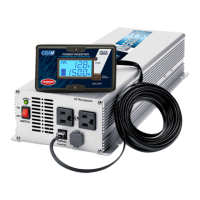
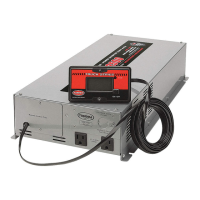
This document serves as an owner's guide for Tundra International DC/AC Power Inverters, specifically covering the E-1000, E-1500, E-2000, HD-1200, HD-1800, HD-2500, HDI-1800, and HDI-3000 models. It provides comprehensive instructions for installation, operation, troubleshooting, and maintenance, emphasizing safety and optimal performance.
Function Description
The Tundra International DC/AC Power Inverters convert 12-volt DC power from a battery source into 120-volt AC power, similar to standard household electricity. These inverters are designed for use in various applications such as trucks, boats, and RVs, providing a reliable source of AC power for a wide range of electrical loads. The output waveform is a "Modified Sine Wave," which is a stepped waveform suitable for most AC loads and is more efficient than the "square wave" generated by some other inverters. The inverters are equipped with safety features to protect against low or high battery voltage, overload, and over-temperature conditions.
Important Technical Specifications
The manual provides a detailed table of specifications for each model, including:
- AC Output Continuous Power:
- E-1000: 1000 W
- E-1500: 1500 W
- E-2000: 2000 W
- HD-1200: 1200 W
- HD-1800: 1800 W
- HDI-1800: 1800 W
- HD-2500: 2500 W
- HDI-3000: 3000 W
- AC Output Power Surge:
- E-1000: 2000 W
- E-1500: 3000 W
- E-2000: 4000 W
- HD-1200: 2400 W
- HD-1800: 3600 W
- HDI-1800: 3600 W
- HD-2500: 5000 W
- HDI-3000: 6000 W
- AC Output Voltage: 120 V for all models.
- AC Output Waveform: Modified Sine Wave for all models.
- DC Input Voltage: 12 V for all models.
- Low Battery Alarm: 11.5 V for E/HD models, 10.5 V for HDI models.
- Low Battery Shutdown: 11.0 V for E/HD models, 10.0 V for HDI models.
- No Load Current Draw "ON": <0.5 Amp for E/HD/HDI-1800 models, <0.7 Amp for HD-2500/HDI-3000 models.
- Cooling Fan(s): Yes for all models.
- Overload Protection: Yes for all models.
- Over Temperature Shutdown: 131 °F ±10% for all models.
- Dimensions (L x W x H) in cm:
- E-1000: 30 x 17.8 x 8.6
- E-1500/E-2000: 42.9 x 17.8 x 8.6
- HD-1200: 35.6 x 27.4 x 10.2
- HD-1800/HDI-1800: 51 x 27.4 x 10.2
- HD-2500/HDI-3000: 55.4 x 27.4 x 10.2
- Net Weight:
- E-1000: 2.2 kg
- E-1500/E-2000: 3.7 kg
- HD-1200: 5.4 kg
- HD-1800/HDI-1800: 9.1 kg
- HD-2500: 9.5 kg
- HDI-3000: 9.8 kg
These specifications are subject to change without notice.
Usage Features
- ON/OFF Switch: Located on the front panel, this switch controls the inverter's control circuit. It does not disconnect power from the inverter; AC and DC power must be disconnected for circuit work. When on without a load, the inverter draws less than 500 mA, but can still drain batteries over time.
- AC Outlets: All models feature two AC outlets. HD models also include one hard wire outlet for alternative output.
- Remote Control (Except E-1000): Equipped with a 6-meter jack remote switch, allowing the inverter to be turned ON/OFF from a convenient location, even if the inverter is out of sight. The front panel switch must be ON for the remote to function.
- Display Features (on remote):
- Input Voltage Indicator: Displays battery voltage at the input terminal when the "SELECT" button is pressed until "INPUT VOLTAGE" light comes on.
- Output Power Indicator: Displays current provided by the inverter in KW when the "SELECT" button is pressed until "OUTPUT POWER" light comes on (1 KW = 1000 watts).
- "FAULT" Light: Accompanied by an audible alarm, indicates faulty conditions like low/high battery voltage or overload.
- "OVERTEMP" Light: Accompanied by an audible alarm, indicates an over-temperature condition.
- "LVP" on Display: Indicates Low Input Voltage Protection mode, meaning the inverter has shut down to protect batteries from over-discharge. The inverter will not restart until input voltage exceeds 13.2 volts.
- "OLP" on Display: Indicates High Input Voltage Protection mode or that consumption exceeds the nominal capacity, protecting against excessive input voltage.
- Installation Recommendations: The manual strongly recommends using Tundra International installation kits (CM series) for safe and optimal performance. These kits include welding cable, terminal lugs, fuse blocks, and other necessary materials.
- Grounding: A #8 AWG copper cable must connect the inverter's chassis ground screw to the vehicle's chassis or a metallic panel connected to the chassis to conform to electrical codes and prevent electrical shock hazards.
- Battery Cable Connection: Proper wiring with covered, flexible, copper welding cables (as short as possible, no longer than 12 feet) is crucial for efficiency. A main fuse (CNL type) must be installed on the positive cable between the batteries and the inverter, as close to the batteries as possible, to prevent fire in case of cable rupture.
- Operating Limits: The inverter operates with input voltages between 11 and 15 volts, with optimum performance between 12.0 and 14.0 volts. It will shut down if voltage drops below a preprogrammed level (11.0V or 10.0V depending on model) or exceeds 15 volts.
- Trouble Loads: While suitable for most AC loads, some appliances may not adequately filter the modified sine wave. Users are advised to contact the device manufacturer if unsure about compatibility. Pure sine wave inverters (HTS series) are recommended for sensitive devices.
- Microwave Ovens: The actual operating power requirement for microwave ovens is 40% to 100% higher than the advertised cooking power. Users should check the microwave's back panel or owner's manual for actual power consumption.
Maintenance Features
- Minimal Maintenance: Very little maintenance is required for proper operation.
- Cleaning: The exterior should be cleaned with a dry cloth to prevent dust accumulation.
- Regular Checks: Periodic maintenance checks are recommended, including:
- Tightening DC input bolts or screws.
- Inspecting cables for solidity and exterior condition.
- Keeping batteries clean to prevent current loss.
- Safety Precaution: When working on the DC input terminals, both wires at the battery side must be disconnected to avoid short circuits.
Troubleshooting Guide
The manual includes a troubleshooting guide for common issues:
- Low Output Voltage (96 to 105 volts):
- Possible Cause: Using a voltmeter that cannot properly read the RMS voltage of a modified sine wave.
- Solution: Use a TRUE RMS reading voltmeter.
- Fault Indicator ON:
- Low Input Voltage: Not enough battery capacity, recharge batteries, improper installation (check steps), or check vehicle alternator condition.
- High Input Voltage: Check vehicle alternator condition.
- Short Circuit or AC Wiring Error: Check AC wiring (120 volts) and test appliances on another power supply.
- Inverter Overload: Remove or reduce load, switch inverter OFF for at least 5 seconds, then restart.
- No Output Voltage:
- Inverter Off: Turn inverter on.
- No DC Power to Inverter: Check wiring, battery fuse, and installation.
- Reverse DC Polarity: Replace internal fuses (damage not covered by warranty).
- Alarm On All The Time / "LVP" Code on Remote Display:
- Poor Battery Condition: Charge or change battery.
- Poor DC Wiring: Use proper cables and make solid connections.
- Poor DC Terminal Lugs Connections: Use proper crimping tool.
- Overheat Indicator On:
- Thermal Shutdown: Reduce load, allow inverter to cool off, improve ventilation, install properly.
- Television and CB Radio Interference:
- Ensure proper grounding to vehicle chassis.
- Reduce power consumption while watching television.
- Move television as far as possible from inverter.
- Run both DC cables as close as possible together with cable ties.
Warranty
Tundra International Inc. provides a Limited One-Year Warranty against defects in workmanship and materials from the date of first consumer purchase. This warranty is valid only for the first end-use purchaser. The warranty is void if the unit is abused, modified, improperly installed, if the housing is removed, or if the serial number/identification markings are defaced or removed. Tundra International Inc. is not liable for incidental, consequential, or other damages arising from the product's use or misuse. For warranty service, defective units must be shipped to Tundra International Service Department with all shipping, handling, and insurance costs paid by the purchaser. Required information includes customer name, address, phone/email, a detailed problem description, and proof of purchase.



 To Next Page
 General