Spreader Operation
The spreader unit is designed to handle dry, clean, free-flowing granular material only.
IMPORTANT
Spreader calibration should be performed as an ongoing process
throughout the day. Monitor material used versus area serviced and
adjust accordingly. The application rate will vary throughout the
application process. Factors affecting the calibration rate include
product rate selector setting, ground speed of the unit, impeller
speed, width of passes, humidity level, and treatment method.
NOTE:
The sprayer unit and the spreader unit can be operated at the same time to provide an even
distribution of both the sprayed and spread products to an area.
IMPORTANT
When spreading material fully engage the drive bar
or operate at your own application speed..
Refer to the
TR460
calibration sheet for more information about granular
application.
1)
Fill the hopper with material. Do not exceed the maximum hopper weight
capacity of 250 lbs.
2)
Set the engine to the recommended 3200 RPMs. Confirm with the hour/
tachometer meter on the dashboard.
3)
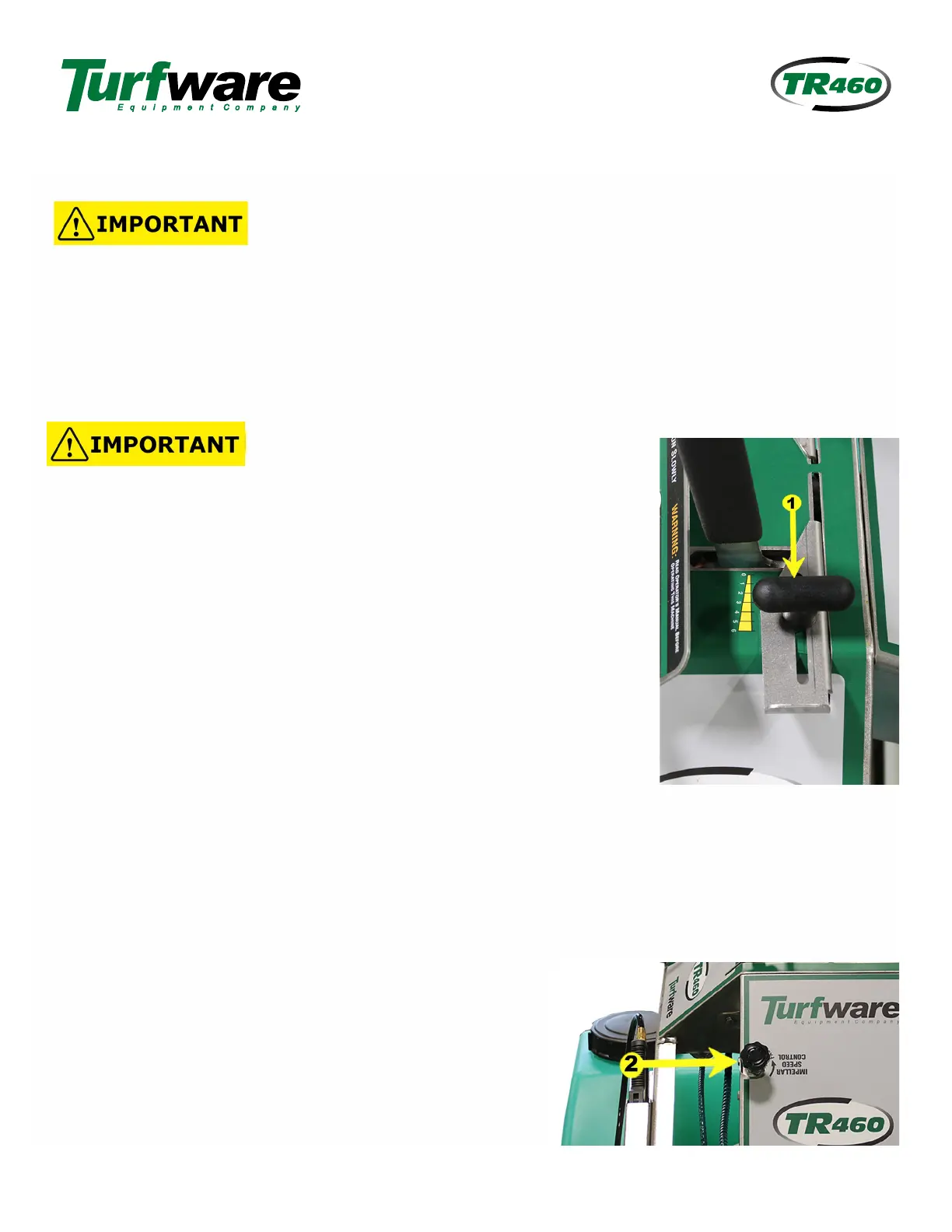
Adjust the
Product Rate Selector,
1
located above the hopper lever, to
match the material coverage you desire.
NOTE:
The numbers are merely an indicator and have no bearing on material rate.
TIP:
For best results use a setting on the low side.
If
the setting proves to be too
low cover the area again. Once the desired setting is determined a higher setting
can be used.
4
)
Adjust the variable
Impeller Speed Control
2
to achieve the desired
5)
Monitor and adjust the product rate selector as needed to maintain accurate coverage of material. The
product rate selector position determines the amount of material to be broadcast. The higher the number,
the heavier the application of material.
6)
Go to the spreading location.
7)
Ensure the area to be maintained is clear.
8)
Engage the drive bar fully when applying materials.
9)
Push the hopper lever to the OPEN position.
10)
Adjust the impeller speed control as needed to obtain coverage
width.
fertilizer spread width. The impeller speed control knob will increase or decrease the spread width to
your desired spread pattern.
NEVER RUN THE SPREADER WITH THE IMPELLER SHUT OFF AND NOT TURNING. THIS WILL
CAUSE DAMAGE TO THE HYDRAULIC PUMP AND VOID THE WARRANTY!
NOTE:
The spread pattern is independent of ground speed.
TR460-12/21
Page 14



 To Next Page