8
Go to Table of Contents
Setup and Connections: PlayStation 4/ Konguracja konsoli PlayStation 4
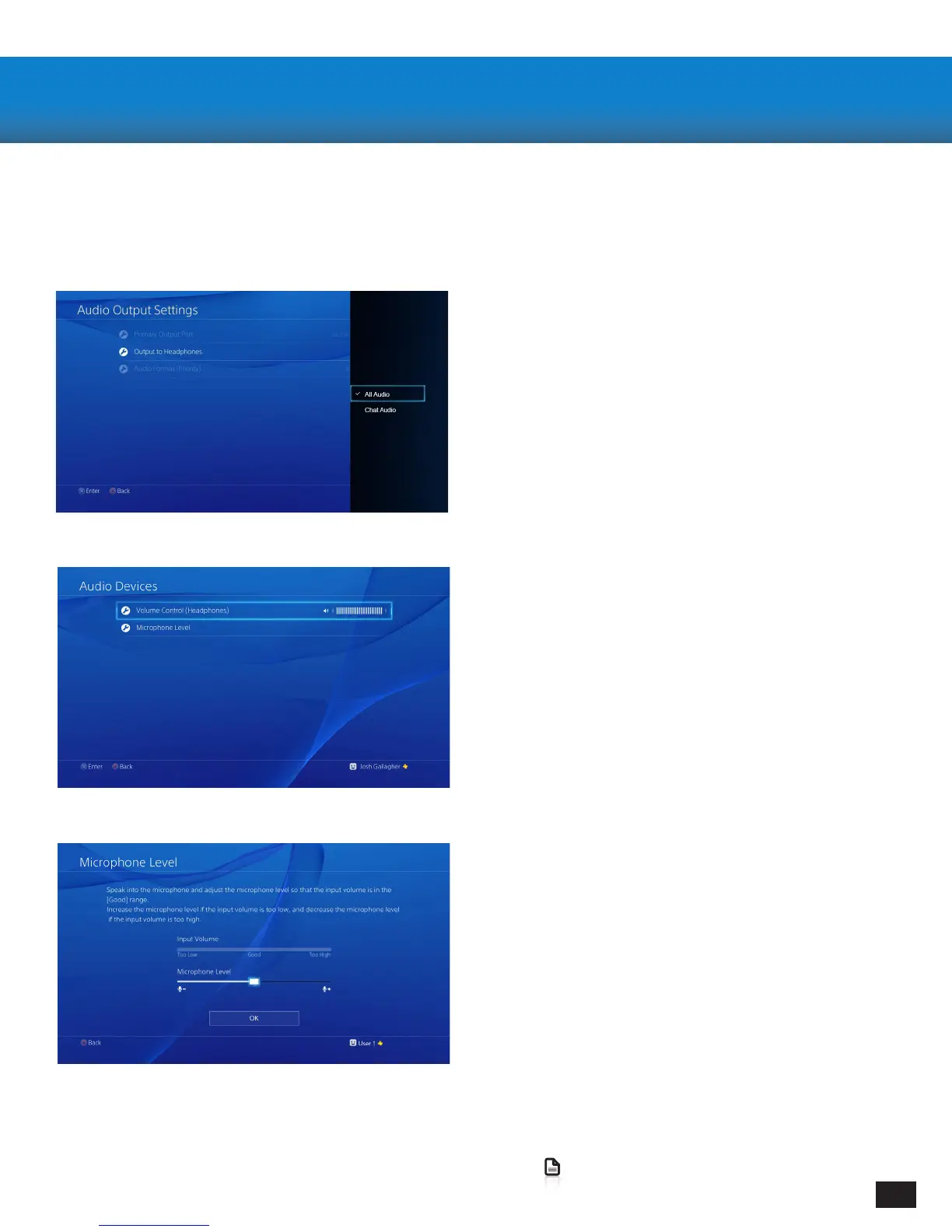
3. Go to Settings >> Devices >> Audio Devices >>
Headsets and Headphones >> Volume Control
(Headphones)
4. Turn up the volume level to maximum
3. Przejdź do ustawienia >> Urządzenia >>
Urządzenia Audio >>
Słuchawki i Zestawy słuchawkowe >> Regulacja
głośności (Słuchawki)
4. Ustaw maksymalny poziom głośności
5. Go to Settings >> Devices >> Audio Devices >>
Headsets and Headphones >> Microphone Level
6. Follow the on-screen instructions to calibrate
your microphone
5. Przejdź do Ustawienia >> Urządzenia >>
Urządzenia Audio >>
Słuchawki i Zestawy słuchawkowe >> Poziom
mikrofonu
6. Postępuj zgodnie z instrukcjami na ekranie aby
skalibrować swój mikrofon
1. Go to Settings >> Sound and Screen >>
Audio Output Settings >> Output to Headphones
2. Select “All Audio”
1. Przejdź do Ustawienia >> Dźwięk i Ekran>>
Ustawienia wyjścia Audio >> Wyjście na słuchawki
2. Wybierz “Wszystkie źródła dźwięku”
Conguring your PlayStation 4/ Konguracja
konsoli PlayStation 4















 To Next Page