EasyManua.ls Logo

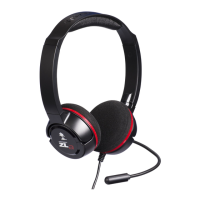
Turtle Beach EAR FORCE PX24 - User Manual

Turtle Beach EAR FORCE PX24
21 pages
Print Icon
To Next Page IconTo Next Page
Loading...
For PS4
I Xbox One I
PC & Mac
®
I Mobile gaming
USER GUIDE
AMPLIFIED GAMING HEADSET

Questions and Answers

Summary

Whats Included in the Box

About the Ear Force PX24 Headset

Updating Headset Firmware

Ear Force SuperAmp Features and Controls

SuperAmp Control Functions

Details master volume, VSS, mic monitor, bass boost, Superhuman Hearing, and mic mute.

SuperAmp Power and Connectivity

Covers platform selection, power management, charging status, and headset jack.

Charging the SuperAmp

Platform Setup Guides

PS4 Setup Instructions

Step-by-step guide for connecting and configuring the headset on a PlayStation 4.

Xbox One Setup Instructions

Step-by-step guide for connecting and configuring the headset on an Xbox One.

PC;Mac & Mobile Setup

Instructions for connecting and using the headset with PC, Mac, and mobile devices.

Adjusting Audio Settings

Console Mode and Volume Adjustments

Guides on switching modes and adjusting console audio and microphone levels.

Virtual Surround Sound Control

How to enable and adjust the intensity of the Virtual Surround Sound effect.

Mic Monitor and Bass Boost

Adjusting microphone monitoring volume and bass boost levels for optimal experience.

Engaging Superhuman Hearing

Enabling and utilizing the Superhuman Hearing feature for enhanced audio cues.

Headset and Amplifier Specifications

Troubleshooting Common Issues

Resolving No Sound Problems

Solutions for issues like low battery, master volume, and loose connections.

Troubleshooting Voice Chat Issues

Steps to fix problems with incorrect setup, program settings, or mic mute.

Important Safety Information

Regulatory Compliance Statements

Declaration of Conformity

Limited One Year Warranty

Exclusions from Limited Warranty

Summary

Whats Included in the Box

About the Ear Force PX24 Headset

Updating Headset Firmware

Ear Force SuperAmp Features and Controls

SuperAmp Control Functions

Details master volume, VSS, mic monitor, bass boost, Superhuman Hearing, and mic mute.

SuperAmp Power and Connectivity

Covers platform selection, power management, charging status, and headset jack.

Charging the SuperAmp

Platform Setup Guides

PS4 Setup Instructions

Step-by-step guide for connecting and configuring the headset on a PlayStation 4.

Xbox One Setup Instructions

Step-by-step guide for connecting and configuring the headset on an Xbox One.

PC;Mac & Mobile Setup

Instructions for connecting and using the headset with PC, Mac, and mobile devices.

Adjusting Audio Settings

Console Mode and Volume Adjustments

Guides on switching modes and adjusting console audio and microphone levels.

Virtual Surround Sound Control

How to enable and adjust the intensity of the Virtual Surround Sound effect.

Mic Monitor and Bass Boost

Adjusting microphone monitoring volume and bass boost levels for optimal experience.

Engaging Superhuman Hearing

Enabling and utilizing the Superhuman Hearing feature for enhanced audio cues.

Headset and Amplifier Specifications

Troubleshooting Common Issues

Resolving No Sound Problems

Solutions for issues like low battery, master volume, and loose connections.

Troubleshooting Voice Chat Issues

Steps to fix problems with incorrect setup, program settings, or mic mute.

Important Safety Information

Regulatory Compliance Statements

Declaration of Conformity

Limited One Year Warranty

Exclusions from Limited Warranty

Turtle Beach EAR FORCE PX24 Specifications

General IconGeneral
BrandTurtle Beach
ModelEAR FORCE PX24
CategoryHeadsets
LanguageEnglish

Related product manuals