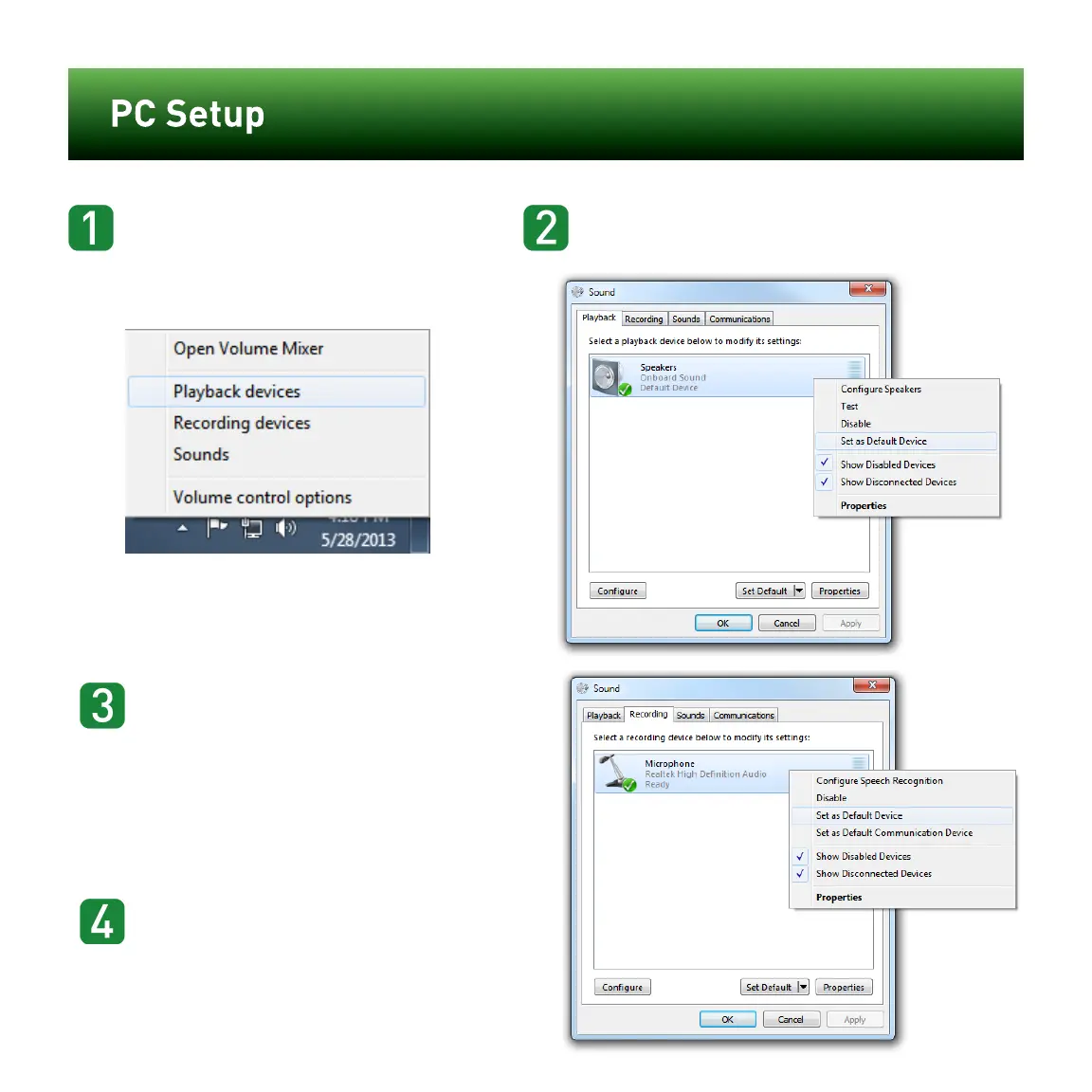
Right-click the Speakericon in your task bar and
select “Playback devices”.
Kattints a jobb billentyűvel a Hangszóró ikonra
számítógéped feladat sávján és
válaszd ki “Visszajátszó berendezések”.
Right-click “SPEAKERS” and select “Set as Default
Device”.
Kattints a jobb billentyűvel a "Hangszórók" ikonra és
válaszd ki “Állítsd be alap berendezésként”.
Click the “Recording” tab, then right-click “Micro-
phone” and
select “Set as Default Device”. If you speak into
the mic, you
should see the green bars on the right move.
Kattins “Rögzítés” billentyűre, majd
kattints a jobb billentyűvel a “Mikrofon” pozícióra és
válaszd ki “Állítsd be alap berendezésként”.
Miközben beszélsz a mikrofonba
a zöld oszlopoknak jobb oldalon
mozogniuk kell.
Click the “OK” button at the
bottom of the window to exit.
Kattints “OK” alul
a képernyő alján, hogy elhagyd az oldalt.
PC csatlakoztatás















 To Previous Page