2
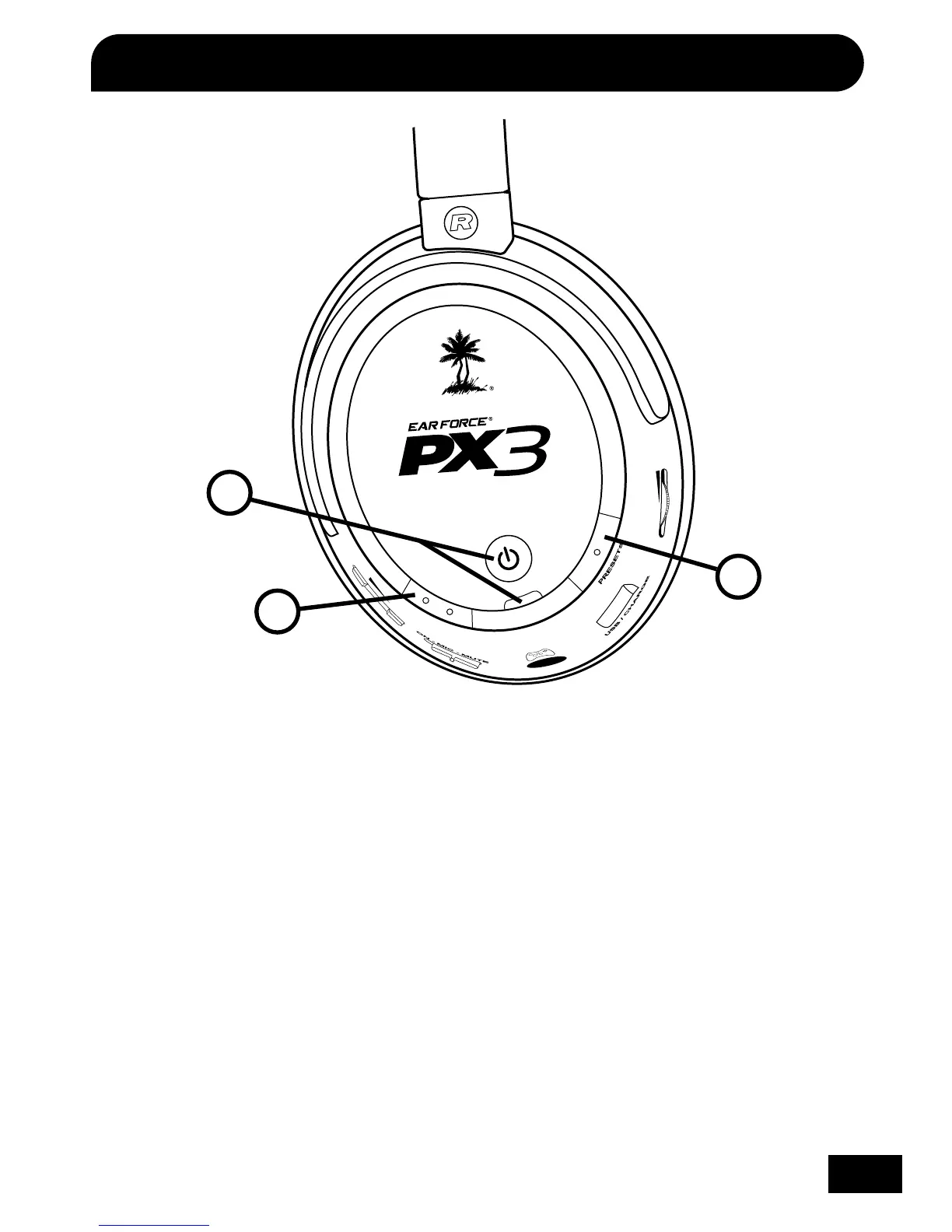
1. Main Power Button with LED
Powering ON: Press and hold for 3 seconds. A double high tone will sound and the LED will begin to blink
about once per second.
Powering OFF: Press and hold for 3 seconds. A double low tone will sound and the LED will turn off.
Automatic Power OFF: If the Headset doesn’t detect any audio for more than 5 minutes, or if the
Transmitter has been powered off for more than 5 minutes, the headset will automatically shut down to
conserve battery power.
Pairing Mode: Press and hold for more than 6 second to initiate pairing mode between the headset and
transmitter. (See “Pairing the Headset and Transmitter” on pg. 8 for further details.)
2. Main (Main Preset Button)
Press to toggle between the selected (alternate) preset and the main (default) preset. One high tone and
one low tone will sound when the main preset is activated. (See "Presets" on pg. 17 for further details)
3. Presets (Alternate Presets Button)
Press to select one of eight (8) alternate game audio presets. A series of low and high beeps indicate
the active presets. (See "Presets" on pg. 17 for further details)















 To Next Page