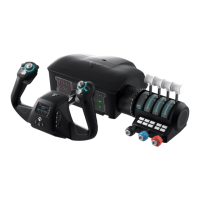
MULTI-FUNCTION LEVERS WITH
2 DETENT BUTTONS
HALL EFFECT SENSING STICK
WITH RUDDER TWIST
TRIM WHEEL
FMD CONFIGURATOR WHEEL
TOUCHPAD WITH CLICK PRESS
XBOX & PC USB-C CONNECTION PORT
ADJUSTABLE WRIST REST
AUXILIARY CONNECTION PORTS
DIGITAL 8-WAY POV
FLIGHT MANAGEMENT DISPLAY
ANALOG POV WITH CLICK PRESS
MICROSWITCH BUTTONS (B16-B17)
TRIGGER
BUTTONS (B1-B4)
BUTTONS (B5-B8)
3.5MM HEADSET PORT
XBOX NAVIGATION CONTROLS
1
2
3
4
5
6
7
8
9
10
11
12
13
14
15
16
17
21
3 34 5
8
9
10
12
13
14
17
15
16
6 7
Auxiliary connection
ports*
Xbox navigation
controls
3.5mm headset port
Hall effect sensing
stick with rudder twist
Trim wheel
Fmd configurator
wheel
Touchpad with click
press
Adjustable wrist
rest
Xbox & pc usb-c
connection port
Multi-function levers with 2
detent buttons
Digital 8-way pov
Flight management
display
Trigger
Analog pov with
click press
Microswitch buttons
(b16-b17)
Buttons (b1-b4)
Buttons (b5-b8)
CONTROLS
*To be used for future VelocityOne
peripherals. Currently, there are
no additional products to use in the
ports. When available, we will issue
a firmware update to the product
to enable use with additional
accessories in our range.



 To Next Page