37
Auto pairing
Once the first time pairing is done between vehicle’s
instrument cluster and your smart phone, the phone
will automatically connect with the vehicle when the
following conditions are met:
1. Vehicle is switched ‘ON’ and vehicle is near to
the smart phone.
2. First time pairing is ensured.
3. In case of iPhone, the ‘TVS CONNECT’ app
should be open or be open in background for
auto-pairing to happen.
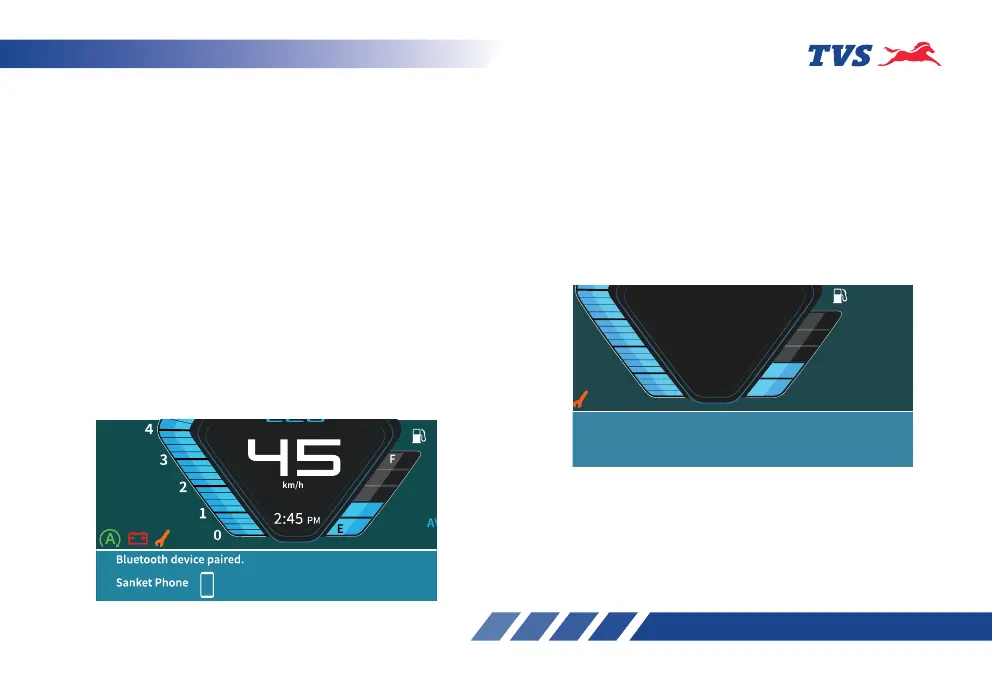
Every time auto-pairing happens, app will open
automatically and connect with the Instrument
cluster. The connected instrument cluster’s TFT
display shows ‘Bluetooth device paired’ along with
the name of the phone.
If your smart phone is disconnected from the
vehicle’s instrument cluster then, ‘No Bluetooth
device paired’ message will be displayed on the
connected instrument cluster’s TFT display.
Similarly, if your smart phone is connection is
unsuccessful from the vehicle’s instrument cluster
then, ‘No Bluetooth device paired’ message will be
displayed on the connected instrument cluster’s TFT
display.
1
0
3
2
45
km/h
E
F
2:45
PM
AV
85
Brightness Increased
No bluetooth device paired.
Please initiate connection from the TVS Smart Connect mobile
application to TVSRDXXXXXX (Speedo Name)














 To Next Page