EasyManua.ls Logo

twintex TP-3020 - User Manual

Default Icon
12 pages
Print Icon
To Next Page IconTo Next Page
Loading...
Single Channel DC Power Supply
TP Series
Operation Manual V1.0
BENCHTOP INSTRUMENT
Question and Answer IconNeed help?

Do you have a question about the twintex TP-3020 and is the answer not in the manual?

Summary

Introduction to TP Series DC Power Supply

TP Series Production Models Overview

TP Series Specifications

TP Series Model Specifications (Table 1)

Technical specifications for TP-1303/1305/1603 series, including voltage/current regulation, ripple, and display.

TP Series Model Specifications (Table 2)

Technical specifications for TP-3010/6005/3020/6010 series, covering voltage/current regulation, ripple, and accuracy.

TP Series Panel Controls and Indicators

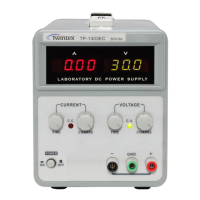
Front Panel Illustration (TP-1303;1305;1603 EC Series)

Illustrates the front panel components and layout for the TP-1303EC, TP-1305EC, and TP-1603EC models.

Front Panel Illustration (TP-1303;1305;1603 C Series)

Illustrates the front panel components and layout for the TP-1303C, TP-1305C, and TP-1603C models.

Front Panel Illustration (TP-1303;1305;1603 Series)

Illustrates the front panel components and layout for the TP-1303, TP-1305, and TP-1603 models.

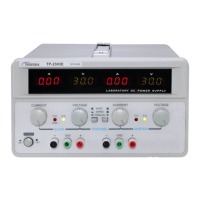
Front Panel Illustration (TP-3010;6005;3020;6010 Series)

Illustrates the front panel components and layout for the TP-3010, TP-6005, TP-3020, and TP-6010 models.

Rear Panel Illustration (30 V;3 A, 30 V;5 A, 60 V;3 A)

Illustrates the rear panel components for 30V/3A, 30V/5A, and 60V/3A models.

Rear Panel Illustration (TP-3010;6005)

Illustrates the rear panel components for the TP-3010 and TP-6005 models.

Rear Panel Illustration (TP-3020;6010)

Illustrates the rear panel components for the TP-3020 and TP-6010 models.

Front Panel Control Descriptions

Provides detailed descriptions of each control and indicator on the front panel of the power supply.

Rear Panel Control Descriptions

Describes the rear panel controls and connectors, including power socket, fuse holder, and AC input selector.

Operation Instructions

Safety Precautions for Operation

Details essential safety precautions for AC input, installation, and operating environment temperature.

Setting the Current Limit

Step-by-step instructions on how to determine and set the current limit for the power supply.

Setting Constant Voltage

Instructions on how to set the constant voltage output, including the use of controls and indicators.

Understanding CC and CV Modes

Explains the behavior of the power supply when operating in Constant Current (CC) and Constant Voltage (CV) modes.

Maintenance Procedures

Fuse Replacement Guide

Instructions for replacing blown fuses, emphasizing correct rating and safety precautions.

Line Voltage Conversion

Details the procedure for converting the power supply between 110V and 220V line voltages.

Cleaning Instructions

Guidelines on how to clean the power supply safely and effectively, avoiding damage.

Summary

Introduction to TP Series DC Power Supply

TP Series Production Models Overview

TP Series Specifications

TP Series Model Specifications (Table 1)

Technical specifications for TP-1303/1305/1603 series, including voltage/current regulation, ripple, and display.

TP Series Model Specifications (Table 2)

Technical specifications for TP-3010/6005/3020/6010 series, covering voltage/current regulation, ripple, and accuracy.

TP Series Panel Controls and Indicators

Front Panel Illustration (TP-1303;1305;1603 EC Series)

Illustrates the front panel components and layout for the TP-1303EC, TP-1305EC, and TP-1603EC models.

Front Panel Illustration (TP-1303;1305;1603 C Series)

Illustrates the front panel components and layout for the TP-1303C, TP-1305C, and TP-1603C models.

Front Panel Illustration (TP-1303;1305;1603 Series)

Illustrates the front panel components and layout for the TP-1303, TP-1305, and TP-1603 models.

Front Panel Illustration (TP-3010;6005;3020;6010 Series)

Illustrates the front panel components and layout for the TP-3010, TP-6005, TP-3020, and TP-6010 models.

Rear Panel Illustration (30 V;3 A, 30 V;5 A, 60 V;3 A)

Illustrates the rear panel components for 30V/3A, 30V/5A, and 60V/3A models.

Rear Panel Illustration (TP-3010;6005)

Illustrates the rear panel components for the TP-3010 and TP-6005 models.

Rear Panel Illustration (TP-3020;6010)

Illustrates the rear panel components for the TP-3020 and TP-6010 models.

Front Panel Control Descriptions

Provides detailed descriptions of each control and indicator on the front panel of the power supply.

Rear Panel Control Descriptions

Describes the rear panel controls and connectors, including power socket, fuse holder, and AC input selector.

Operation Instructions

Safety Precautions for Operation

Details essential safety precautions for AC input, installation, and operating environment temperature.

Setting the Current Limit

Step-by-step instructions on how to determine and set the current limit for the power supply.

Setting Constant Voltage

Instructions on how to set the constant voltage output, including the use of controls and indicators.

Understanding CC and CV Modes

Explains the behavior of the power supply when operating in Constant Current (CC) and Constant Voltage (CV) modes.

Maintenance Procedures

Fuse Replacement Guide

Instructions for replacing blown fuses, emphasizing correct rating and safety precautions.

Line Voltage Conversion

Details the procedure for converting the power supply between 110V and 220V line voltages.

Cleaning Instructions

Guidelines on how to clean the power supply safely and effectively, avoiding damage.

twintex TP-3020 Specifications

General IconGeneral
Brandtwintex
ModelTP-3020
CategoryPower Supply
LanguageEnglish

Related product manuals