38
39
System Setup Method
System Setup Method
System Setup Method System Setup Method
8
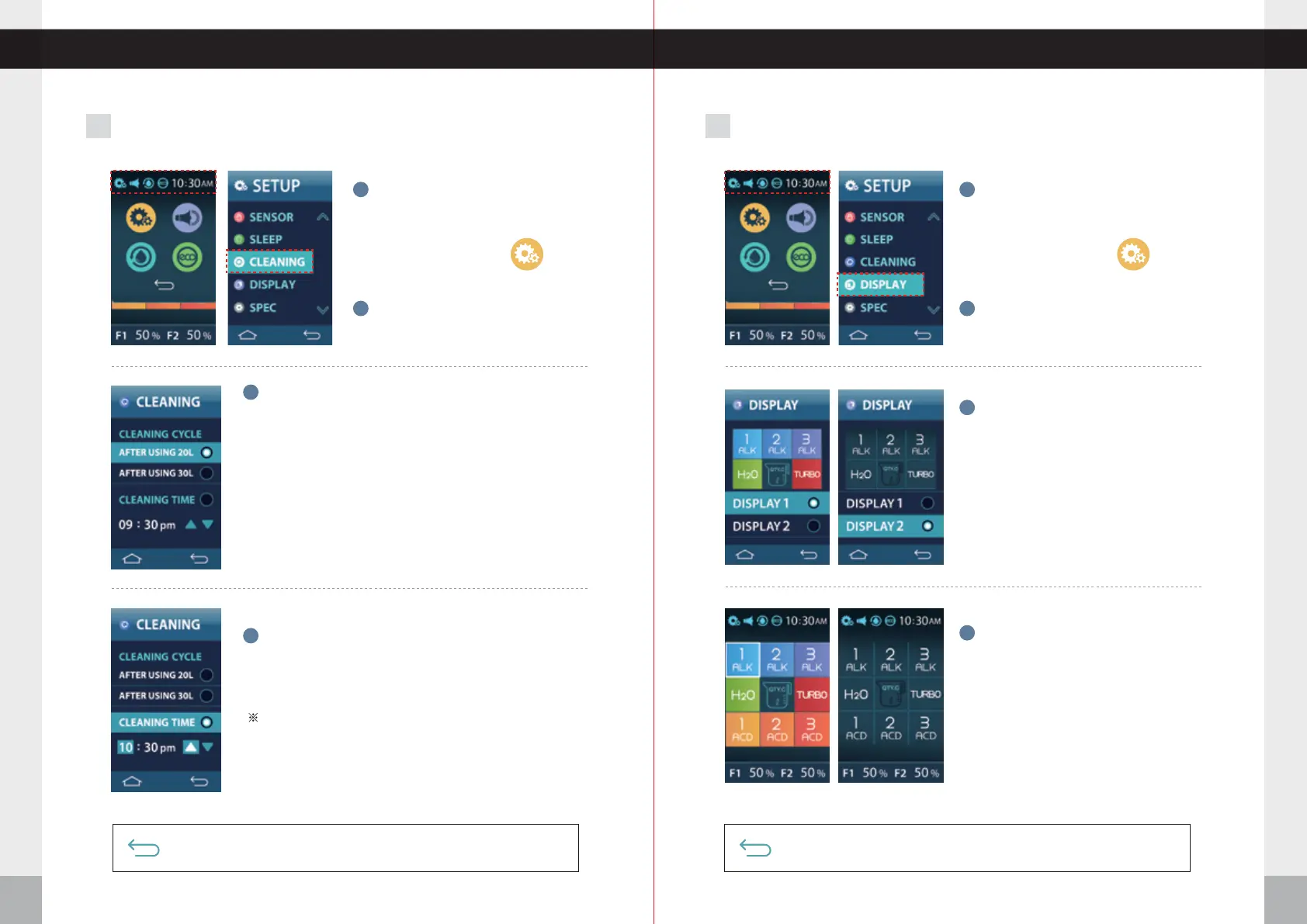
CLEANING Mode Setting
9
MAIN Display Setting
Press
CLEANING.
2
3
1
Press the setup icon.
Press the top left corner of the
screen. The menu options will fall
below the upper part of the screen.
Push the RETURN icon for the previous menu screen. Voice says: “
Applied
”
Push the RETURN icon again to complete setup. Voice says: “
Setup was completed
”
Push the RETURN icon for the previous menu screen. Voice says: “
Applied
”
Push the RETURN icon again to complete setup. Voice says: “
Setup was completed
”
Select
CLEANING CYCLE.
Select
CLEANING TIME.
You can choose to have the automatic cleaning occur after a
predetermined volume of water is poured, or you can choose to
have the cleaning cycle run at a certain time of the day.
Note: The actual cleaning cycle will not start on its own. Instead,
the unit will wait until the next time that you use the machine,
and it will begin then.
※You can set up the cleaning cycle as a time.
※You can automatically start cleaning at the set time every day.
3
Press
DISPLAY.
2
1
Press the setup icon.
Press the top left corner of the
screen. The menu options will fall
below the upper part of the screen.
One of the two main display designs
can be set as a main.
4
The display appearance you select will
be reflected when you return to the
home screen.
4
To set a time for cleaning, touch the current set time and use
the up and down arrows to make adjustments.
To set a time for cleaning touch the hour or minutes and use
the up and down arrows to make adjustments.


 To Next Page