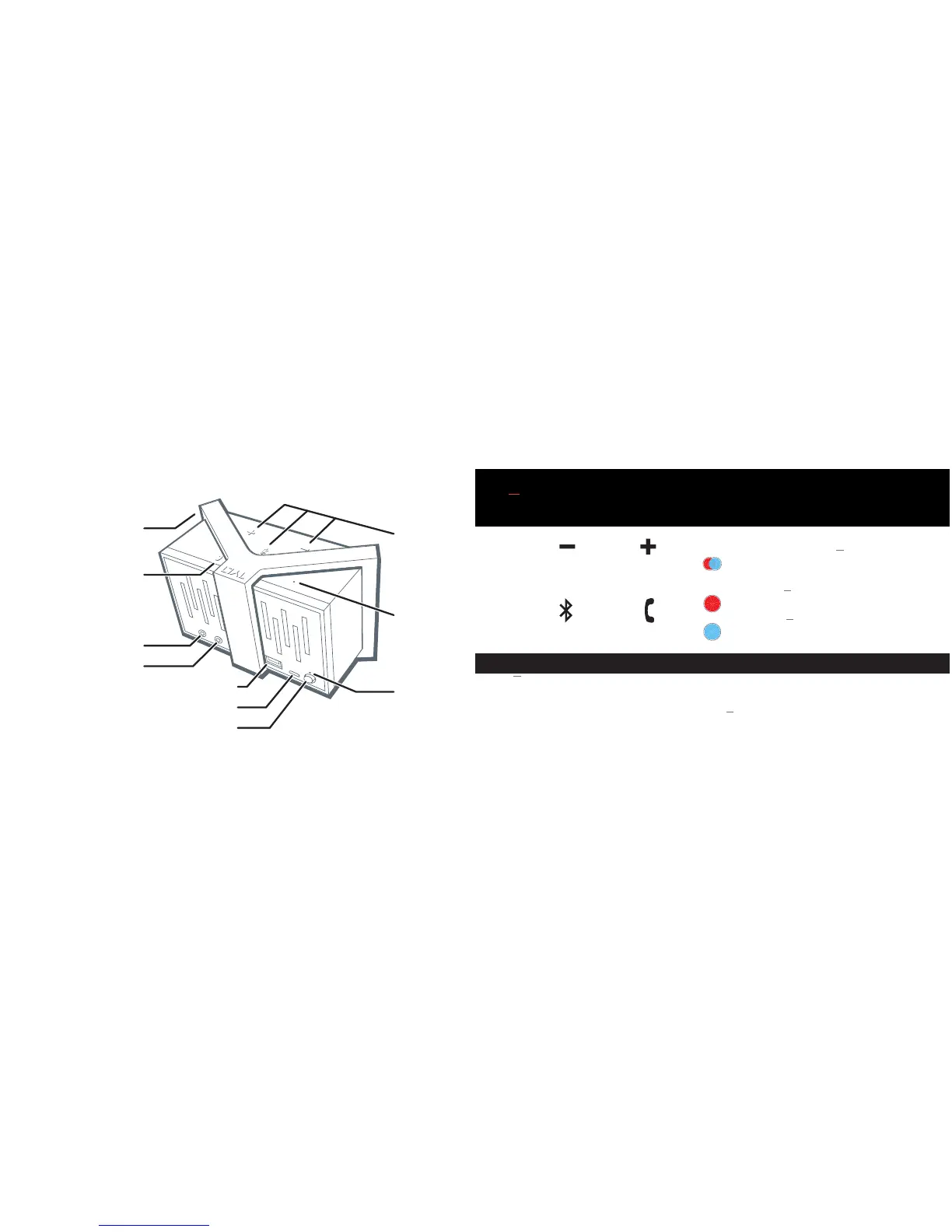
3TUNZ Rechargeable Bluetooth
®
Speaker
Removable
Silicon Band
3.5mm Audio Input
Button
3.5mm Audio Output
Charging Output (Charge Devices)
Charging Input (Charge Speaker)
Power Switch (ON/OFF)
LED
Status
Light
Buttons
Mic
WHAT’S INCLUDED?
• TUNZ Portable Bluetooth
®
Speaker
• 3 Removable Silicone Bands
(Black, Red, and Blue)
• Universal 3.5mm Audio Cable
• USB Charging Cable
• User Guide
• TUNZ Carry Bag
BUTTONS LED STATUS LIGHT FUNCTIONS
Alternating Red/Blue: TUNZ is in
pairing mode and ready to connect
to your Bluetooth
®
device.
Solid Red: TUNZ is being charged.
Charging not yet completed.
Solid Blue: TUNZ is powered ON, or when
being charged, charging is completed.
Phone
Button
Multifunction
Button
Volume
Up
Volume
Down


 To Next Page