18
7
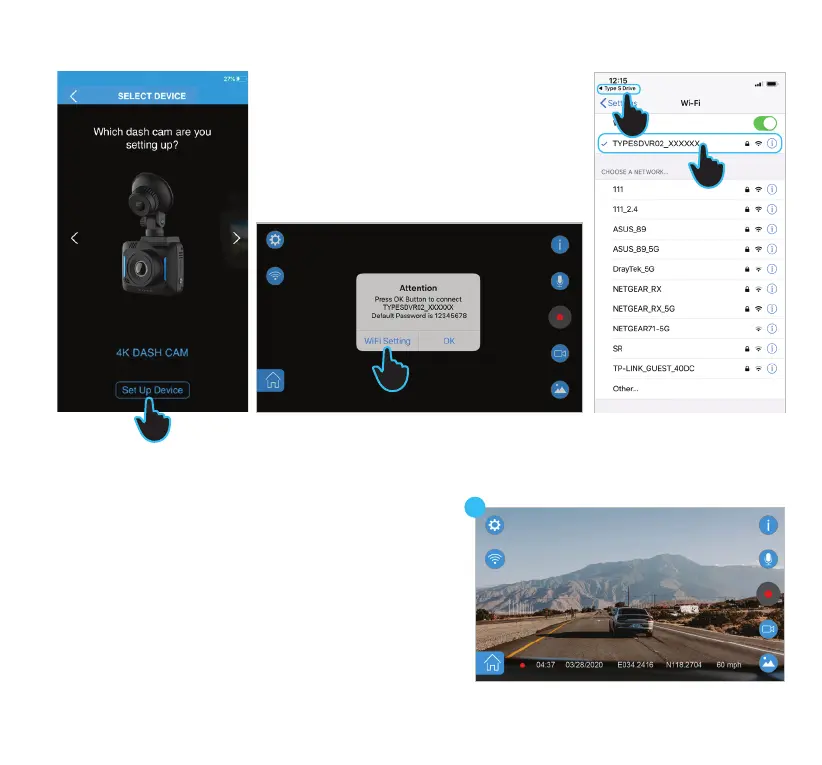
3. Open the TYPE S Drive APP and select the Dash Cam
category. Select 4K Dash Cam from the list of Dash Cams.
Press Set Up Device.
4. Press WiFi Setting on the main interface when it prompts
you to go to the WiFi setting page.
5. On the WiFi setting page choose SSID
“TYPESDVR02_XXXXXX” and enter password “12345678”.
6. Press TYPE S Drive icon to return to the APP.
7. You should see the live view of the Dash Cam on the main
interface.
iOS device
5
6
3
4



 To Next Page