This is a manual for an add-on wireless parking camera, designed as an extension kit for a wireless backup camera. The product is identified by ITM. / ART. 1362874, WP ITM. BT56780, and Costco ITM. / ART. 1344584.
Function Description
The Add-on Wireless Parking Camera is designed to enhance vehicle safety by providing a visual aid for parking and backing up. It works in conjunction with a compatible wireless backup camera system, specifically the Solar Wireless Backup Camera with 6.8" Widescreen HD Monitor - BT57132 / Costco ITM. / ART. 1344584. The camera is mounted on the license plate and transmits video wirelessly to the monitor. It is intended to assist in detecting objects behind the vehicle, thereby reducing the risk of accidents during parking maneuvers. The system is not a substitute for rearview mirrors or other motor vehicle equipment mandated by law, and users should always look around outside their vehicle and use mirrors to confirm rearward clearance.
Important Technical Specifications
- Frequency: 2.4GHz
- Operating Voltage: DC 5V
- Operating Temperature: 14°F~122°F (-10°C~50°C)
- Camera Water Resistance: IP65 Rating
- Battery Capacity: 3350mAh
- Maximum Signal Range: 33 Feet/10 Meters (without interference or obstruction)
The camera features a Blue LED Indicator and a Power Button. It is equipped with a MicroUSB Charging Port for convenient power management. The IP65 rating indicates that the camera is protected against dust ingress and low-pressure water jets from any direction, making it suitable for outdoor vehicle use. The 3350mAh battery capacity ensures a reasonable operating time, and the 2.4GHz frequency provides a stable wireless connection within the specified range.
Usage Features
The installation process involves mounting the camera on the vehicle's license plate. The manual provides detailed instructions for standard installation, as well as specific guidance for vehicles with trunks or hatch door releases, and for trucks/SUVs with step bumpers, to ensure proper camera frame out of the cavity of the step bumper.
Installation Steps:
- Unscrew the license plate.
- Secure the Solar Wireless Backup Camera and license plate with screws back onto the rear of the vehicle.
- For vehicles with a trunk or hatch door release, unscrew and detach the original mounting tabs from the back of the Solar Wireless Backup Camera, then install the two-way mounting tabs.
- For trucks and SUVs with step bumpers, install the two-way mounting tabs using original plate screws and mounting screws.
- Finally, install the Solar Wireless Backup Camera and license plate onto the rear of your vehicle and tighten the mounting nuts with a wrench.
Pairing Process:
- Charge and test the camera before installation. Fully charge the camera via the MicroUSB charging cable.
- Press and hold the Power Button on the Add-on Wireless Parking Camera for 6 seconds until the LED flashes blue continuously. The camera will be in Pairing Mode for 1 minute.
- On the Dash Monitor, tap the "Settings" icon and then tap "Pair Camera" to enter the pairing screen. Tap "Front Camera - Click to pair."
- The camera should be paired within 2 seconds.
- Push and hold the power button of the Solar Wireless Backup Camera for 1 second; the blue LED light will flash 2 times.
- Power on the Monitor with the 12V/24V adapter. The parking view can be seen when the Solar Wireless Backup Camera is woken up by tapping once on the screen or motion trigger in front of the Monitor.
The camera provides a "night vision" feature that enhances brightness with colorful image in low-light conditions. The displayed image may be faint or dark, distorted, or not entirely visible in certain circumstances. The area displayed by the Add-on Wireless Parking Camera is limited, and objects in the camera's field of view may vary according to vehicle orientation or road conditions.
Maintenance Features
Cleaning:
- If dirt, rain, or snow attaches to the Camera, the Monitor may not clearly display objects.
- Water droplets, snow, or mud adhering to the Camera lens should be wiped with a dry cloth.
- Do not use alcohol, benzene, or thinner to clean the Camera, as this may cause discoloration.
- To clean the Camera, wipe with a clean cloth dampened with mild cleaner diluted with water and then wipe with a dry cloth.
- The camera will work up to 33 feet.
- Always engage Parking/Emergency/Hand Brakes of the vehicle when testing the system.
Warranty:
The product comes with a Type S LIMITED WARRANTY. Type S warrants to the original purchaser that its products are free from defects in material and workmanship for 1 year from the date of original purchase. This warranty is exclusive and Type S makes no other warranty of any kind. For North American customers, the warranty applies only to purchases made in North America.
Conditions of Warranty:
If during the 1-year warranty period the new product is found to be defective, Type S will repair such defect or replace the product, without charge for parts or labor, subject to the following conditions:
- All repairs must be performed by Type S.
- All warranty claims must be accompanied by a copy of the sales receipt or bill of sale.
- The equipment must not have been altered or damaged through negligence, accident, improper operation, or failure to follow the product instructions for installation, use, or care.
- The replacement of parts is excluded from the warranty when replacement is necessary due to normal wear and tear.
- Repair or replacement parts supplied by Type S under this warranty are protected only for the unexpired portion of the original warranty.
- This is a "repair or replace" warranty only and does not cover costs incurred for installation, removal, or reinstallation of the product, or damage to any mobile phone device or vehicle.
Owner's Responsibilities:
Type S will make every effort to provide warranty service within a reasonable period of time. For assistance, customers should call toll-free 1.866.294.9244 during regular business hours Monday through Friday 8:00 AM to 5:00 PM.
Safety Information:
The manual emphasizes important safety instructions, including:
- Always read all installation instructions carefully. Improper installation will void the manufacturer's warranty.
- Consult an experienced technician if uncomfortable installing the product.
- Always use the product as outlined in this user manual.
- Never depend on the Add-on Wireless Parking Camera entirely when backing up.
- Be sure to check the camera's position and mounting angle before each use.
- Make sure the trunk, hatch, or backdoor is completely and securely closed when backing up.
- If the back of the vehicle is hit, the position and mounting angle of the Add-on Wireless Parking Camera may change.
- When washing the vehicle with high-pressure water, ensure not to spray it around the Add-on Wireless Parking Camera.
- Do not strike the Add-on Wireless Parking Camera.
- This product will only provide images of items that are within the field of view of the Add-on Wireless Parking Camera.
- Adhere to all applicable traffic laws and motor vehicle regulations.
- Never allow children to play with the device. Small parts may be a choking hazard.
- There is a plastic cover over the Add-on Wireless Parking Camera. Do not scratch the cover when cleaning dirt or snow from the cover.
- The Add-on Wireless Parking Camera has a water resistant construction. Do not detach, disassemble, or modify it.
- Do not submerge Add-on Wireless Parking Camera in water.
- If the temperature changes rapidly, such as when hot water is poured on the vehicle in cold weather, the system may not operate normally.
- When strong light directly enters a camera, objects may not be displayed clearly.
- The screen may flicker under fluorescent light.
- The colors of objects on the Dash Monitor may differ somewhat from those of the actual object.
- Roll down your window so you will be able to hear what is happening outside your vehicle.
- Owners of SUVs, trucks, and vans need to take extra care to avoid hitting or running over a child.
- Teach children to move away from a vehicle whenever it is started.

 Need help?
 General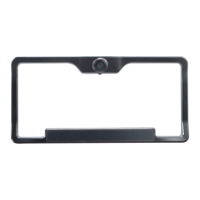

 To Next Page