7
With the Solar Wireless Backup Camera with 6.8” Widescreen HD Monitor - BT57132 / Costco
ITM. / ART. 1344584 pre-paired as rear camera, you can set the Add-on Wireless Parking Camera -
BT56780 as the front camera following these easy steps:
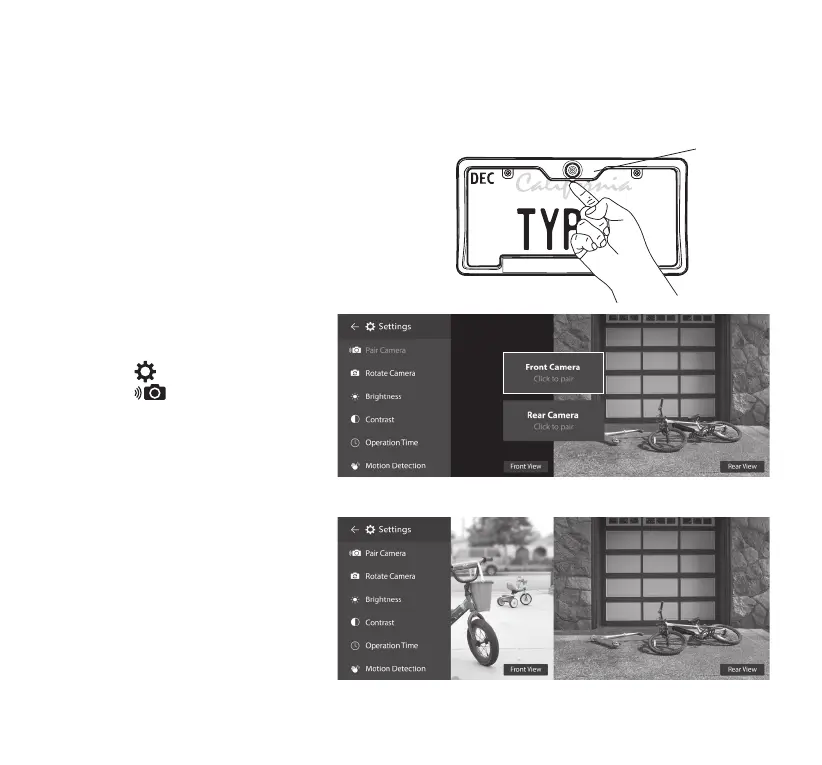
1. Press and hold the Power Button under
the Add-on Wireless Parking Camera for
6 seconds, or until the LED ashes Blue
continuously. The camera will be turned on
and enter Pairing Mode for 1 minute.
2. On the Dash Monitor, tap
the Settings icon and then
tap Pair Camera to enter
the pairing screen. Tap Front
Camera - Click to pair.
3. The camera should be paired
within 2 seconds.
Blue LED light
7. PAIRING


 To Next Page