4
Please charge and test the Camera before you install on your vehicle.
1. Fully charge camera. Fold back camera power port plug and insert included charging cable.
Most AC wall adapters will work with the USB charging cable.
2. Make sure you already purchase and install the Solar Wireless Backup Camera with 6.8”
Widescreen HD Monitor - BT57132 / Costco ITM. / ART. 1344584.
6. INSTALLATION GUIDE
5. BEFORE YOU INSTALL
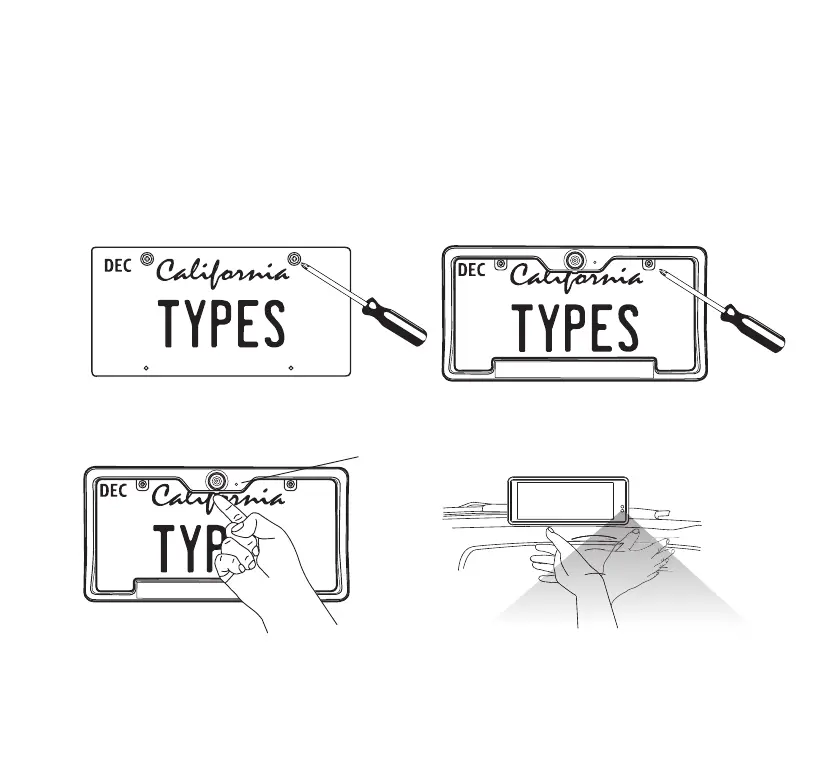
A STANDARD INSTALLATION:
2. Secure the Solar Wireless Backup Camera
and license plate with screws
back onto the rear of your vehicle.
Blue LED light
4. Power on the Monitor with the 12V/24V
adapter. You can see the parking view when
you wake up the Solar Wireless Backup
Camera by tapping once on the screen or
motion trigger in front of Monitor.
3. Push and hold the power button of
the Solar Wireless Backup Camera
for 1 second, the blue LED light
will ash 2 times.
1. Unscrew your license plate.


 To Next Page