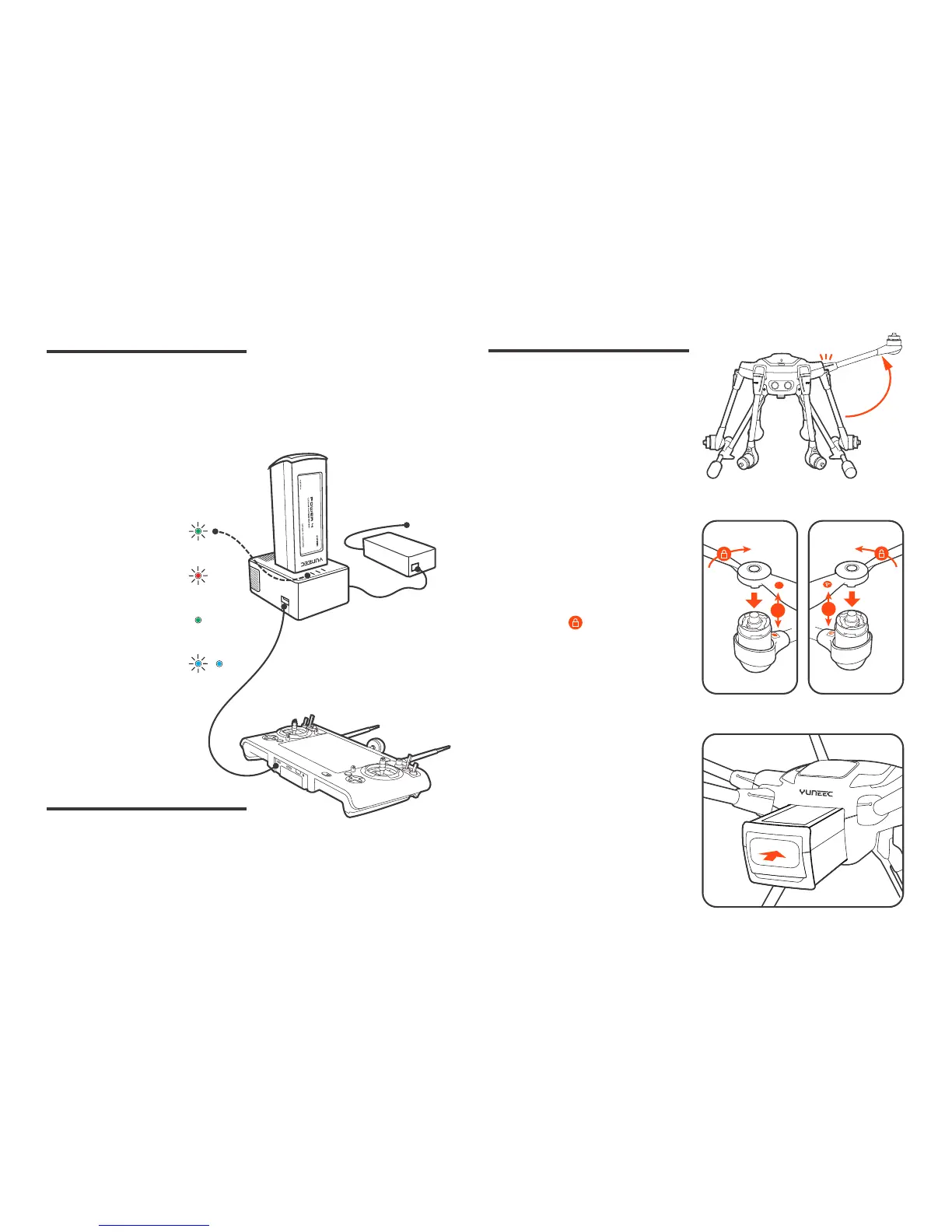
Assembling the Arms
Unfold the motor arms and secure
them until hearing a 'click'.
Installing the Propellers
Mount propeller 'A' on motor 'A' and
propeller 'B' on motor 'B'.
Press and rotate propellers in the
direction the [ ] points to until the
propellers lock.
Cross-check to be sure propellers are
properly locked in place.
Charge the Batteries
ST16S Ground Station
Assembly
A
B
B
B
unfold & click
push & click
Power the desktop charger from a
100-240V AC outlet using the AC adapt-
er/power supply, or from a 12V-17.4V
DC accessory socket/cigarette lighter
receptacle in an automobile using the
included adapter. Plug the aircraft bat-
tery into the charger port as illustrated.
Charge the ST16S battery by using
supplied USB cable and inserting
it into the Micro USB port on the
charger. It will take approximately
five hours to charge a fully discharge
battery.
Installing the Flight Batteries
Push the battery into the battery com-
partment until hearing a 'click'.
power
Green Blinking:
Ready to charge
Red Blinking:
Charging
Solid Green:
Charge Completed
Blue Blinking / Solid:
Error
/



 To Next Page