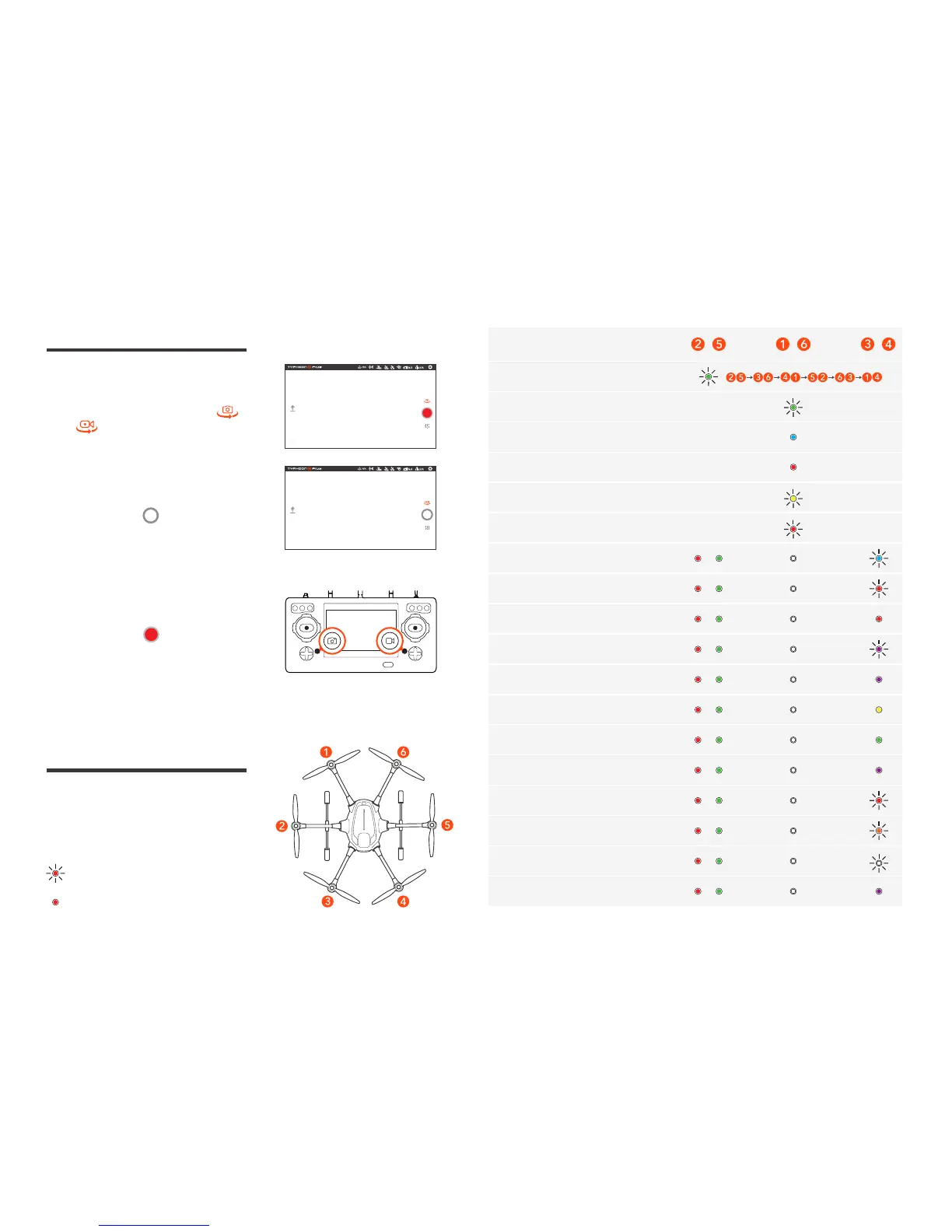
STATUS
Accelerometer/
Gyro Calibration Completed
The Aircraft is in Angle Mode
(without GPS lock)
The Aircraft is in Angle Mode
(with GPS lock)
First / Second Level Low Voltage
Battery Warning
Camera Control
Taking Photos and Recording
Video
Taking photos and recording video
can be switched by tapping [ ]
and [ ] icons.
To Take A Still Photo
Press the icon [ ], or press the
button located near the bottom left
corner of the ST16S.
To START/STOP Recording Video
Press the icon [ ], or press the
button located near the bottom on
the right corner of the ST16S.
Initiate Compass Calibration
During Initialization
Rotor Abnormal Alarming
The Aircraft is in Binding Mode
Binding Failed
Calibration Failed
The Aircraft is in Sport Mode
The Aircraft is in RTL Mode
The Aircraft is in Task Mode
The Aircraft is in IPS Mode
Low Voltage Battery Warning
Compass Alarming
The Aircraft is in No-Fly Zone
OBS. Function Activated
LED Status Indications
All the LEDs mentioned are numbered as shown.
The color of the icon indicates the color of the LED.
Indicates the LED flashing.
Indicates the LED solid on.



 To Next Page