

EasyManua.ls Logo

TYPHOON TYPH-BS-C3 - User Manual

TYPHOON TYPH-BS-C3
15 pages
Print Icon
To Next Page IconTo Next Page
Loading...
TM
TM
WATERPROOF SPEAKER ACCESSORY
FOR
TUMBLERS INSTRUCTION MANUAL
TYPHOON BLUETOOTH SPEAKER
Model No:TYPH-BS-C3
Question and Answer IconNeed help?

Do you have a question about the TYPHOON TYPH-BS-C3 and is the answer not in the manual?

Overview

This document describes the TYPHOON™ Bluetooth Speaker, model TYPH-BS-C3, a waterproof speaker accessory designed for tumblers.

Function Description:

The TYPHOON™ Bluetooth Speaker is a portable, wireless speaker designed to transmit audio from any Bluetooth® enabled device. It features an integrated rechargeable battery and is specifically designed to fit most tumbler style cups, increasing their capacity. The speaker can be used individually or paired with a second TYPHOON™ speaker for stereo sound. It also includes a speakerphone function for hands-free communication.
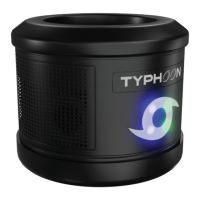
Important Technical Specifications:

  • Model No: TYPH-BS-C3
  • Dimensions (H x W): 2.68" x 4.02"
  • Frequency: 120 Hz ~ 17 KHz
  • Battery size: 3.7V/ 1200mAh
  • Waterproof Rating: IP67 (element proof)
  • BPA Free: Yes
  • Operating Temperature: 32°F to 100°F
  • Battery Charge Time: 1 hour PD / 4 hours
  • Average Run Time (per full charge): Approximately 6 hours (varies depending on volume level)
  • Bluetooth® Technology: Employs Bluetooth® technology for wireless connectivity.

Usage Features:

  • Package Contents: Includes the Bluetooth® speaker for tumblers, protective caps, a 3 ft. charging cable, and an instruction manual.
  • Power On/Off: Press and hold the front Power button to turn the speaker on. The speaker will audibly say "Power On," and the LED typhoon symbol will light up blue.
  • Bluetooth® Pairing:
    • When powered on, the speaker will audibly say "Bluetooth Pairing," indicating it's in pairing mode.
    • Ensure the Bluetooth® transmitting device is in close proximity.
    • Turn on Bluetooth® on your device and enter pairing mode.
    • Select "TYPHOON_SPK_CAT3" from the list of available devices.
    • Once connected, the LED typhoon symbol will be solid blue, and the speaker will audibly say "Bluetooth is connected."
    • If connection issues arise, "disconnect" or "forget device" from any previously synced phones.
  • Audio Playback:
    • Connect the speaker to a Bluetooth® transmitting device.
    • Play audio from your device (e.g., cellphone, computer).
    • Volume Adjustment: Tap '+' or '-' buttons for single-click adjustments, or hold them to increase/decrease volume continuously. Ensure the device's volume is set to at least 50%.
    • Track Navigation: Tap the forward (>>) or rewind (<<) buttons to change song tracks.
    • Play/Pause: Tap the Play/Pause button to pause or resume music.
  • Speakerphone: The device has speakerphone capabilities. Check local laws regarding hands-free speakerphone use while driving and prioritize driving safety.
  • Stereo Sound Pairing (Link Two Speakers):
    • Connect your Bluetooth® device to the primary speaker first, ensuring the second speaker is powered off.
    • While near the primary speaker, power on the second speaker and tap the link symbol.
    • The speaker will say "Typhoons connected," indicating both speakers are paired in stereo mode.
    • If pairing issues occur, ensure both speakers are not connected to other devices by "forgetting the device" in settings.
    • To disconnect from stereo mode, tap the link symbol on the back of either speaker.
    • Stereo Mode Notes:
      • The primary speaker (directly connected to the Bluetooth® source) will have mic/phone capability.
      • After disconnecting from stereo mode, reconnect to your phone directly from device settings.
      • When powering down in stereo mode, both speakers turn off. To prevent the primary speaker from powering off, disconnect by tapping the link symbol on the secondary speaker first.
  • Demo Mode:
    • To enter demo mode, press the power button three times; the speaker will say "In Demo Mode."
    • To exit demo mode, press the power button three times again; the speaker will say "Exiting Demo Mode."

Maintenance Features:

  • Charging:
    • Fully charge for 2 hours before first use.
    • Connect the charging cable (micro USB C) to the port on the back of the speaker (under the port protection flap, which should remain closed when not charging).
    • Connect the other end to a USB C port on a computer or wall adapter (not included).
    • The LED indicator light is solid red while charging and turns off when complete.
    • The speaker will audibly notify you when the battery is low. Battery percentage can be checked on some devices.
  • Cleaning:
    • DO NOT PLACE IN DISHWASHER. Hand wash only.
    • Despite being IP67 waterproof, it is recommended to use a damp cloth to clean the speaker by hand to extend its life.

Important Safety Instructions and Warnings:

  • Read and keep all instructions and follow all warnings.
  • Do not block ventilation openings.
  • Install according to manufacturer's instructions.
  • Do not store or operate near heat sources (radiators, heat registers, stoves, amplifiers).
  • Unplug during lightning storms or when unused for long periods.
  • Avoid excessive exposure to liquids/moisture/dripping/splashing or full submersion, as this may void the warranty.
  • Never expose to fire, as this could result in personal injury.
  • Do not store in extremely cold or warm environments.
  • Do not clean with abrasive cleaning solutions.
  • Never dismantle the product.
  • Keep out of reach of children.
  • Do not drop or throw the speaker, as it could damage the housing, speaker, battery, or mic.
  • Do not stick anything inside the speaker housing, as it could damage internal components and compromise the seal.
  • The battery in this speaker cannot be replaced by the user.
  • Observe signs requiring electrical devices or RF radio products to be switched off in designated areas (hospitals, blasting areas, explosive atmospheres).
  • Turn off the speaker and Bluetooth® signal prior to boarding an aircraft. Do not use in an aircraft.
  • Compatibility with other Bluetooth®-enabled products is not guaranteed.
  • The speaker automatically powers off when not in use for a long period.

Limited Warranty:

  • Covers defects in materials and workmanship for two (2) years from the original purchase date.
  • Does not cover damage due to transportation, storage, improper use, failure to follow instructions, lack of maintenance, modifications, unauthorized repair, normal wear and tear, or external causes (accidents, abuse, etc.).
  • During the warranty period, the manufacturer will, at its discretion, repair, replace, or refund the purchase price.
  • Shipping and handling fees for repaired/replacement products will be covered by the manufacturer.
  • To obtain warranty services, visit www.typhoonaccessories.com and follow return authorization instructions.
  • An original receipt is required for proof of purchase. Products without a Return Authorization or proof of purchase will be returned at the consumer's expense. International returns are subject to freight charges.
  • Limitation of Warranty: Remedies described are sole and exclusive. Liability will not exceed the actual amount paid for the defective product. No liability for consequential, incidental, special, or punitive damages or losses.
  • This device complies with Part 15 of the FCC Rules and industry license-exempt RSS standard(s).
  • Operation is subject to two conditions: (1) device may not cause harmful interference, and (2) device must accept any interference received, including undesired operation.
  • Equipment has been tested and found to comply with Class B digital device limits.
  • Changes or modifications not expressly approved by the responsible party could void user's authority to operate the equipment.
  • Manufacturer is not responsible for radio or TV interference caused by unauthorized modifications.
  • Troubleshooting for Interference: Reorient/relocate receiving antenna, increase separation between equipment/receiver, connect equipment to a different circuit, consult dealer/technician.
  • The device meets general RF exposure requirements and can be used in portable exposure conditions without restriction.
  • The Bluetooth® word mark and logos are registered trademarks owned by Bluetooth SIG, Inc.

WEEE (Waste Electrical and Electronic Equipment) Information:

  • The crossed-out wheelie bin symbol indicates that the product should not be mixed with general household waste.
  • For proper treatment, recovery, and recycling, take the product to designated collection points for free acceptance.
  • Alternatively, in some countries, products can be returned to a local retailer upon purchase of an equivalent new product.
  • Correct disposal helps save resources and prevents negative environmental and health effects.
  • Contact local authorities for details on designated collection points.
  • Penalties may apply for incorrect disposal according to national legislation.

TYPHOON TYPH-BS-C3 Specifications

General IconGeneral
BrandTYPHOON
ModelTYPH-BS-C3
CategorySpeakers
LanguageEnglish