Need help?
Do you have a question about the TYT DM-UVF10 and is the answer not in the manual?
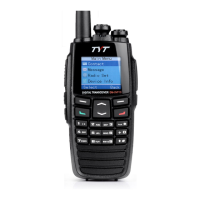
Detailed diagram illustrating the physical controls and ports of the radio unit.
Information on keys that can be assigned custom functions and available shortcut operations.
Manage contacts and send/receive text messages using the radio's features.
Utilize scan functions to monitor channels and emergency features for safety.
Step-by-step guide for charging the radio battery using the provided charger and adapter.
Instructions on how to properly attach the antenna to the radio unit.
Guidance on attaching the battery pack and the belt clip to the radio.
Instructions for connecting audio accessories or programming cables to the radio.
Explanation of various icons displayed on the LCD and the function of the LED indicator.
Description of icons indicating Direct Mode and Repeater Mode operations.
How to turn the radio on/off and adjust the audio volume using the control knob.
Methods for selecting channels and locking/unlocking the radio's keypad to prevent accidental use.
Steps to transmit a private call via preset contact, contact list, or manual dial.
Instructions for transmitting group and all calls, and their limitations.
How to receive calls and respond to private/group calls, and calls on analog channels.
Overview of the main menu hierarchy and how to access different options.
Steps to access the Contact menu, including Contact List and New Contact options.
Adding, editing, viewing, and deleting contacts in the contact list.
Creating new messages, using the inbox and outbox, and managing received messages.
Configuring radio settings like Mode (VFO, CH, MR) and Channel Type (Analog, Digital).
Configuring channel display, name, CTCSS/DCS, and scan features.
Adjusting squelch, beep tone, encryption, and LED status.
Configuring TOT, VOX, Dual Wait, and TX Transmit priority.
Adjusting backlight, brightness, battery save, and FM monitor settings.
Managing scan modes, ANI, and keypad lock settings.
Viewing device info, setting language, and configuring power display options.
Configuring VFO scan, offset, and accessing GPS information.
Details on selecting and using radio accessories.
Navigating to the home screen and operating the scan feature with different modes.
Using the monitor feature for signal reception and understanding the Time-out Timer (TOT).
Managing squelch off for continuous audio and busy channel lockout for transmission control.
Utilizing emergency features for help requests and understanding different emergency types.
Controlling radio status remotely and using the FM radio functionality.
Performing common functions using shortcut key combinations.
Using DTMF for PTT ID, emergency alerts, selective calls, and remote kill/stun.
Configuring and using 2 Tone and 5 Tone signaling for selective calls and other functions.
Using digital IDs for various alerts and calls, including manual dialing.
Analyzing and solving issues related to powering on and communicating with other members.
Addressing problems with channel settings, noise, and interference on the radio.
Tips for protecting the radio from damage and maintaining its condition.
Instructions on how to clean the radio's surface, charging piece, and controls safely.
Using the keypad to enter text via simplified Chinese Pinyin.
Entering text using English letters and numerical digits via the keypad.
Overview of the radio's general technical specifications, including frequency range and voltage.
Detailed technical parameters for the transmitter and receiver components.
Details of the product guarantee, terms, and service procedures.
Information on RF electromagnetic energy exposure limits and FCC compliance.
Guidelines for avoiding interference and operating the radio in controlled environments.
 General
| Display | LCD |
|---|---|
| Channel Spacing | 12.5 kHz / 25 kHz |
| Operating Mode | Simplex |
| Operating Temperature | -20°C to +60°C |
| Antenna Impedance | 50 Ω |
| Frequency Range | 136-174 MHz |
| Channel Capacity | 128 |
| Battery Capacity | 2000mAh |
| Operating Voltage | 7.4V DC |
| Modulation | F3E |

 To Next Page