LEA-5, NEO-5, TIM-5H - Hardware Integration Manual
GPS.G5-MS5-09027-A2 Released Appendix
Page 59 of 68
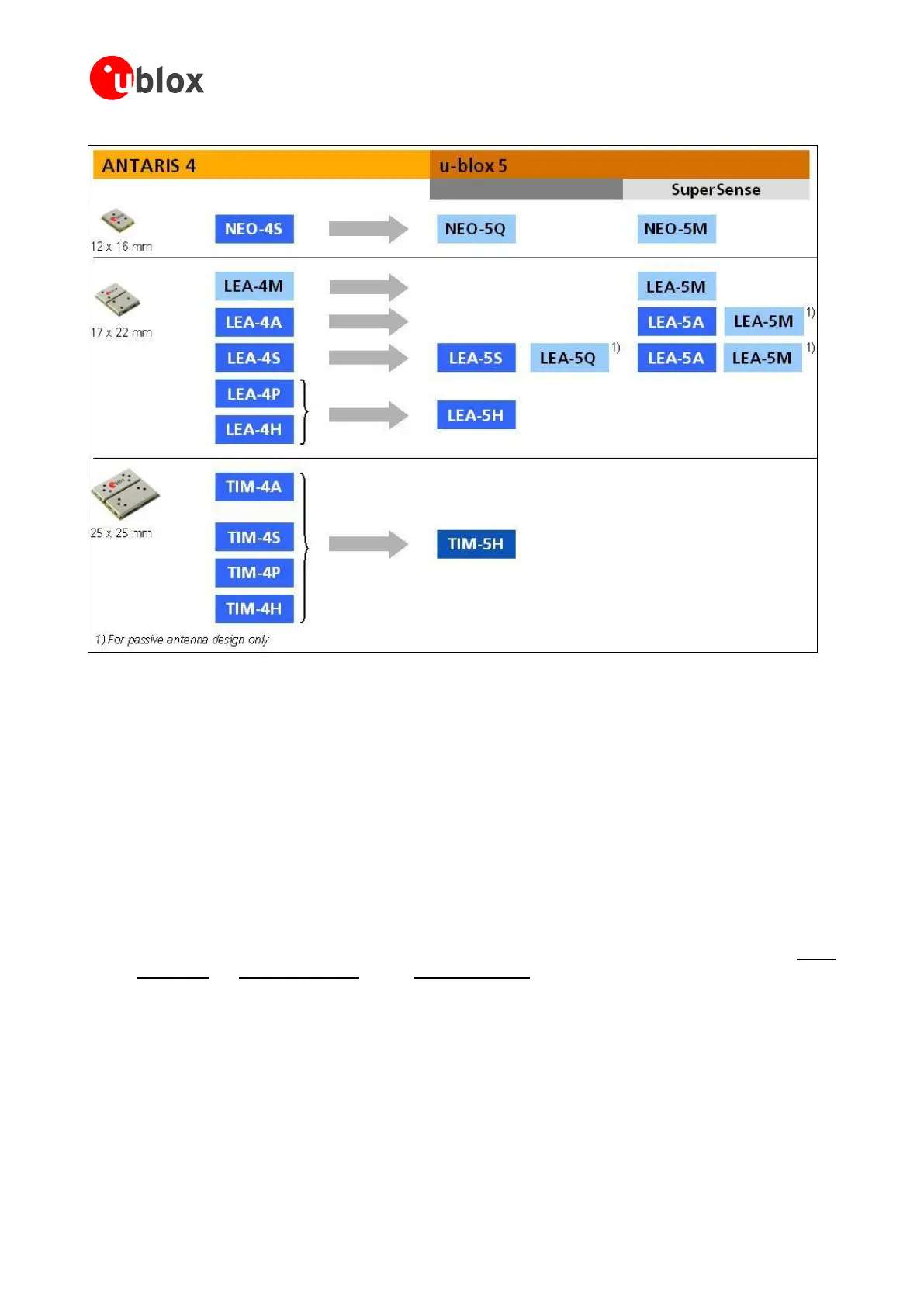
Figure 48: u-blox5 module migration made easy
Check u-blox 5 Hardware Requirements:
Check the battery power to supply the battery backup pin, since u-blox5 draws higher current in
comparison to ANTARIS 4 receivers.
Compare the u-blox 5 module peak current consumption (150 mA) with the specification of the power
supply.
u-blox 5 modules can be operated in two different power modes: Max. Performance or Eco mode. Select
Eco mode for reduced current consumption. For FW 6.00 and additional Power Save mode is available.
u-blox5 modules with KickStart (LEA-5S, LEA-5H, LEA-5T, LEA-5Q, NEO-5G, NEO-5Q and TIM-5H)
operate in Max. Performance mode by default. Standard u-blox5 modules (NEO-5D, NEO-5M, LEA-5A
and LEA-5M) are set to Eco mode by default.
NEO-5G, NEO-5Q and LEA-5Q also feature a Configuration Pin to switch between the power modes.
For more information on u-blox5 Power supply specifications and power modes, check our latest LEA-5
Data Sheet [1], NEO-5 Data Sheet [2] and TIM-5 Data Sheet [3].
If you use an active antenna supervisor circuitry to detect open conditions, you need to verify resistor
reference recommendations in our integration manuals.
See chapter 2.7 EOS/ESD/EMI Precautions.
No need to power Vbat before power-up.
Check u-blox 5 Software Requirements:
Not all of the functionalities available with ANTARIS 4 are supported by u-blox 5 Firmware version 4.00,
4.01 or 5.00. These include:


 To Next Page
 Loading...