U-Line Product Operation 7
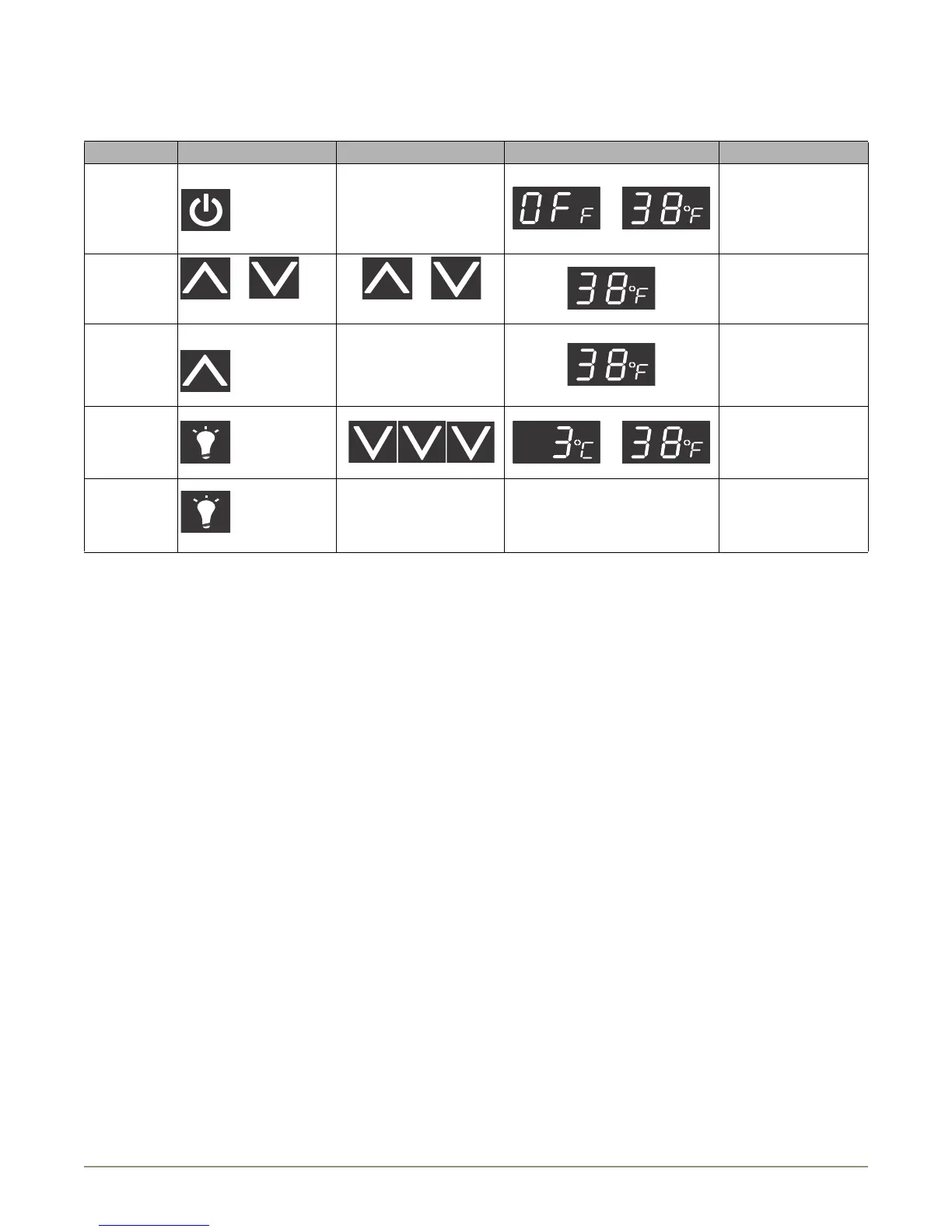
Electronic Control Quick Guide
Ta s k To u c h To u c h Display Comment
Turn ON/OFF Hold 10 seconds Release when °F flashes. or
Adjust
Te m p e r a t u r e
or
Touch and release
or
Touch to change temperature
°F flashes after first touch,
set-point saved after 5
seconds of inactivity and °F
stops flashing.
View Actual
Te m p
Hold 5 seconds Release when °F flashes.
WC models will scroll top/
mid/bottom temps.
Change F/C Hold or
Blackout Mode Hold 10 seconds
Display (and cabinet light) will not
operate in Blackout Mode.
Blackout will end in 36
hours, or hold again to
terminate early.
NOTE: 38°F is an example; the display will vary with actual set-
point.



 To Next Page