USER GUIDE
Remove Fan and Cover 1
SAFETY • INSTALLATION & INTEGRATION • OPERATING INSTRUCTIONS • MAINTENANCE • SERVICE
Remove Fan and Cover
PARTS REPLACEMENT
Note: These models do not require removal of the ice
maker or freezer housing to access the fan motor, drain or
evaporator.
REPLACING EVAPORATOR FAN MOTOR
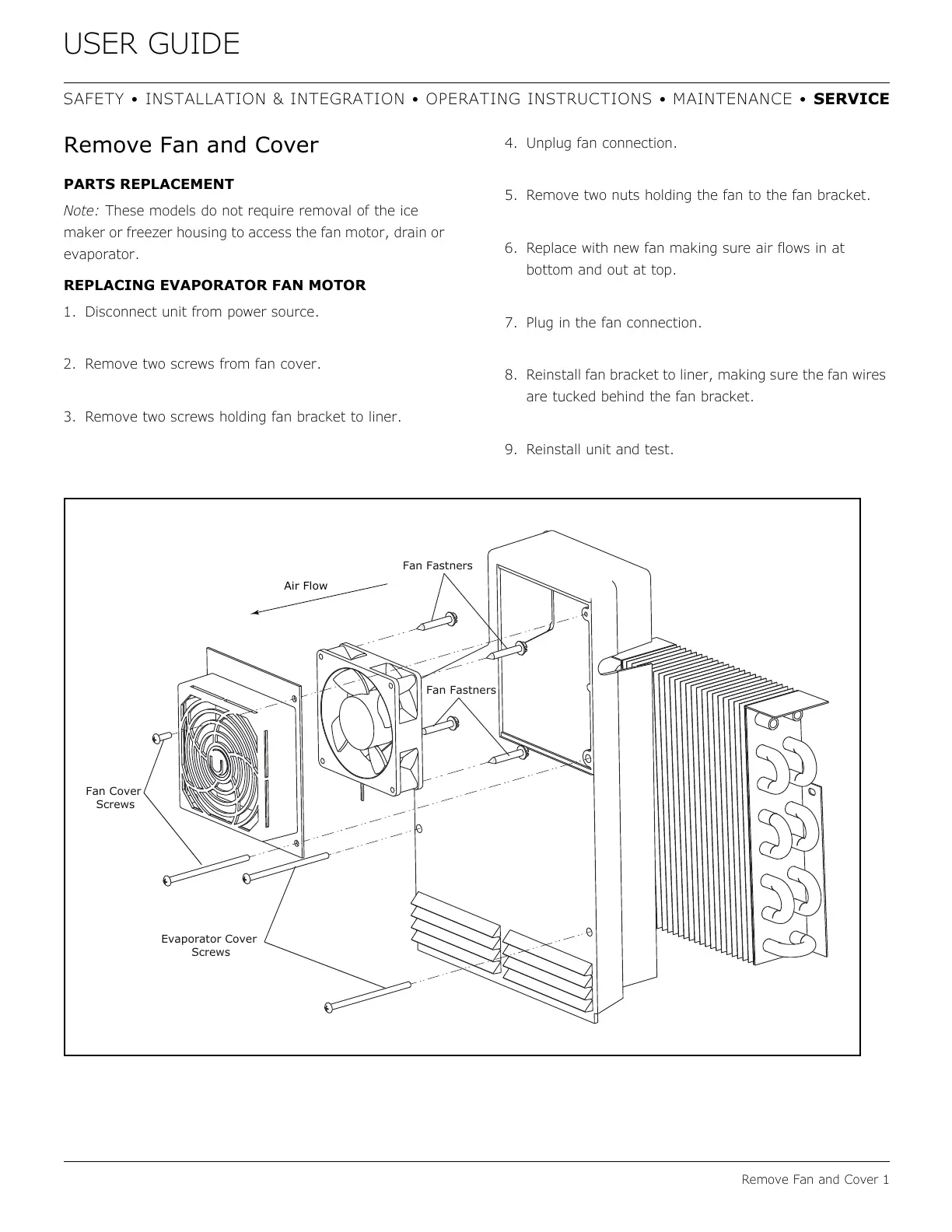
1. Disconnect unit from power source.
2. Remove two screws from fan cover.
3. Remove two screws holding fan bracket to liner.
4. Unplug fan connection.
5. Remove two nuts holding the fan to the fan bracket.
6. Replace with new fan making sure air flows in at
bottom and out at top
.
7. Plug in the fan connection.
8. Reinstall fan bracket to liner, making sure the fan wires
are tucked behind the fan bracket.
9. Reinstall unit and test.
Fan Cover



 To Next Page
 Loading...