This document describes a UBERHAUS window air conditioner, providing instructions for its safe operation, installation, and maintenance, along with details on its features and troubleshooting tips.
Function Description
The UBERHAUS window air conditioner is designed to cool indoor spaces by removing heat and humidity from the air. It operates by drawing in room air, passing it over cooling coils, and then recirculating the cooled air back into the room. The unit also has a fan-only mode for air circulation without cooling and a dry mode for dehumidification. The air conditioner is equipped with a current detection device in its power supply cord to reduce the risk of fire. It features an automatic 3-minute time delay for the cool circuit to prevent compressor overheating and circuit breaker tripping when the unit is turned off and on quickly. The unit can maintain a set temperature within a range of 1°F/1°C, between 62°F (17°C) and 86°F (30°C). It is capable of displaying temperature in either Fahrenheit or Celsius.
Usage Features
The air conditioner can be controlled using either the unit's electronic control panel or a remote controller.
Electronic Control Panel and Remote Control Features:
- On/Off Button: Starts or stops the unit's operation.
- Temperature Adjustment (Up/Down Arrows): Allows users to increase or decrease the desired temperature setting. The temperature can be set in 1°C/1°F increments within a range of 17°C/62°F to 30°C/86°F. When in Fan Only mode, the display shows the actual room temperature instead of the set temperature.
- Mode Selection: Users can select from various operating modes:
- Auto Mode: The unit automatically chooses between Cooling, Fan, or Heating (for cooling & heating models only) based on the ambient room temperature and the set temperature. In this mode, the fan speed is automatically controlled and cannot be manually adjusted.
- Cool Mode: Provides cooling to the room.
- Dry Mode (Dehumidifying): Reduces humidity in the room. In this mode, the fan speed is automatically controlled and cannot be manually adjusted.
- Fan Mode: Circulates air without cooling. Users can select from four fan speeds: Auto, Low, Med, or High.
- Heat Mode: (For cooling & heating models only) Provides heating to the room.
- Fan Speed Selection: Allows users to choose from four fan speeds: Auto, Low, Med, or High, except in Auto and Dry modes where fan speed is automatically controlled.
- Timer Function (Auto Start/Stop): Enables scheduling the unit to turn on or off automatically. The timer can be set in 0.5-hour increments up to 10 hours, and then in 1-hour increments up to 24 hours. The control counts down the remaining time until start/stop. Turning the unit on or off manually will cancel the Auto Start/Stop function.
- Combined Timer: Allows setting both Auto Stop and Auto Start timers simultaneously (e.g., stop after 2 hours, start after 10 hours) or Auto Start and Auto Stop timers simultaneously (e.g., start after 5 hours, stop after 8 hours).
- Energy Saver Mode: In this mode, the fan continues to run for 3 minutes after the compressor shuts off. The fan then cycles on for 2 minutes at 10-minute intervals until the room temperature rises above the set temperature, at which point the compressor restarts.
- Sleep Mode: Activates a program designed to maintain a comfortable temperature during sleep. In this mode, the selected temperature increases by 2°F (1°C) 30 minutes after activation, and then by another 2°F (1°C) after an additional 30 minutes. This new temperature is maintained for 7 hours before returning to the originally selected temperature. Sleep mode can be canceled by pressing the Mode, On/Off, Fan Speed, or Sleep button again. This function is available in Cool, Heat, or Auto modes only.
- One Touch Button: Automatically shifts the unit to COOL operation with auto fan speed and a setting temperature of 26°C/80°F. The timer setting program will be canceled when this button is used.
- Check Filter Reset Button: A reminder feature that illuminates an LED after 250 hours of operation, indicating that the air filter needs cleaning. Pressing this button after cleaning resets the timer and turns off the light.
Air Directional Louvers:
The unit features adjustable louvers that allow users to direct the airflow up, down, left, or right throughout the room as needed. Horizontal louvers can be pivoted for up/down direction, and levers can be moved side to side for left/right direction.
Fresh Air Vent Control (on some models):
This feature allows the air conditioner to:
- Recirculate inside air: Vent is closed.
- Draw fresh air into the room: Vent is open.
- Exchange air from the room and draw fresh air into the room: Vent and exhaust are open.
Installation Instructions:
The air conditioner is designed for standard double-hung windows with opening widths of 23 1/4 to 36 inches (590mm to 914mm). The lower sash must open sufficiently to allow a clear vertical opening of 14 inches (356mm) for 8000Btu/h models or 15-1/4 inches (394mm) for 10000-12000Btu/h models. The unit requires clear air space around its side louvers and rear for proper airflow and heat removal. The top rail must be assembled on the unit for models under 10000Btu/h. The installation process involves placing the unit on a flat surface, attaching the top rail, sliding the accordion panels into the cabinet, placing the unit into the window opening, extending the side panels, securing the frame with a frame lock and screws, and inserting a foam seal between the sashes. If a storm window blocks the AC, wood may need to be added or the storm window removed.
Maintenance Features
Air Filter Cleaning:
The air filter should be checked at least once a month for cleanliness. Trapped particles can lead to frost accumulation on cooling coils. To clean:
- Push the vent handle to the Vent Closed position (if applicable).
- Open the front panel.
- Grasp the filter by the center and pull it up and out.
- Wash the filter with liquid dishwashing detergent and warm water. Rinse thoroughly.
- Gently shake off excess water and ensure the filter is thoroughly dry before replacing.
- Alternatively, vacuum the filter clean.
- Caution: Never use hot water over 40°C (104°F) to clean the air filter. Do not operate the unit without the air filter.
Cabinet Cleaning:
To clean the cabinet and front panel:
- Caution: Unplug the air conditioner to prevent shock or fire hazards.
- Dust the cabinet and front with an oil-free cloth or wash with a cloth dampened in a solution of warm water and mild liquid dishwashing detergent.
- Rinse thoroughly and wipe dry.
- Caution: Never use harsh cleaners, wax, or polish on the cabinet front.
- Caution: Wring excess water from the cloth before wiping around the controls to prevent damage to the air conditioner.
- Plug in the air conditioner after cleaning.
Winter Storage:
If the unit is to be stored during winter, it should be carefully removed from the window according to the installation instructions. Cover it with plastic or return it to its original carton for protection.
Troubleshooting Tips:
The manual provides a comprehensive list of common problems and their solutions, such as the unit not starting, insufficient cooling, ice formation on coils, rapid cycling, noise, and water dripping. This helps users diagnose and resolve issues before calling for service. For example, if the unit doesn't start, solutions include checking the power plug, circuit breaker, or resetting the current device. If air doesn't feel cold enough, solutions include checking room temperature, thermostat settings, or compressor operation.
Remote Controller Maintenance:
The remote controller is powered by two dry batteries (R03/LR03X2). To replace them:
- Remove the cover by pressing and sliding it off.
- Remove old batteries and insert new ones, ensuring correct polarity (+ and -).
- Reattach the cover.
- Note: Removing batteries erases all programming, so the remote controller must be reprogrammed after inserting new batteries.
- Caution: The air conditioner will not operate if signals are blocked. Prevent liquids from falling on the remote controller and avoid direct sunlight or heat exposure. If other electrical appliances react to the remote controller, move them or consult a dealer.

 Need help?
 General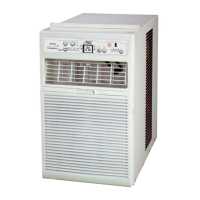


 To Next Page