This document is an operator's manual for UBERHAUS window air conditioners, specifically models 87795012 (MWL-10CRN1-B15) and 87795037 (MWL-12CRN1-B15). It provides detailed instructions for installation, operation, maintenance, and troubleshooting, and includes a 3-year warranty.
Function Description:
The UBERHAUS window air conditioner is designed to cool and dehumidify indoor spaces. Some models also offer heating and fan-only operation. It can be controlled via a unit control panel or a remote control. The unit features various operating modes including Auto, Cool, Dry, and Fan. It also includes an Energy Saver feature, Sleep mode, and a Timer for auto start/stop functionality. An Exhaust Control allows for circulating inside air or exhausting stale air to the outside. The 4-Way Louvers enable users to direct airflow up, down, left, or right as needed.
Important Technical Specifications:
- Models: 87795012 (MWL-10CRN1-B15), 87795037 (MWL-12CRN1-B15)
- Power Supply Cord: Equipped with a 3-prong grounding plug and a current detection device to reduce fire risk.
- Electrical Requirements: Requires adequate electrical service (information on serial plate), proper grounding, and a dedicated power circuit with a time delay fuse or circuit breaker. Extension cords or adapter plugs should not be used. Receptacle wiring should be a minimum of 14 gauge copper wire.
- Operating Conditions (Cooling):
- Outdoor temperature: 18-43°C (T1 Environment), 21-52°C (T3 Environment)
- Indoor temperature: 17-32°C (T1 Environment), 17-32°C (T3 Environment)
- Operating Conditions (Heating - some models):
- Outdoor temperature: -5-24°C (T1 Environment), -7-24°C (T3 Environment)
- Indoor temperature: 0-27°C (T1 Environment), 0-30°C (T3 Environment)
- Window Dimensions for Installation:
- Minimum width: 15-1/2 inches
- Maximum width (casement windows): 16-1/4 inches
- Minimum height (with window panel retainer): 21-1/4 inches
- Minimum height (window panel retainer removed): 20-5/16 inches
- Maximum height: 39-7/16 inches
- Remote Controller Specifications (RG32A/E, RG32A/CE):
- Rated Voltage: 3.0V (Dry batteries AAA x2)
- Lowest Voltage of CPU Emitting Signal: 2.4V
- Signal Receiving Range: 16 ft (5m)
- Environment: -5℃~60℃ (23°F~140°F)
Usage Features:
- On/Off: Press the On/Off button on the unit or remote to turn the unit on or off.
- Temperature Adjustment: Use the Left (<) or Right (>) buttons on the unit or remote to set the desired temperature between 62°F (17°C) and 86°F (30°C). The display can be switched between Celsius and Fahrenheit by pressing the Left and Right buttons simultaneously for 3 seconds.
- Fan Speed: Select from Auto, Low, Med, or High fan speeds using the fan speed button. In Dry mode, fan speed is automatically set to Low. In HEAT mode (some models), fan speed may not be adjustable.
- Operating Modes:
- Auto Mode: Automatically selects cooling, heating (on some models), or fan-only operation based on set temperature and room temperature. Fan speed is automatically controlled.
- Cool Mode: Provides cooling.
- Dry Mode: Operates as a dehumidifier. Fan speed is automatically set to Low.
- Fan Only Mode: Circulates room air or exhausts stale air. Allows selection of any fan speed. Displays actual room temperature.
- Energy Saver Feature: In COOL mode, the fan runs for 3 minutes after the compressor shuts off, then cycles on for 2 minutes at 10-minute intervals until the room temperature rises above the set temperature.
- Sleep Feature: Available in COOL, HEAT, or AUTO modes. Increases the set temperature by 1°C (2°F) after 30 minutes, and again after another 30 minutes. This new temperature is maintained for 6 hours before returning to the original setting. Can be cancelled by pressing MODE, ON/OFF, FAN SPEED, or SLEEP button.
- Timer (Auto Start/Stop): Allows setting a time for the unit to automatically turn on or off, up to 24 hours in 0.5 or 1-hour increments.
- Check Filter Feature: An LED illuminates after 250 hours of operation as a reminder to clean the air filter. Press the Check Filter button to reset.
- Exhaust Control: Allows the unit to circulate inside air (Closed position for maximum cooling) or exhaust stale air to the outside (Open position).
- 4-Way Louvers: Manually adjust louvers to direct airflow.
- Remote Control: Provides all control functions from a distance of up to 16 ft (5m).
Maintenance Features:
- Air Filter Cleaning: Check at least once a month. Grasp the filter by the center and pull up and out. Wash with liquid dishwashing detergent and warm water, rinse thoroughly, and shake off excess water. Ensure it is thoroughly dry before replacing. Alternatively, vacuum the filter clean. Do not use hot water over 40°C (104°F) and never operate the unit without the air filter.
- Cabinet Cleaning: Unplug the unit. Dust the cabinet and front with an oil-free cloth or wash with a cloth dampened in a solution of warm water and mild liquid dishwashing detergent. Rinse thoroughly and wipe dry. Avoid harsh cleaners, wax, or polish. Wring excess water from the cloth before wiping around controls to prevent damage.
- Winter Storage: If storing for winter, remove the unit from the window according to installation instructions. Cover it with plastic or return it to the original carton. Store in an upright position in a dry place to prevent rust or electrical damage.
- Troubleshooting Tips: The manual includes a comprehensive list of common problems and their solutions to help users diagnose and resolve issues before calling for service.
- Battery Replacement (Remote Control): The remote uses two AAA batteries. Slide off the cover, replace old batteries, ensuring correct polarity (+/-), and reattach the cover. Remove batteries if the remote will not be used for several weeks to prevent leakage.

 Need help?
 General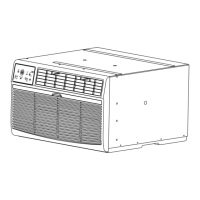


 To Next Page