
 Need help?
Do you have a question about the Ubiquiti UVC-G3-PRO and is the answer not in the manual?
Details the 10/100 RJ45 Ethernet port and the function of the reset button.
Step-by-step guide for mounting the camera on walls or ceilings.
Step-by-step guide for mounting the camera on poles.
Instructions for downloading and using the UniFi Protect app for device configuration.
Steps for fine-tuning the camera's viewing angle after installation.
Important warnings regarding hot surfaces, water, storms, and electrical safety information.
Information on FCC, ISED Canada, Australia/New Zealand, CE marking, WEEE, and Declaration of Conformity.
Links and access to further product information and support.
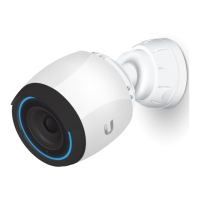
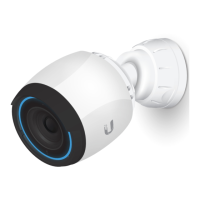
The device described in the manual is the UniFi Video Camera G3 Pro (UVC-G3-PRO), a high-performance surveillance camera designed for both indoor and outdoor use. Its primary function is to capture video footage for security and monitoring purposes, offering robust features for various deployment scenarios.
The UVC-G3-PRO serves as a professional-grade video surveillance camera within the UniFi Protect ecosystem. It captures high-definition video, allowing users to monitor their premises effectively. The camera is equipped with a powered zoom lens, enabling users to adjust the field of view remotely to focus on specific areas of interest or achieve a wider overview. This zoom capability is crucial for adapting to different monitoring needs without physically repositioning the camera.
Night mode functionality, supported by IR LEDs and a mechanical IR cut filter, ensures clear video capture in low-light or complete darkness. This feature is essential for 24/7 surveillance, providing continuous monitoring regardless of ambient light conditions. The camera also incorporates various image settings such as flip, brightness, contrast, WDR (Wide Dynamic Range), hue, infrared, sharpness, saturation, denoise, and 50/60 Hz flicker reduction. These settings allow for fine-tuning the video output to optimize image quality based on the environment and specific surveillance requirements. WDR, in particular, helps to balance exposure in scenes with both very bright and very dark areas, ensuring details are visible across the entire image.
Connectivity is established via a 10/100 RJ45 Ethernet port, which supports PoE (Power over Ethernet) standards (802.3af/802.3at or 24V Passive PoE). This means the camera receives both power and data through a single Ethernet cable, simplifying installation and reducing the need for separate power outlets. The camera can be managed either through the UniFi Protect software (for a comprehensive surveillance solution) or as a standalone device with an integrated web UI, offering flexibility in deployment and management.
The UVC-G3-PRO offers versatile mounting options, including wall, ceiling, and pole mounts, making it adaptable to a wide range of installation environments. The manual provides detailed instructions for both wall/ceiling and pole mounting. For wall/ceiling installations, the process involves detaching the mounting plate, marking drill points, drilling holes, inserting screw anchors (if needed), and then securing the mounting plate with self-tapping screws. The Ethernet cable can be routed either through a hole in the wall/ceiling or along the surface, depending on the aesthetic and practical requirements of the installation. Once the mounting plate is secure and the Ethernet cable is connected, the camera body is attached to the mounting plate and rotated to lock it in place.
For pole mounting, the camera utilizes a pole mount bracket and requires two metal straps or hose clamps (not included) to secure it to a pole with a diameter between 40-80 mm. The pole mount bracket is first attached to the pole using the straps, and then the camera is connected to the Ethernet cable and attached to the bracket, similar to the wall/ceiling mount. The camera's design allows for easy adjustment of the viewing angle after installation. The tightening tool included in the package is used to adjust the camera's position, allowing for precise aiming and focusing. The camera's housing is designed to be UV stabilized and is made from polycarbonate and die-cast aluminum, ensuring durability for outdoor use. It also boasts an IP67 weatherproofing rating, indicating strong resistance to dust and water ingress, making it suitable for harsh outdoor conditions.
The camera's setup and configuration are primarily done through the UniFi Protect app, which can be downloaded from the App Store (for iOS) or Google Play (for Android). This app guides users through the setup process, enabling them to configure the camera, adjust settings, and view live or recorded footage. For users with UniFi Video 3 deployments, a separate UniFi Video mobile app is available.
The UVC-G3-PRO is designed for minimal maintenance. Its robust, weather-resistant construction (IP67 rated) reduces the need for frequent checks or repairs due to environmental factors. The UV-stabilized polycarbonate and die-cast aluminum enclosure ensures longevity even when exposed to sunlight and varying weather conditions.
A key maintenance feature is the reset button, which allows users to restore the camera to its factory default settings. This can be useful for troubleshooting or reconfiguring the device. To perform a factory reset, the button must be pressed and held for more than 10 seconds while the camera is powered on.
For optimal performance and protection, the manual recommends using shielded Category 5 (or above) cabling with a drain wire for all outdoor Ethernet connections. This cabling should be grounded through the AC ground of the PoE to protect against harmful outdoor environments and ESD (Electrostatic Discharge) events. Ubiquiti's industrial-grade, shielded Ethernet cable is specifically recommended for this purpose. Furthermore, surge protection is advised for all outdoor installations. The manual suggests using two Ethernet Surge Protectors (model ETH-SP), one near the camera and another at the building's entry point, to absorb power surges and safely discharge them into the ground, thereby protecting the camera and network equipment from electrical damage.
The camera's design, with its adjustable components, allows for easy access to the Ethernet port and reset button during installation or troubleshooting. The tightening tool provided facilitates secure adjustments of the camera's position, ensuring that once set, the view remains stable. Regular cleaning of the lens might be necessary depending on the environment to maintain clear image quality, though the weatherproofing helps to minimize dust and debris accumulation.
 General
| Video Compression | H.264 |
|---|---|
| Maximum Frame Rate | 30 FPS |
| Microphone | Yes |
| Power Method | PoE (802.3af) |
| Max. Power Consumption | 12.5W |
| Frame Rate | 30 FPS |
| Weatherproof Rating | IP67 |
| Memory | 512 MB |
| Resolution | 1920 x 1080 |
| Image Settings | Brightness, Contrast, Saturation |
| Networking Interface | Ethernet (10/100/1000 Mbps) |
| Operating Temperature | -20 to 50° C (-4 to 122° F) |
| Operating Humidity | 20 to 80% (non-condensing) |
| Certifications | FCC, IC, CE |
| IR Range | Up to 30 m |
| Day/Night | Yes |
| Mounting | Wall, ceiling |
| Management | UniFi Video |





 To Next Page
