Home
Uconnect
Car Stereo System
430N
Page 71 (Deleting Tracks from the Hard Disk Drive)
Uconnect 430N - Deleting Tracks from the Hard Disk Drive
153 pages
Manual
Save Page as PDF
To Next Page
To Next Page
To Previous Page
To Previous Page
Loading...
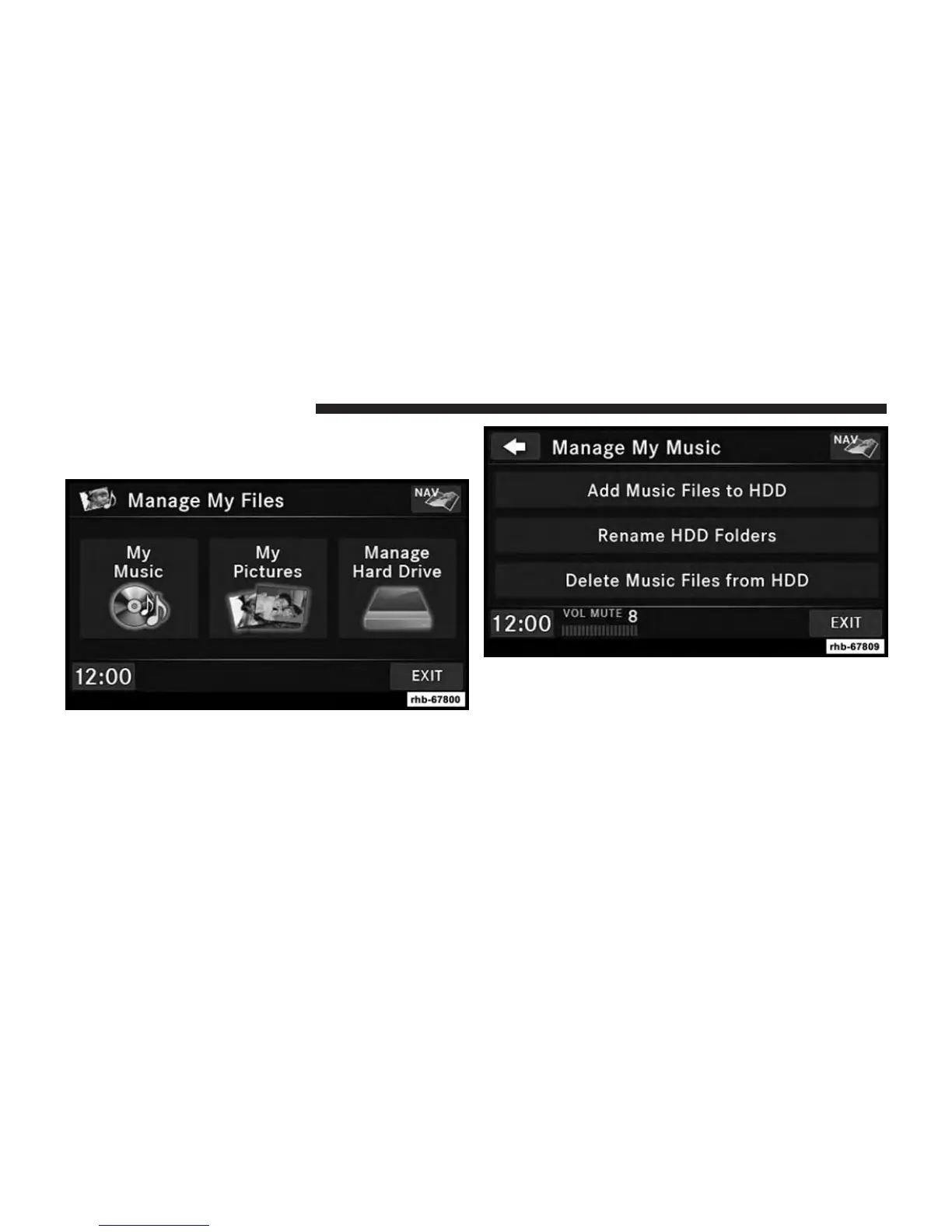
Deleting
T
racks
From
The
Hard
Disk
Drive
1.
Press
the
MENU
hard-key
.
2.
T
ouch
the
MY
MUSIC
soft-key
.
3.
T
ouch
the
Delete
Music
Files
from
HDD
soft-key
.
4.
Select
the
folder
from
which
you
want
to
delete
tracks.
70
Uconnect®
MUL
TIMEDIA
(MEDIA)
70
72
Table of Contents
Main Page
Introduction
6
Safety Guidelines 3
2
Table of Contents
6
Warnings
7
Safety References
7
Intended Use
7
System Care
7
Software Update
7
Safe Usage of the Radio System
7
Introduction 5
7
Connections
8
Touchscreen
9
CD/DVD Drive
9
GPS Navigation Antenna - if Equipped
10
Satellite Radio Antenna - if Equipped
10
Other Electronic Devices
10
Getting Started
20
Change the Language
21
SET the TIME - Uconnect® 430
21
SET the TIME - Uconnect® 430N
22
Store Radio Presets
23
Uconnect® Multimedia (Radio)
26
Overview
28
Radio Mode
28
Siriusxm Satellite Radio
28
Change a Channel or Frequency
29
Station Presets
29
Radio Broadcast Data System (RBDS)
30
Radio Text Information
30
Music Type (Program Type Filter)
31
RBDS (FM) Program Types
31
Favorite Songs & Artists
32
Siriusxm Satellite Radio Program Types
32
Replay Mode
33
AM/FM Menu
34
Radio Settings
34
SAT Menu
34
Channel Lock
35
Favorites
35
Favorite Songs & Artists
36
Favorite Teams
36
Re-Subscribe to Siriusxm Satellite Radio
37
Uconnect® Multimedia (Media)
42
Disc Mode
44
Overview
44
Disc Requirements
44
Inserting a Disc
45
Removing a Disc
45
Selecting Disc Mode
46
Scan Search
46
Change a Track
46
Displaying the Elapsed Title Time
46
Select Title from List
47
Disc Info
47
Gracenote® End User License Agreement
47
Copy Disc to Hard-Drive
49
Disc Menu
49
Playing a MP3/WMA Disc
50
Playing a Video DVD
50
DVD MENU Controls
51
DVD Playback Controls
52
DISC Menu
53
Disc Skipping
54
Temperature Protection
54
Hard Disk Drive Mode (Hdd)
54
Copy Audio Disc to Hard-Drive
54
Copy WMA/MP3 Files to Hard-Drive
56
Copying Complete Disc
57
Selective Song Copying from Disc
58
Copying from USB
60
Playing Audio Files from the Hard Disk Drive
62
Change a Track
64
Tagging Favorite HDD Songs
65
Displaying the Elapsed Time
65
HDD Menu
65
Random Playback
65
Repeat Track
65
Favorite Playlists on the Hard Disk Drive
66
Editing Track Info on the Hard Disk Drive
68
Editing Folder Names on the Hard Disk Drive
69
Deleting Tracks from the Hard Disk Drive
71
Deleting All Files from the Hard Disk Drive
72
Importing Pictures
73
Uconnect® Multimedia (Media) 41
75
Uconnect® Multimedia (Remote Devices)
78
Video Entertainment System (Ves™) - if Equipped
80
Receiving Audio/Video from the Ves
80
Sending Audio/Video and Controlling the VES
81
VES™ Lock
83
VES™ Unlock
83
Playing a Video DVD for the Rear VES
84
License Agreements
85
Dolby Digital License Agreement
85
Rovi Corporation License Agreement
85
Usb Connector
86
Compatible Devices
86
How to Open the Cover
87
How to Close the Cover
88
Audio Jack (Aux) Mode
89
USB Port - if Equipped
90
Playing Audio Files from the Audio Device
91
Select an Ipod® or External USB Category
92
List Jump
94
Uconnect® MULTIMEDIA (REMOTE DEVICES) Change a Track
95
Pause
95
Play
95
Displaying the Elapsed Title Time
95
Scan Search
95
Track Info
95
AUX Menu
96
Random Playback
96
Repeat Track
97
Bluetooth® Streaming Audio (Btsa)
97
Controlling BTSA Using the Radio
97
Play Mode
97
Selecting a Different Audio Device
97
Uconnect® PHONE - if EQUIPPED
98
Voice Command - if Equipped
99
Navigation (Uconnect® 430N Only)
100
Safety Precautions and Important Information
103
Warning
103
Caution
104
Notice
104
Map Data Information
104
Getting Started
105
Setting up Your System
105
Acquiring Satellites
105
Main Menu
106
Using the On-Screen Buttons
106
Using the On-Screen Keyboard
106
Finding a Point of Interest
107
Finding a Location by Spelling the Name
107
Adding Points to the Active Route
107
Changing the Destination of the Active Route
108
Taking a Detour
108
Stopping the Route
108
Finding Locations
108
Using the Go! Page
110
Setting a Home Location
110
Going Home
111
Editing Your Home Location Information
111
Viewing a List of Recently Found Locations
111
About Favorites
111
Planning a Trip
113
Using the Map Buttons
114
Browsing the Map by Touching the Screen
114
Entering Coordinates
115
About the Map Pages
115
Viewing the Map While Navigating
115
About Mytrends
117
Viewing Trip Information
117
Viewing the Turn List
118
Viewing the Next Turn
119
Viewing the Junction View
120
Using the Tools
120
Viewing Current Location Information
120
Using Help
120
Using the World Clock
121
Using the Calculator
121
Using the Unit Converter
121
Customizing the Navigation System
122
System Settings
123
Changing the Map Settings
123
Route Preferences
124
Language Settings
125
Restoring All Original Settings
125
Appendix
125
About GPS Satellite Signals
125
Updating the Software
125
Updating the Map Data
126
Custom Pois (Points of Interest)
126
SIRIUSXM TRAVEL LINK (Uconnect® 430N ONLY)
128
Weather
130
Ski Info
130
Fuel Prices
130
Movie Listings
131
Sports Scores
131
End-User License Agreements
132
System Information
148
User Data Backup
149
Software and Database Updates
149
Disc
150
Hdd
150
Troubleshooting
150
Radio
150
Glossary of Terms
151
Other manuals for Uconnect 430N
User Manual
138 pages
Related product manuals
Uconnect 430
153 pages



 To Next Page