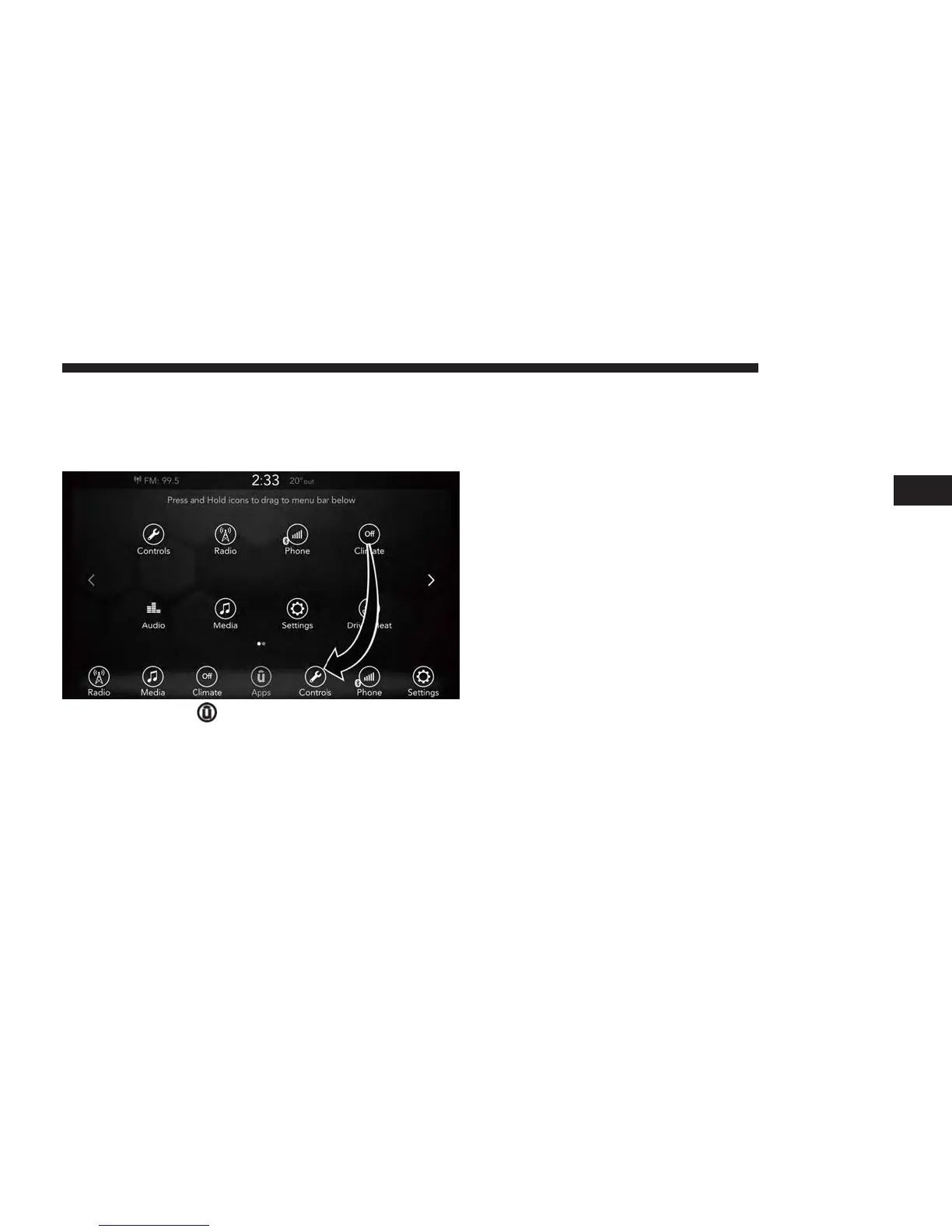
PERSONALIZED MENU BAR
The Uconnect features and services in the main menu bar
are easily changed for your convenience. Simply follow
these steps:
1. Press the “Apps
” button to open the App screen.
2. Press and hold, then drag the selected App to replace an
existing shortcut in the main menu bar.
The new shortcut will now be an active App/shortcut
on the main menu bar.
RADIO MODE
Radio Controls
The radio is equipped with the following modes:
• AM
• FM
• SiriusXM Satellite Radio (if equipped)
Press the RADIO button on the touchscreen, bottom left
corner, to enter the Radio Mode. The different tuner modes;
AM, FM, and SXM, can then be selected by pressing the
corresponding buttons in the Radio mode.
VOLUME/POWER Control
Push the VOLUME/POWER control knob to turn off the
screen and mute the radio. Push the VOLUME/POWER
control knob a second time to turn the screen back on and
unmute the radio.
The electronic volume control turns continuously (360 de-
grees) in either direction, without stopping. Turning the
VOLUME/POWER control knob clockwise increases the
volume, and counterclockwise decreases it.
3
UCONNECT 7.0 13



 To Next Page