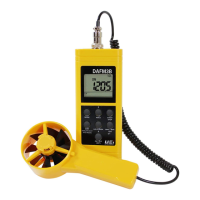
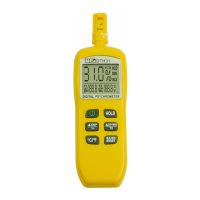
The DAFM3 is a versatile Anemometer/Psychrometer meter designed for HVAC/R professionals, integrating six essential parameters into a single portable, battery-operated instrument. It measures Humidity, Air Temperature, Dew Point, Wet Bulb Temperature, Air Velocity, and Air Volume. The device features a remote fan with a built-in sensor, protected by a twist cap that must be opened during operation for accurate temperature and humidity readings.
Function Description
The DAFM3 is primarily used for measuring and calculating various air-related parameters crucial for HVAC/R applications. Its core functions include:
- Air Velocity Measurement: The device directly measures the speed of airflow, which is fundamental for assessing ventilation and system performance. It can capture up to eight velocity values and display their minimum, maximum, and average.
- Temperature and Humidity Measurement: It provides readings for Dry Bulb Temperature, Relative Humidity (RH%), Dew Point Temperature (DP), and Wet Bulb Temperature (WB). These parameters are essential for understanding air quality and comfort levels.
- Air Volume Calculation (CFM, CMM): Beyond just velocity, the DAFM3 can calculate air volume, which represents the total amount of air moving through a given area over time. This is critical for determining the efficiency of heating or cooling equipment. The calculation requires the user to input the area dimensions (length/width for rectangular ducts, diameter for round ducts, or free area for grills). The device performs a 30-second average measurement for accurate volume calculation.
- Data Averaging and Storage: The meter can capture and store multiple readings (up to 8 points for velocity) and then calculate and display minimum, maximum, and average values for various modes. This feature is particularly useful for multi-point averaging in ductwork or across multiple outlets.
- Total Volume Accumulation: For applications involving multiple air outlets with similar characteristics, the DAFM3 can accumulate total air volume from successive measurements, providing a comprehensive overview of system performance.
Usage Features
The DAFM3 is designed for ease of use with a clear LCD digital display and intuitive controls.
- Power Management: The "ON/OFF" button turns the meter on with auto-sleep mode and off from any mode. A long press (more than four seconds when off) allows access to "UNITS" selection. The device also features a selectable Auto Power Off function, which can be disabled by pressing and holding "MIN/MAX" then "ON/OFF" until a beep is heard.
- Mode Selection: The "MODE" button allows users to cycle through different measurement modes (Temp, DP, WB, RH, Velocity). Holding this button until a beep activates the "VOLUME" function.
- Unit Selection: Before starting measurements, users can select desired units (e.g., °C/%RH/m/s/M³/m, °F/%RH/ft/m/cfm) by pressing and holding the "ON/OFF (UNITS)" button when the meter is off, then using the "AVG/MIN/MAX [↑ Increase]" button to scroll and "ENTER" to confirm.
- Basic Measurement: Upon powering on, air velocity is the default display. Other parameters can be viewed by pressing the "MODE" key.
- MIN/MAX/AVG Functionality: This button allows users to view the minimum, maximum, and average values captured since the meter was powered on for any selected mode.
- Velocity Averaging: In velocity mode, the "RECORD START" button stores current velocity readings (up to 8 points). The "AVG Velocity/Total Volume [next digit]" button displays the average of stored velocities.
- Air Volume Measurement Setup: This is a more involved process:
- Enter "VOLUME" mode by pressing and holding "MODE."
- Use the "LW-D-AREA" button to select the method for entering area: "LW" (Length/Width for rectangular ducts), "D" (Diameter for round ducts), or "AREA" (Free Area for grills). Icons on the display indicate the selected method.
- Input dimensions using the "AVG/MIN/MAX [↑ Increase]" button to change digits and "LW-D-AREA [next digit]" to move between digits. "ENTER" confirms the input.
- After dimension entry, a 20-second countdown begins, allowing time to position the air vane. This wait can be skipped by pressing "RECORD START."
- Following the countdown, a 30-second average sample period commences, displaying immediate and average air volume.
- After the sample, "ENTER" allows moving to the next register, retaining the last entered area value for efficiency.
- The "AVG Velocity/Total Volume [next digit]" button can be pressed at the end of a test to display the total volume from all measurements made since entering volume mode, along with the number of outlets measured.
- Hold Function: The "HOLD" button freezes the current reading on the display, and pressing it again unlocks the reading.
- Professional Remote Vane: The remote vane design allows for flexible positioning and accurate readings in various ductwork or grill configurations.
- English/Metric Scales: The device supports both English and Metric units, enhancing its versatility across different regions and standards.
Maintenance Features
Proper maintenance ensures the longevity and accuracy of the DAFM3.
- Periodic Service: Any repair or service beyond basic user tasks should be performed by qualified personnel to maintain the instrument's integrity and safety features.
- Cleaning: The meter's case should be cleaned periodically with a damp cloth. Abrasive materials, flammable liquids, cleaning solvents, or strong detergents should be avoided as they can damage the finish, impair safety, or affect structural components.
- Battery Replacement: The DAFM3 is powered by a 9V battery. To replace it, the screw on the battery compartment cover on the back of the meter must be removed, the cover taken off, and the old battery replaced with a fresh 9V battery, paying attention to polarity. The cover and screw are then reinstalled.
- Low Battery Indication: The device features a two-level battery indicator:
- Level 1: The battery indicator flashes, signaling that users should prepare to replace batteries, though the meter will still function normally.
- Level 2: The battery indicator is continuously displayed on the LCD, indicating that batteries should be changed immediately.
- Protective Twist Cap: The temperature/humidity sensor on the remote fan is protected by a twist cap, which should be closed when not in use to prevent damage and opened during measurements for accuracy.
The DAFM3 is a robust and reliable instrument, built with microprocessor circuitry for enhanced reliability, making it a valuable tool for HVAC/R professionals.



 To Next Page
 General