RESET
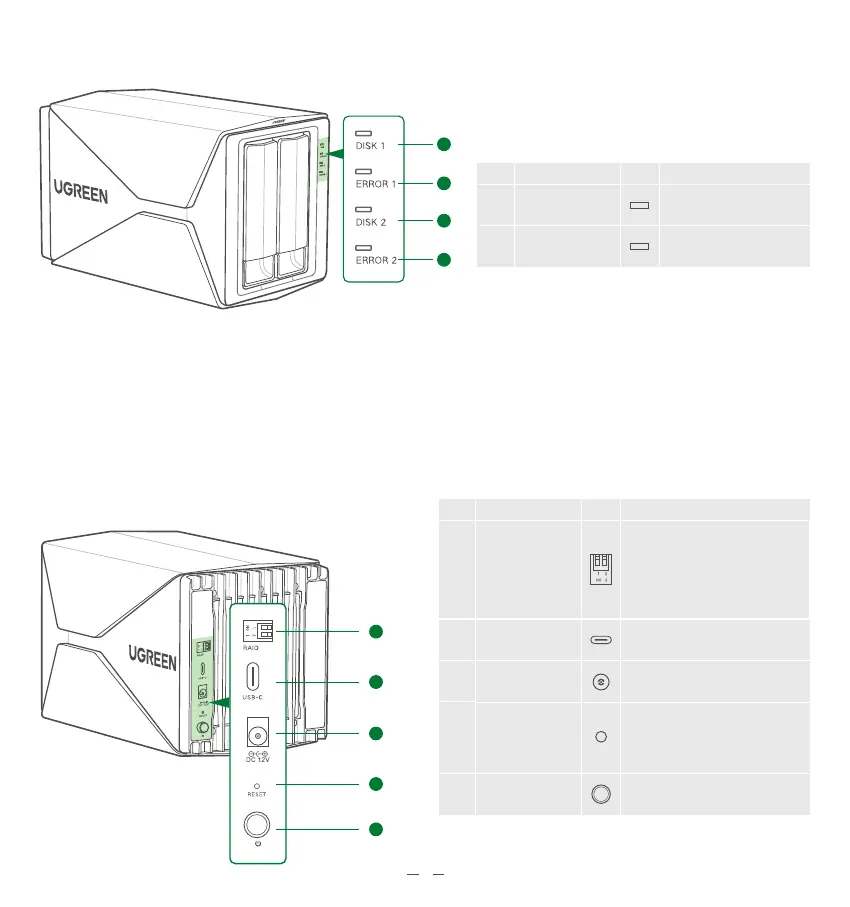
When changing RAID array
modes, you'll have to use this
button to reset, and then
create a new RAID mode
3
DESIGNED BY UGREEN
NameNO. Icon Description
RAID DIP Switch
For mode setting switch
and 4 kinds of array modes;
with different RAID modes come
different DIP combinations
(See "RAID Modes & DIP Switch"
for details)
USB-C
Data transfer port for connecting
to PCs/laptops
④
③
⑥
Power Button Power ON/OFF
⑦
1
2
1
2
2 Product Overview
NameNO. Icon Description
DISK Indicator
(×2)
ERROR Indicator
(×2)
Indicates status of
each hard drive
Indicates the abnormality
of each hard drive
②
①
②
①
DC Power Supply
Please use the standard power
adapter to power up the product
⑤
3
5
6
7
4


 To Next Page