| User Manual
20
EN
D- USING YOUR PRODUCT
General Informatıon and Instructıons
Keys;
1- [ ]: Press and release, ncreases the sldng optons among menu optons and enables
transton.
2-[ ]/Light: Internal menu status, reduces sldng values among menu optons or enables
transton. When you press for 5 seconds, the Lght turns on/off.
3- [ ]/(Esc): Press and release, return to the prevous menu and approval of
parameter values. When you press at least for 5 seconds, all the functons are
turned off excludng the lghts (Standby on)
4-[ ]/(Enter): Press and release, dsplays the alarms and opens sub menus
(f any). When you press for 5 seconds, opens programmng menus. Approves the
commands.
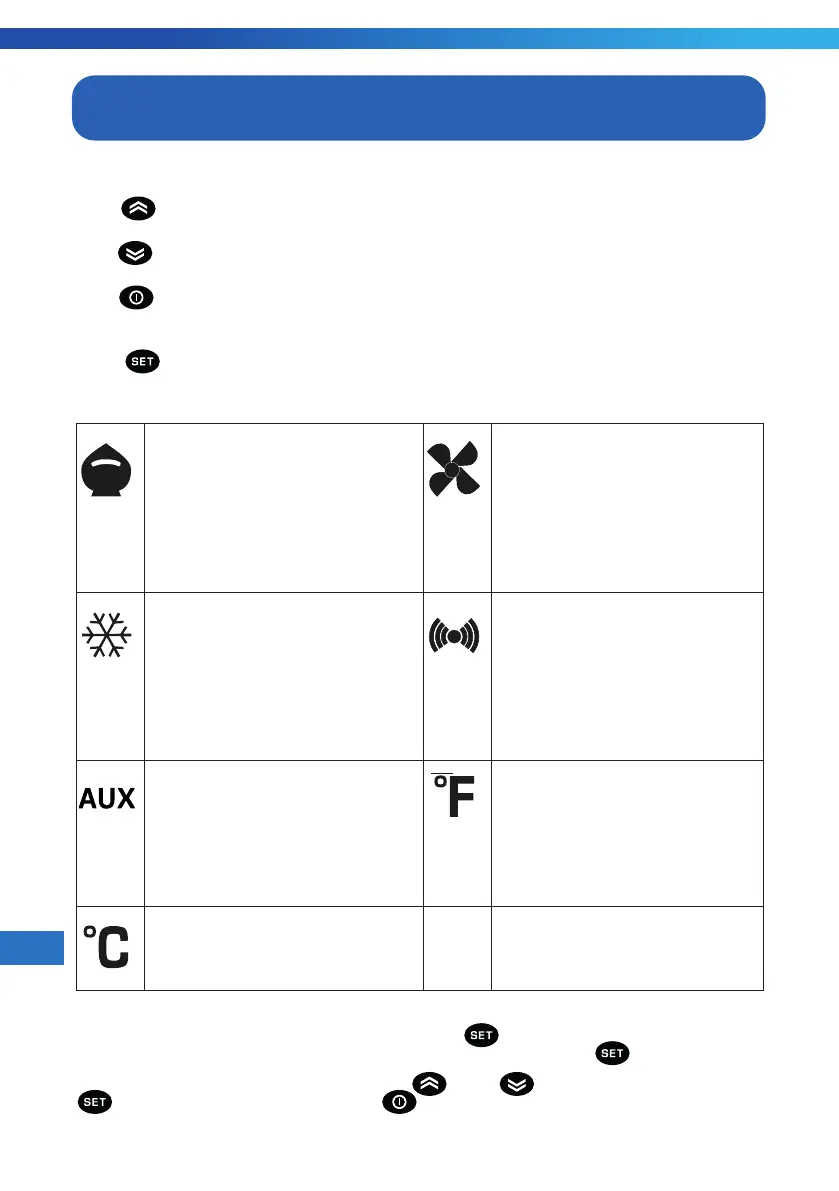
Reduced SET / Economy LED
Permanently on: Energy
Savng actve
Flashng: Reduced set actve
Quck ashng: Access to level2
parameters
O: Otherwse
Fans LED
Permanently on: Fans actve
O: Otherwse
Compressor LED
Permanently on: Compressor actve
Flashng: Delay, protecton or actvat-
on blocked
O: Otherwse
Alarms LED
Permanently on: alarm actve
Flashng: alarm acknowledged
O: otherwse
Aux LED
Permanently on: Aux output actve
Flashng: Deep coolng Cycle actve
O: Aux output not actve
°F LED
Permanently on: °F settng
(dro = 1)
O: otherwse
°C LED
Permanently on: °C settng (dro = 0)
O: otherwse
Set Temperature
To display the Setpoint value press the [ ] key when the 'SEt' label is
displayed. The Setpoint value appears on the display. Please again press the [ ].
To change the Setpoint value, press the [ ] and [ ] keys within 15 seconds. Press
[ ]to confirm the modification. Press the[ ] key to exit setting.



 To Next Page