EasyManua.ls Logo

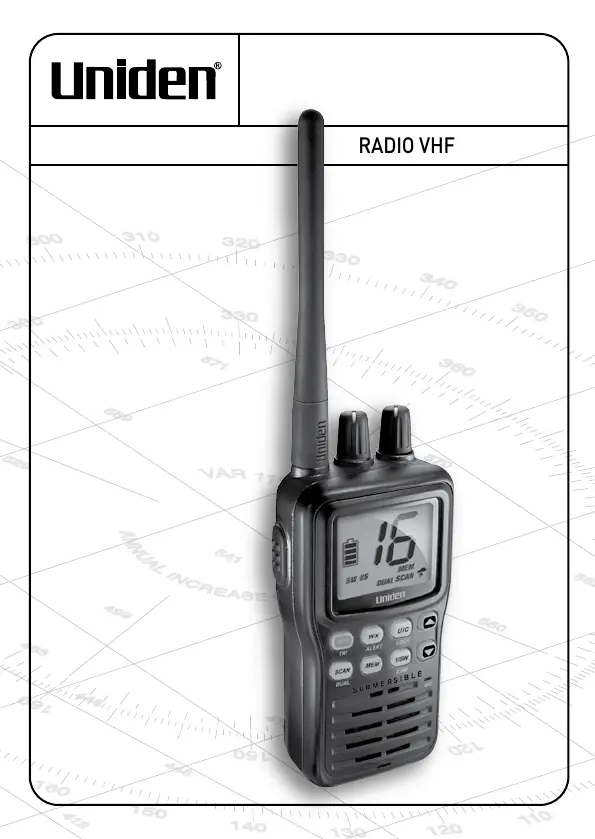
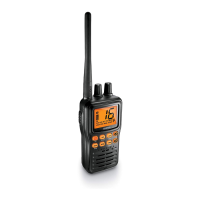
Uniden MHS75 - User Manual

Uniden MHS75
72 pages
Print Icon
To Next Page IconTo Next Page
Loading...
MHS75
RADIO VHF MARITIME
GUIDE D’UTILISATION
VHF MARINE RADIO
OWNER’S MANUAL

Table of Contents

Questions and Answers

  • O
    Oscar RamosJul 26, 2025
    What to do if my Uniden MHS75 won’t transmit?
    • W
      William BrooksJul 26, 2025
      If your Uniden Two-Way Radio won’t transmit, ensure you are not in weather or scan mode. Also, verify that you are not attempting to transmit on a receive-only channel or using the incorrect power level for the current channel. Check the battery level and charge it if it's low before attempting to transmit. Finally, make sure your transmission duration does not exceed 5 minutes.
  • M
    Martin BrownJul 29, 2025
    What to do if the power LED on the Uniden MHS75 Two-Way Radio charger doesn’t turn on?
    • J
      Janet FrancisJul 30, 2025
      If the power LED on your Uniden Two-Way Radio charger doesn’t turn on, replace the fuse inside the charger or replace the battery.
  • K
    kgeorgeAug 3, 2025
    Why is my Uniden MHS75 display flashing?
    • B
      bhowardAug 3, 2025
      If the display on your Uniden Two-Way Radio is flashing, it might be in a watch or scan mode. To resolve this, try turning off scanning, Weather Alert Watch, Triple Watch, or Dual Watch.
  • S
    Shannon FordAug 7, 2025
    How to fix noise coming out of the Uniden Two-Way Radio speaker all the time?
    • K
      Kyle BrownAug 8, 2025
      To fix the noise continuously coming from the speaker of your Uniden Two-Way Radio, adjust the squelch level. It is likely set too low.
  • K
    Kathryn KellyAug 11, 2025
    What to do if I can't hear anything from the Uniden Two-Way Radio speaker?
    • N
      Nicholas OrtizAug 12, 2025
      If you cannot hear anything from the speaker of your Uniden Two-Way Radio, try adjusting the squelch level. It might be set too high.
  • J
    Joseph BestAug 16, 2025
    How to turn on hazard alerts on Uniden MHS75?
    • N
      Nicole OrtizAug 16, 2025
      To receive hazard alerts on your Uniden Two-Way Radio, ensure that the Weather Alert Watch feature is turned on.
  • A
    Amanda SloanAug 20, 2025
    How to fix Uniden Two-Way Radio if I can transmit, but no one can hear me?
    • M
      Mary JacksonAug 20, 2025
      If you can transmit with your Uniden Two-Way Radio, but no one can hear you, check your UIC channel settings. The area you are in may use different channel assignments.

Summary

Making a Distress Call

Introduction

Getting Started

Whats Included

Lists the items included in the MHS75 package.

Parts of the MHS75

Front View Controls and Displays

Identifies and labels all front-facing buttons, knobs, and the display.

Back View Components

Identifies and labels components on the rear of the radio.

DC Charger Operation

Reading the Display Icons

How It Works

Normal Mode Operations

Covers basic operation, power levels, and watch modes in normal mode.

Scan Mode Operations

Explains scan mode, including saving channels and interactions with watch modes.

Weather Mode Operations

Details weather mode, including alerts and interactions with watch modes.

Setting Up the Hardware

Attaching and Installing Components

Instructions for attaching the antenna and installing the battery.

Battery Charging and Disconnection

Details connecting, charging, and disconnecting the radio's battery and charger.

Belt Clip Attachment and Removal

Instructions for attaching and detaching the belt clip for carrying.

Using Your Radio

Basic Operations

How to adjust volume, set squelch, and change channels on the radio.

Transmission and Power Control

How to transmit, manage talk time, and adjust transmission power levels.

Channel Mode Settings

How to switch between US, Canadian, and International channel sets using UIC mode.

Maintenance and Troubleshooting

Common Troubleshooting Questions

Addresses frequently asked questions and provides solutions for common radio issues.

Specifications

General Specifications

Lists overall technical details and performance characteristics of the MHS75 radio.

Channel Frequencies and Names

Lists frequencies, status, and names for US, Canadian, International, and Weather channels.

Regulations and Safety Warnings

Maritime Radio Services Operation

Information on operating the radio within US, Canadian, and international maritime regulations.

Basic Radio Guidelines

Essential rules and guidelines for using marine VHF radios.

Regulatory Compliance and Exposure

Details FCC/Industry Canada compliance, output power, and RF exposure information.

Lithium Ion Battery Warnings

Three Year Limited Warranty Statement

Obtaining Warranty Performance

Instructions on how to obtain service or repair under the product's warranty.

Uniden MHS75 Specifications

General IconGeneral
Battery LifeUp to 12 hours
DisplayLCD
NOAA Weather ChannelsYes
TypeHandheld
ChannelsAll US, Canadian, and International marine channels
Power Output1W, 2.5W, 5W
Waterproof RatingIPX7
Battery TypeLithium-ion

Related product manuals