EasyManua.ls Logo

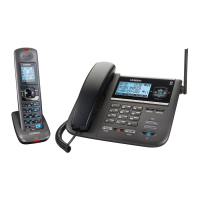
Uniden TRU9488 - User Manual

Uniden TRU9488
84 pages
Print Icon
To Next Page IconTo Next Page
Loading...
DEN
S
S
TRU9488

Table of Contents

Questions and Answers

Summary

Uniden TRU9488 Product Overview

TRU9488 Phone System Features

Details the comprehensive features of the Uniden TRU9488 cordless phone.

Integrated Answering Machine Features

Lists the capabilities and functions of the built-in digital answering machine.

Uniden TRU9488 Phone Components

Uniden TRU9488 Handset Diagram

Illustrates and labels all parts of the cordless handset.

Using the Phone Interface

Installing Your Uniden Phone

Basic Setup and Customization

Advanced Features

Adding and Registering Accessory Handsets

Information on compatible handsets and the process for registering them.

Phonebook Management

Creating, finding, editing, storing, erasing, and copying phonebook entries.

Phone Operations and Features

Answering Machine Setup and Operation

Answering Machine Interface and Language

Operating the answering machine via menus and selecting announcement language.

Greeting and Message Settings

Recording greetings, setting ring times, and record times.

Answering Machine Message Management

Managing messages: turning on/off, reviewing, deleting, and screening.

Remotely Operating Your Answering Machine

Maintenance and Troubleshooting

Troubleshooting Common Issues

Solutions for common problems like interference, display issues, and call connectivity.

Summary

Uniden TRU9488 Product Overview

TRU9488 Phone System Features

Details the comprehensive features of the Uniden TRU9488 cordless phone.

Integrated Answering Machine Features

Lists the capabilities and functions of the built-in digital answering machine.

Uniden TRU9488 Phone Components

Uniden TRU9488 Handset Diagram

Illustrates and labels all parts of the cordless handset.

Using the Phone Interface

Installing Your Uniden Phone

Basic Setup and Customization

Advanced Features

Adding and Registering Accessory Handsets

Information on compatible handsets and the process for registering them.

Phonebook Management

Creating, finding, editing, storing, erasing, and copying phonebook entries.

Phone Operations and Features

Answering Machine Setup and Operation

Answering Machine Interface and Language

Operating the answering machine via menus and selecting announcement language.

Greeting and Message Settings

Recording greetings, setting ring times, and record times.

Answering Machine Message Management

Managing messages: turning on/off, reviewing, deleting, and screening.

Remotely Operating Your Answering Machine

Maintenance and Troubleshooting

Troubleshooting Common Issues

Solutions for common problems like interference, display issues, and call connectivity.

Uniden TRU9488 Specifications

General IconGeneral
Number of Lines4
Power over Ethernet (PoE)Yes
Wall MountableYes
HD AudioYes
BluetoothNo
Wi-FiNo
FeaturesCall Transfer, Call Waiting, Caller ID, Conference, Speakerphone
Supported ProtocolsSIP
Headset PortYes

Related product manuals