PART IV: MAINTENANCE
43
Flame detection probe
To clean/replace the detection photocell, proceed as follows:
1 Disconnect the system from the electrical power supply.
2 Shut off the fuel supply;
3 remove the photocell from its slot (see next figure);
4 clean the bulbe if dirty, taking care not to touch it with bare hands;
5 if necessary, replace the bulb;
replace the photocell into its slot.
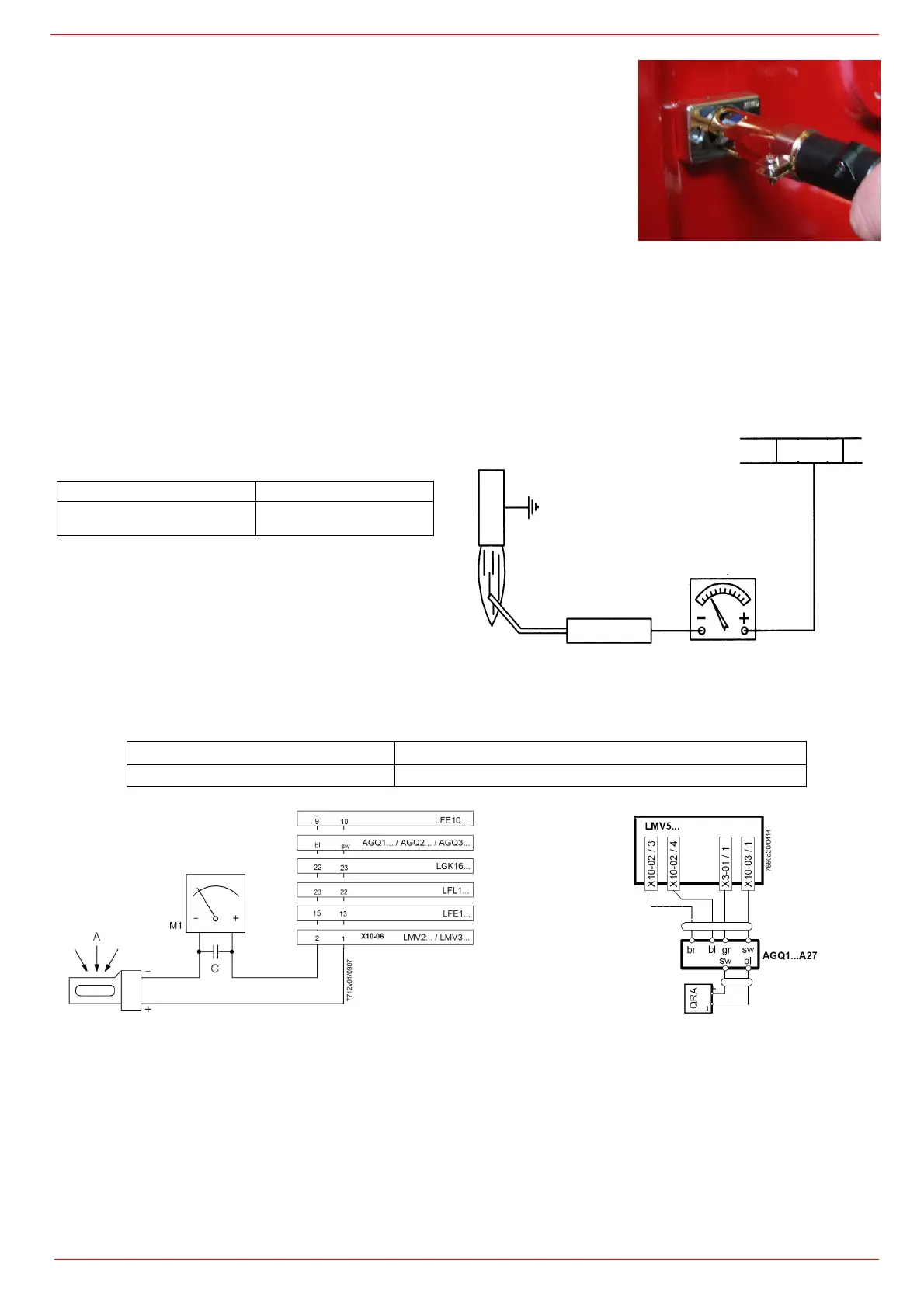
Checking the detection current with electrode (natural gas)
To check the detection signal follow the scheme in the picture below. If the signal is less than the value indicated, check the position of
the detection electrode or detector, the electrical contacts and, if necessary, replace the electrode or the detector.
Device
Minimum detection signal (QRAx)
Siemens LMV5
6 µA
Control box Minimum detection signal
Siemens LMV5x
6 µA (values on display:
50%)
Connector
µA DC SCALE
X10-03.1
Detection electrode
Flame


 To Next Page
 Loading...