10
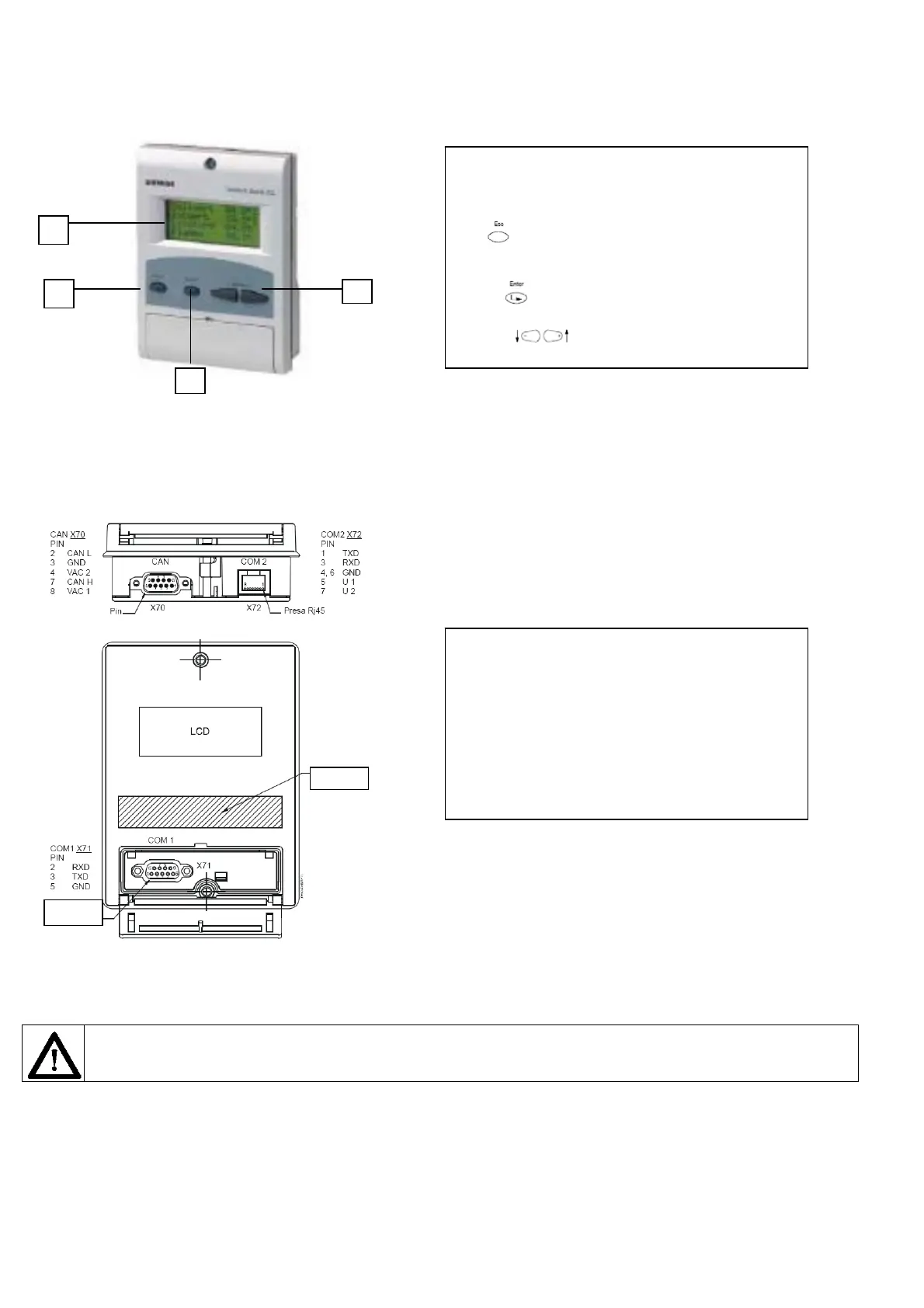
2 AZL display/programming unit
Users can set only the LMV parameters that can be accessed without password: (see “Adjusting the temperature set-point”). The Siemens AZL User
Interface allows programming the Siemens LMV control box and monitoring the system data.
Note: COM1 and COM2 ports do not work at the same time.
Caution: when MODBUS in active, it is not possible to execute the backup via ACS450; if backup is executed the set-point will be
missing and the burner will immediately turns off.
keys
socket
The user interface is made of:
display: it shows menus and parameters
ESC key (previous level): it goes back to the previous
level menu or exits the programming mode without changing
data.
ENTER key (next level): it confirms the data changing
and jumps to the next menu/parameter.
SELECT keys: they select a menu item and
change the parameter values.
AZL5x provides three sockets to interface with other devices:
X70 socket for CAN bus connection: it provides power supply
to display also.
COM1 (X71) for connection to PC/laptop by RS232 connector
CMO2 (X72) for connection to building automation system by
RJ45 connector.
1
2
3
4



 To Next Page