28
Checking parameters by means of the combustion analyzer go on increasing the Air (and/or VSD if provided) and the Fuel actuators.
At the end the last point will be set.
ATTENTION: Set the % output load values, for every curve-point
ATTENTION: Adjust actuators position by small changes, always checking combustion parameters.
Caution! For safety reasons, once the maximum load point P2 is set, never go down to the minimum load point P1, without
having set the other intermediate points before (see next paragraph).
Point Load 100
:2 Fuel 12
O2 Air 6.7
VSD 70
Point Load 100
:2 Fuel 12
O2 Air 6.7
VSD 70
Point Load 100
:2 Fuel 12
O2 Air 6.7
VSD 70
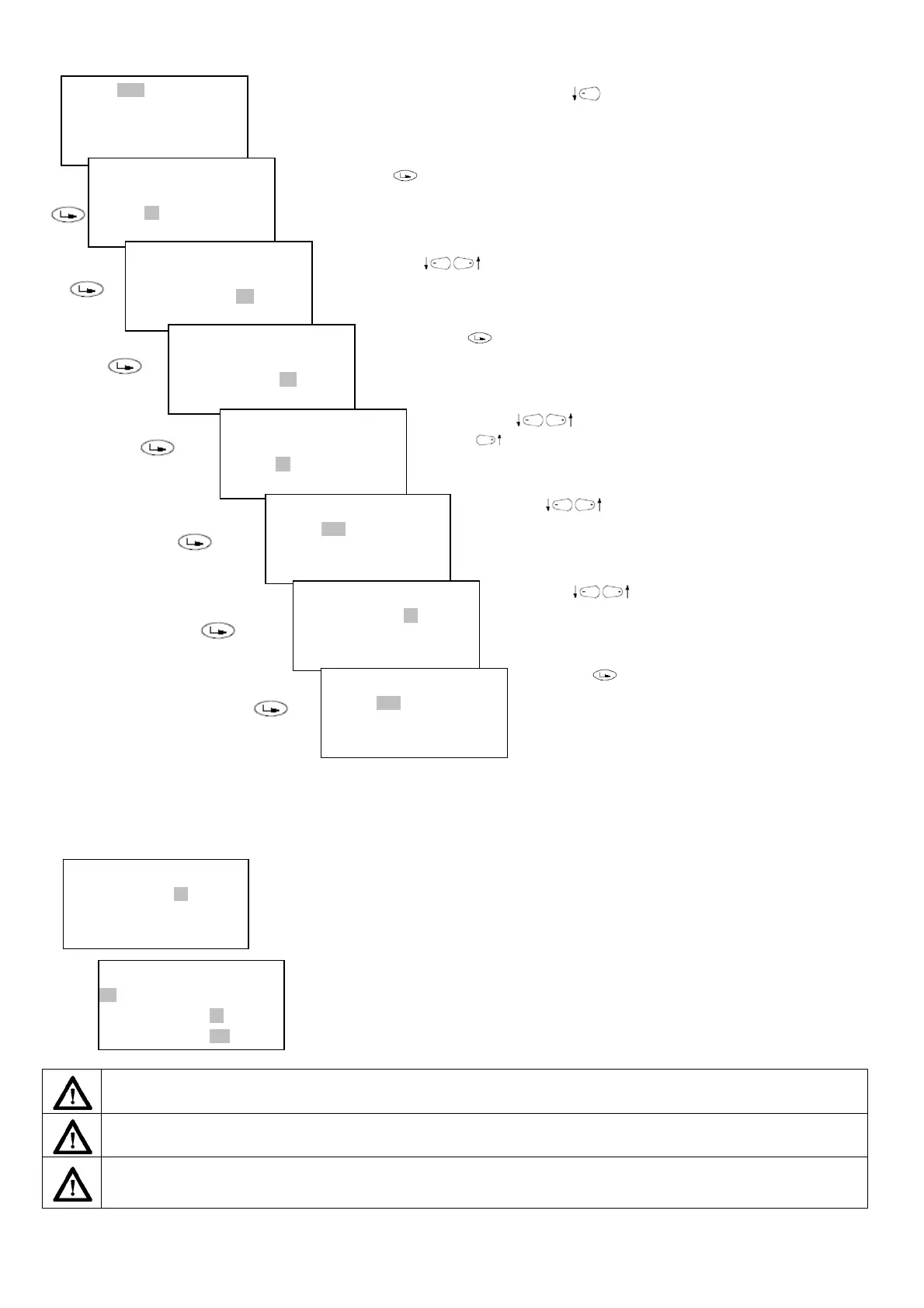
To choose the actuator to set, press the “left arrow” and choose Air or VSD
Press "Enter" to access the Air actuator value to be set.
Press keys to change value.
Press Enter to confirm the value and go back to Air actuator. (Do not
exit by pressing Esc from the values column because data will not be
stored)
Press arrows to select another actuator to be set, for example,
press to choose Fuel)
Press keys to change the value. Press Enter to confirm the
value and go back to Fuel actuator
Point Load 100
:10 Fuel 90
O2 Air 50
VSD 85
ct on the pressure governor to adjust the fuel pressure at the proper value in order to reach the real
100% load of the generator/boiler.
ct only on the AIR or VSD actuators, to adjust the combustion.
Point Load 100
:2 Fuel 12
O2 Air 9.5
VSD 70
Point Load 100
:2 Fuel 12
O2 Air 9.5
VSD 70
Point Load 100
:2 Fuel 12
O2 Air 9.5
VSD 70
Point Load 100
:2 Fuel 12
O2 Air 9.5
VSD 70
Point Load 100
:2 Fuel 15
O2 Air 9.5
VSD 70
Press keys to change value.
Press Enter to confirm the value and go back to Fuel
actuator. (Do not exit by pressing Esc from the values column
because data will not be stored)
Point Load 100
:10 Fuel 90
O2 Air 90
VSD 100
n example of final point will be as per the display aside, imaging to set 10 curve-points.



 To Next Page