Need help?
Do you have a question about the Unihertz Jelly and is the answer not in the manual?
Provides instructions for inserting SIM and microSD cards into the phone.
Explains how to care for the battery and its status indicators.
Details the procedure for powering the phone on and off.
Guides on using the Backup app for data transfer between phones.
Instructions for backing up phone data to a microSD card.
Steps to restore data from a microSD card to the phone.
Methods for transferring data using a USB cable and computer.
Describes methods for transferring contacts from an old to a new phone.
Guides through the initial setup process, including language and Wi-Fi.
Configures settings for phones with dual SIM card support.
Instructions for connecting to the internet via Wi-Fi.
Enables and configures mobile data for internet access.
Procedure for downloading and installing applications from the Play Store.
Steps to remove unused applications from the phone.
Methods for locking and unlocking the phone's screen.
Instructions for making calls using smart dialing and contacts.
Steps to initiate a call from the Contacts list.
How to make calls using the phone's call history.
Procedure for making emergency calls, even without a SIM card.
Guidelines for making international calls.
How to answer or decline incoming calls.
Handling incoming calls while already on another call.
Steps to set up and manage conference calls.
Configuring call forwarding to another number.
Activating call waiting to manage multiple calls.
Diverting calls to voicemail when the phone is unavailable.
Instructions for adding new contacts to the phone.
Methods for importing and exporting contact data.
Techniques for searching and locating contacts.
Composing and sending SMS messages with attachments and emoticons.
How to respond to incoming text messages.
Setting up personal and Exchange email accounts.
Composing and sending emails with attachments.
Refreshing and reading emails in the inbox.
Opening the camera interface to prepare for shooting.
Instructions for framing and capturing a still photograph.
Manual control over camera settings for professional shots.
Instructions for recording video clips.
Playing music files and controlling playback.
Watching video files on the phone.
Enabling and using mobile data for internet access.
Connecting to wireless networks for internet access.
Methods for sharing the phone's internet connection.
Setting up the phone as a Wi-Fi hotspot.
Sharing internet via USB cable to a computer.
Sharing internet connection via Bluetooth.
Enabling Bluetooth and pairing devices for data transfer.
Methods for sending and receiving files via Bluetooth.
Guides on using the Backup app for data backup and restoration.
How to reset the phone to its original factory settings.
Procedures for updating the phone's system software.
Downloading and installing Over-The-Air system updates.
Checking battery consumption and optimization settings.
Setting up APNs for mobile data connectivity.
Setting up screen lock patterns or passwords.
Creating and adding various types of accounts to the phone.
Enabling/disabling and using TalkBack for visually impaired users.
 General
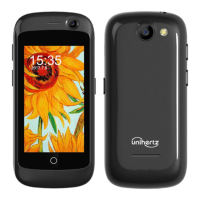
| Resolution | 240 x 432 pixels |
|---|---|
| Processor | Quad-core 1.1 GHz Cortex-A53 |
| Main Camera | 8 MP |
| Selfie Camera | 2 MP |
| Battery Capacity | 950 mAh |
| Battery Type | Li-Ion |
| Operating System | Android 7.0 (Nougat) |
| Loudspeaker | Yes |
| 3.5mm jack | Yes |
| Bluetooth | 4.0, A2DP |
| GPS | Yes, with A-GPS |
| NFC | No |
| Radio | FM radio |
| USB | microUSB 2.0 |
| Display Size | 2.45 inches |
| RAM | 2 GB |
| Internal Storage | 16 GB |
| SIM | Nano-SIM |
| WLAN | Wi-Fi 802.11 b/g/n |
| Sensors | Accelerometer, proximity |
| Chipset | Mediatek MT6737 |
| Weight | 60 g |

 To Next Page