EA300 User’s Manual
1.4.5 Installing SIM/ TF Card
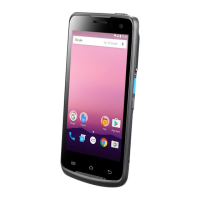
1.Swing open the main battery cover clip by 90 degrees, you can then remove
the battery cover.
2.Insert the SIM card or Micro SD/TF card into their corresponding slots in the
battery compartment.
Note: You should gently push the SIM/TF card to the correct position.
Note
:
1
、
Please use standard SIM card.
2
、
Do not push too hard when SIM card
、
TF card
、
PSAM card are inserted into the slot.
3
、
To remove the cards, please press cards to jump out from card slots.
13
© 2018 unitech Electronics Co., Ltd. All rights reserved.
unitech is a registered trademark of unitech Electronics Co., Ltd.


 To Next Page