1.5. Mounting
Proper installation is critical to system performance. It is particularly important to
install the Titanium correctly in order to receive and distribute optimal signal quality.
- Mount the Titanium to a wall in a well ventilated and cool room.
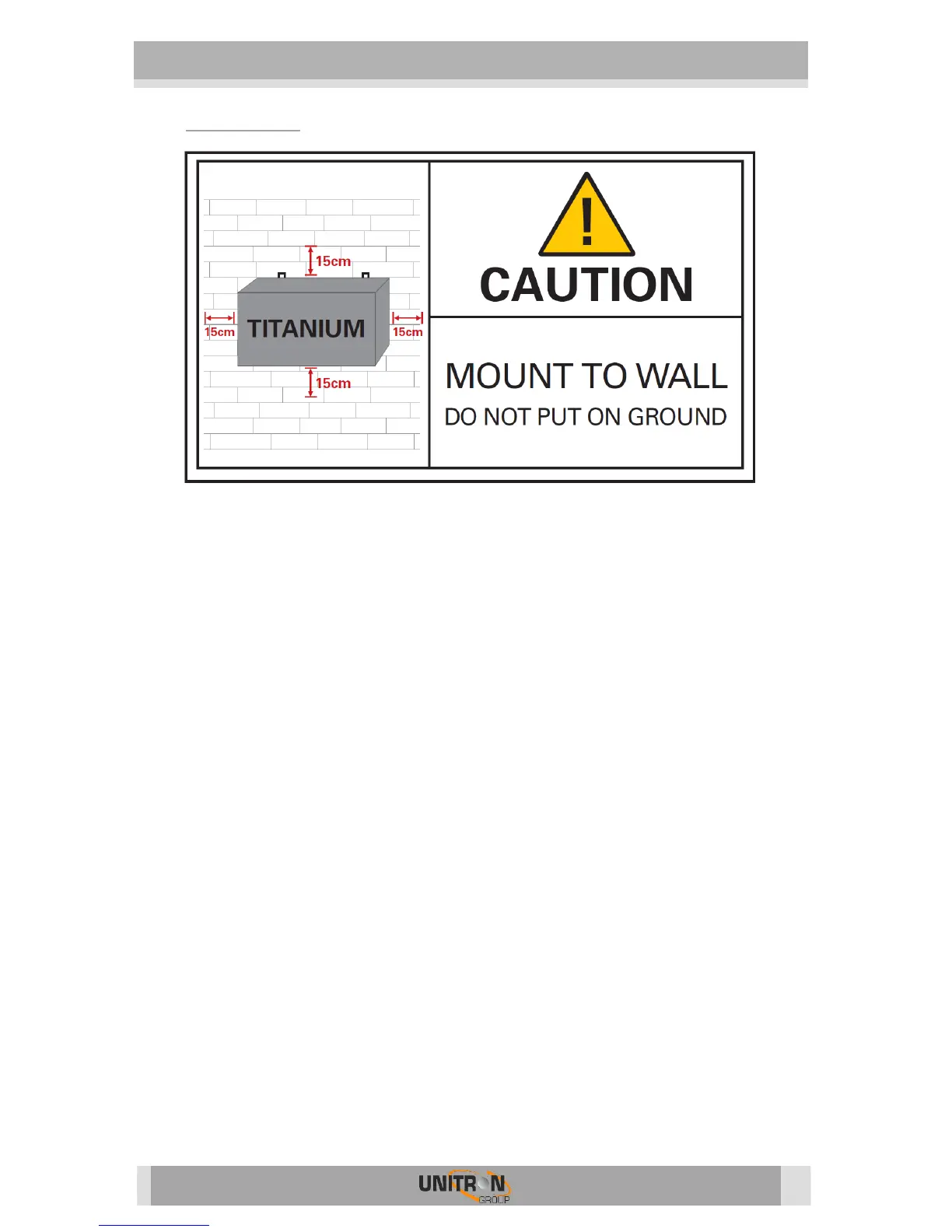
For ventilation purposes, leave a minimum of 15 cm around all sides of
the module.
- Plug the 4 satellite cables in the SAT 1-4 ports.
- If the Titanium should receive RF signal from another Titanium or an external
source, connect a coaxial cable to the RF IN port. If not applicable, insert a 75
Ohm terminator in the RF IN port.
- Connect the coaxial TV network to the RF out port.
- If the Titanium is configured to read CAM cards, insert 1 or 2 CAM cards* and
smart cards* in the slots on the backside of the Titanium.
(*Not included with the Titanium).
- Power the Titanium with the mains cable.
Once it is powered, a RED POWER LED will start blinking. When the LED stops
blinking and turns BLUE, the module is completely booted and ready for
configuration. This will take approximately 4 minutes.
- For configuration of the module, the web interface must be accessed.
Therefore, plug an Ethernet cable in the control port, and the other end in a
computer.
- More information about configuration of the Titanium module can be found in
the next section


 To Next Page