Vision™ OPLC™
Unitronics 9
RS232 to RS485 Jumper Settings
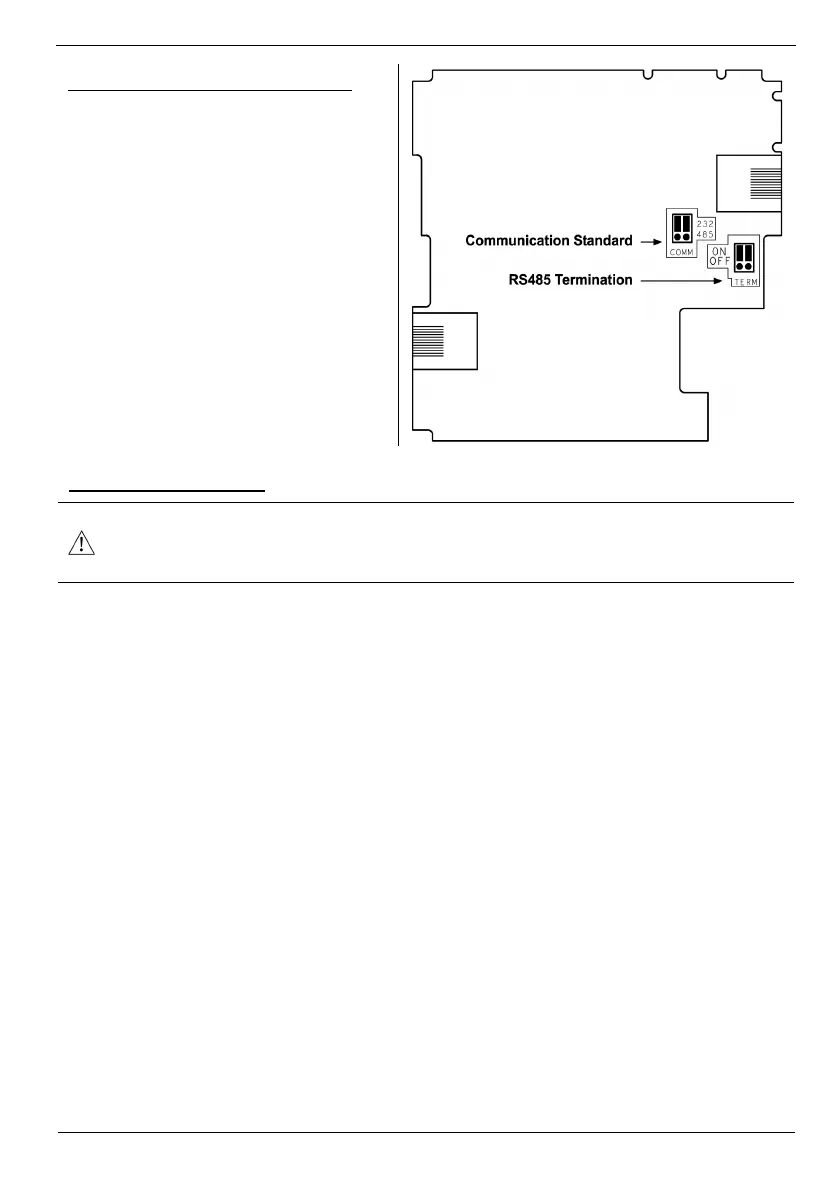
The figure to the right shows the jumper
factory default settings, RS232, RS485
termination ON.
Note that in order:
To change the communication
setting to RS485, both
communication standard jumpers
must be moved
To change the RS485
termination, both termination
jumpers must be moved
To access the jumpers, you must open the
controller according to the instructions
beginning on page 9.
Opening the Controller
Before performing these actions, touch a grounded object to discharge any electrostatic
charge.
Avoid touching the PCB board directly. Hold the PCB board by its connectors.
1. Turn off the power supply, disconnect, and dismount the controller.
2. The back cover of the controller comprises 4 screws, located in the corners. Remove the screws,
and pull off the back cover.


 To Next Page