EasyManua.ls Logo

Universal Audio Volt 476 - User Manual

Universal Audio Volt 476
17 pages
Print Icon
To Next Page IconTo Next Page
Loading...
Volt 476 Hardware Manual
This article contains complete instructions for Volt 476 hardware controls
and connections.
Note: To learn how to set up Volt with audio software and how to redeem
your bundled software, please see the Volt Software Manual.
Article Contents
Getting Started
Introduction & Overview
Hardware Descriptions
Troubleshooting

Questions and Answers

Summary

Getting Started

Introduction and Overview

A Letter from Bill Putnam, Jr.

Personal introduction discussing the Volt product philosophy and UA's heritage.

Best-in-Class Audio Quality

Describes the superior studio sound quality and tone of the Volt 476 interface.

Vintage Mic Preamp Mode

Highlights the analog tube preamp emulation inspired by the UA 610.

UA Compression

Details the onboard 76 Compressor for clarity and punch, inspired by the UA 1176.

Curated Audio Software Suite

Mentions the bundle of music production tools, virtual instruments, and plug-ins.

System Requirements

Lists the necessary hardware and software specifications for Mac, PC, iPad, and iPhone.

Hardware Descriptions

Front Panel Controls

Details the input connectors, volume and gain controls, and vintage/compressor buttons.

Front Panel Indicators

Explains input/output meters, host indicator, and mono button functionality.

Rear Panel Connections

Covers line inputs/outputs, monitor outputs, MIDI I/O, USB-C, and power.

Security Slot

Describes the Kensington security slot for securing the hardware.

Troubleshooting

Summary

Getting Started

Introduction and Overview

A Letter from Bill Putnam, Jr.

Personal introduction discussing the Volt product philosophy and UA's heritage.

Best-in-Class Audio Quality

Describes the superior studio sound quality and tone of the Volt 476 interface.

Vintage Mic Preamp Mode

Highlights the analog tube preamp emulation inspired by the UA 610.

UA Compression

Details the onboard 76 Compressor for clarity and punch, inspired by the UA 1176.

Curated Audio Software Suite

Mentions the bundle of music production tools, virtual instruments, and plug-ins.

System Requirements

Lists the necessary hardware and software specifications for Mac, PC, iPad, and iPhone.

Hardware Descriptions

Front Panel Controls

Details the input connectors, volume and gain controls, and vintage/compressor buttons.

Front Panel Indicators

Explains input/output meters, host indicator, and mono button functionality.

Rear Panel Connections

Covers line inputs/outputs, monitor outputs, MIDI I/O, USB-C, and power.

Security Slot

Describes the Kensington security slot for securing the hardware.

Troubleshooting

Overview

The Volt 476 is a 4-in/4-out USB audio interface designed for musicians, producers, and content creators, offering studio-quality sound and a suite of analog features. It provides class-leading 24-bit/192 kHz audio conversion for Mac, PC, iPad, and iPhone, making it suitable for a wide range of recording and production environments.

Function Description:

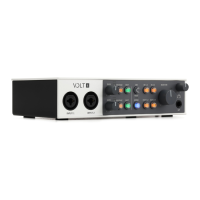
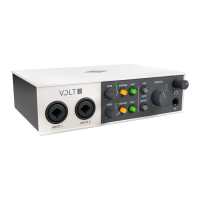
The Volt 476 serves as a central hub for connecting microphones, instruments, and line-level sources to a computer or mobile device for recording and playback. It features two XLR/TRS combo inputs on the front panel for microphones, instruments (Hi-Z), or line-level signals, and two additional 1/4" balanced line inputs (3-4) on the rear for external sound modules or synths. The device includes a headphone output with an independent volume control for monitoring, as well as four balanced 1/4" line outputs (1-4) on the rear for connecting to studio monitors or other audio equipment. MIDI I/O is also provided for connecting MIDI devices.

Important Technical Specifications:

  • Audio Conversion: 24-bit/192 kHz
  • Inputs:
    • 2 x XLR/TRS Combo Inputs (front panel) with automatic gain/impedance adjustment.
    • 2 x 1/4" Balanced Line Inputs (3-4, rear panel) for line-level sources.
  • Outputs:
    • 1 x 1/4" TRS Headphone Output.
    • 2 x 1/4" TRS Monitor Outputs (1/L, 2/R).
    • 4 x 1/4" Balanced Line Outputs (1-4, rear panel).
  • Connectivity: USB-C (USB 2.0 or higher compatible).
  • Phantom Power: 48V for condenser microphones (toggleable).
  • Power: 5VDC power supply (included); USB bus powered in limited configurations.
  • MIDI: 1-in/1-out MIDI connections (5-pin DIN).
  • System Requirements:
    • Mac & PC: Available USB 2.0 (or higher) port, Intel, AMD, or Apple Silicon processor, Windows 10 64-bit edition (PC), macOS 10.14 Mojave or later (Mac), Internet connection for software downloads.
    • iPad & iPhone: iPadOS / iOS 14 or later.

Usage Features:

  • Vintage Mic Preamp Mode: This exclusive analog circuit, inspired by the legendary UA 610 mic preamp, adds a rich, full tube emulation sound to mic, line, and instrument inputs. Activated by a dedicated "Vintage" button, which lights orange when active.
  • 76 Compressor: An onboard analog compressor, inspired by the iconic UA 1176 Limiting Amplifier, provides clarity and punch. It features three perfectly tailored presets:
    • VOC (Vocal): Fast attack and slow release for smooth vocal compression.
    • GTR (Guitar): Slow attack and relatively quick release, allowing more guitar/bass transients.
    • FAST: Very fast attack and medium release for aggressive compression. The compressor can be cycled through presets (VOC, GTR, FAST, or OFF) using a dedicated button, which lights orange when active. Note that input level increases when the compressor is active, requiring potential gain readjustment.
  • Direct Monitoring: Allows latency-free recording by routing hardware inputs directly to the monitor and headphone outputs. This can be enabled via the "IN 1-2" and "IN 3-4" Monitor Source buttons.
  • Monitor Source Buttons: These buttons select what audio is heard through the monitor and headphone outputs. Users can monitor mic/line/instrument inputs, computer outputs (OUT 1-2, OUT 3-4), or both simultaneously. When both IN and OUT sources are enabled, the software volume is slightly reduced to prioritize input signals.
  • Mono Button: Routes direct monitor inputs in mono instead of stereo, useful for checking phase or creating a centered sound. This button lights blue when enabled and applies only to Volt's hardware inputs.
  • Input Gain Knobs: Adjust preamp gain for inputs 1 and 2. Optimal gain is achieved when input meters show signal (green/yellow) but do not light red (indicating clipping).
  • 48V Phantom Power: A dedicated button toggles 48V phantom power for XLR microphone inputs. The LED blinks red during activation/deactivation and stays solid red when active. It's crucial to disable phantom power before connecting or disconnecting microphones, especially ribbon microphones which can be damaged by it.
  • Instrument (INST) Buttons: Toggle impedance and gain for line inputs to accommodate Hi-Z instruments like electric guitars or basses. These buttons light green when Hi-Z inputs are enabled.
  • Input and Output Meters: LED meters provide visual feedback on signal levels. Red LEDs indicate levels near 0 dB, signaling potential clipping.
  • Host Indicator: A blue LED lights up when Volt is recognized by the connected computer or device.
  • Bundled Software: Includes a curated suite of audio and music software, such as Ableton, Melodyne, UJAM's Virtual Drummer, Marshall, and Ampeg, enhancing the production workflow.

Maintenance Features:

  • Rugged Construction: Designed for durability, built to withstand years of use, making it suitable for "on-the-go" use.
  • Kensington Security Slot: Allows for securing the hardware with Kensington-compatible security devices.
  • Troubleshooting Guide: The manual includes a basic troubleshooting section for common issues like "No power," "Host indicator doesn't light," "Crackling audio, dropouts, glitches," and "(PC) ASIO driver not available in DAW," providing quick solutions. For example, crackling audio can often be resolved by increasing the buffer size in the software.

Universal Audio Volt 476 Specifications

General IconGeneral
BrandUniversal Audio
ModelVolt 476
CategoryRecording Equipment
LanguageEnglish

Related product manuals