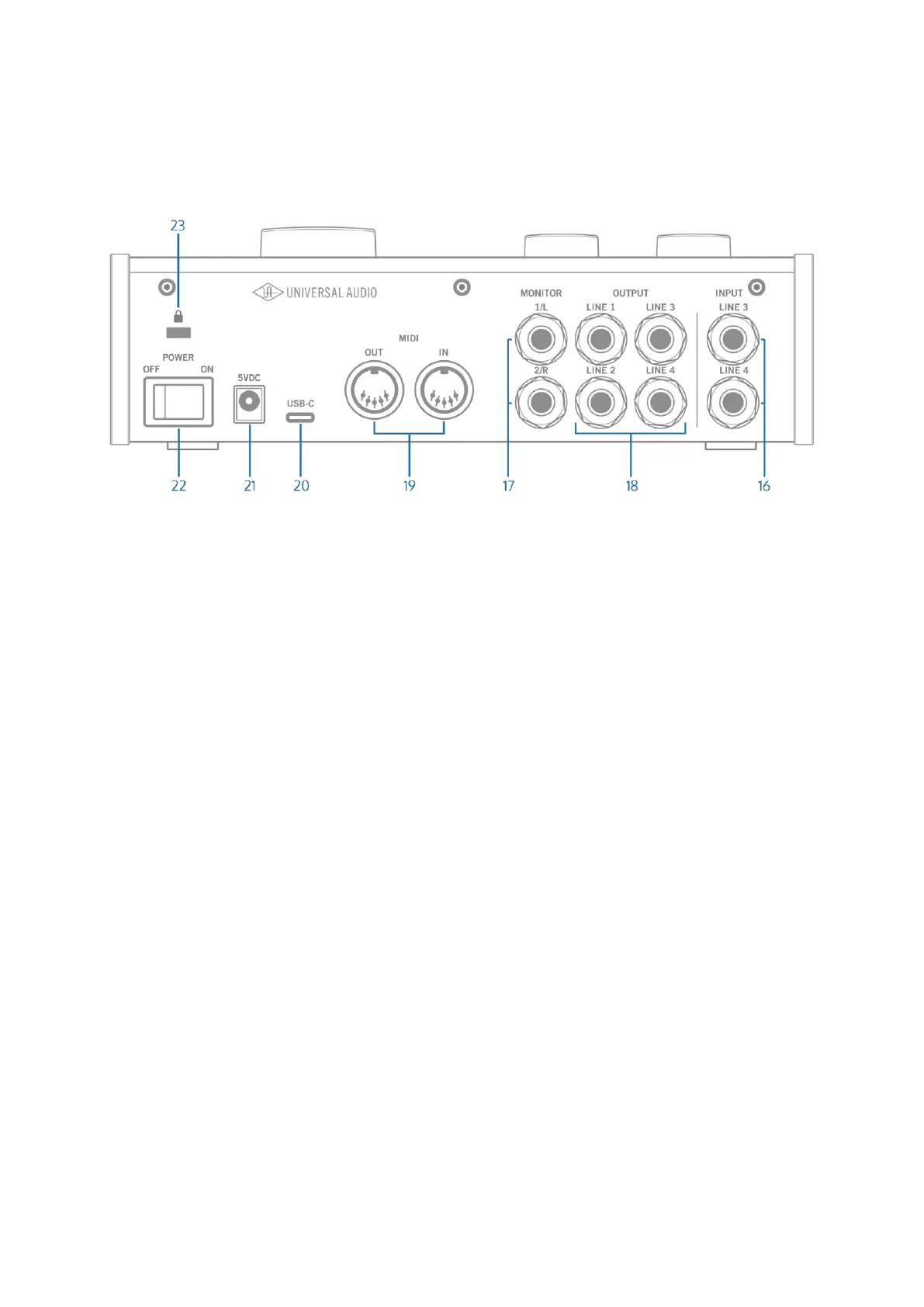
Rear Panel
(16) Line 3-4 Inputs
Connect input sources for line inputs 3-4 here. These are ¼” balanced
inputs designed for line-level sources, such as synths, external sound
modules, or other line-level sources.
Note: There are no gain controls on the line 3-4 inputs. Any level controls
must be configured in your software.
(17) Monitor Outputs
Connect your stereo speaker system to the monitor outputs. Connect the
left speaker to Monitor 1/L and the right speaker to Monitor 2/R. You can
use TS (tip-sleeve) or TRS (tip-ring-sleeve) ¼” (6.35mm) cables.
MONITOR NOTES
• The sources that you hear in the monitor and headphone outputs
are assigned using the Monitor Source buttons (11). To hear your
computer or software in the monitor speakers and headphones,
Monitor Source OUT 1-2 must be enabled. These outputs are
enabled by default.
• When you enable direct inputs with the Monitor Source IN
buttons, you will hear those inputs on the monitor outputs and














 To Next Page