ULS Computer Controlled Compressed Air Unit
The ULS Computer Controlled Compressed Air Unit provides a 50 PSI max pressure and 2.0 cfm free air flow (3.2
bar and 3.2 cubic meters/hour) source of clean, dry, oil free compressed air for air assisted laser material
processing. It can be used in conjunction with either the Air Assist Cone or Air Assist Back Sweep accessory. It
also supplied compressed air for optics protection. It contains a sound insulated air compressor,
CAUTION: Air Assist can decrease frequency of cleaning for the optics, but will not decrease the need for
maintenance as a whole.
Installation
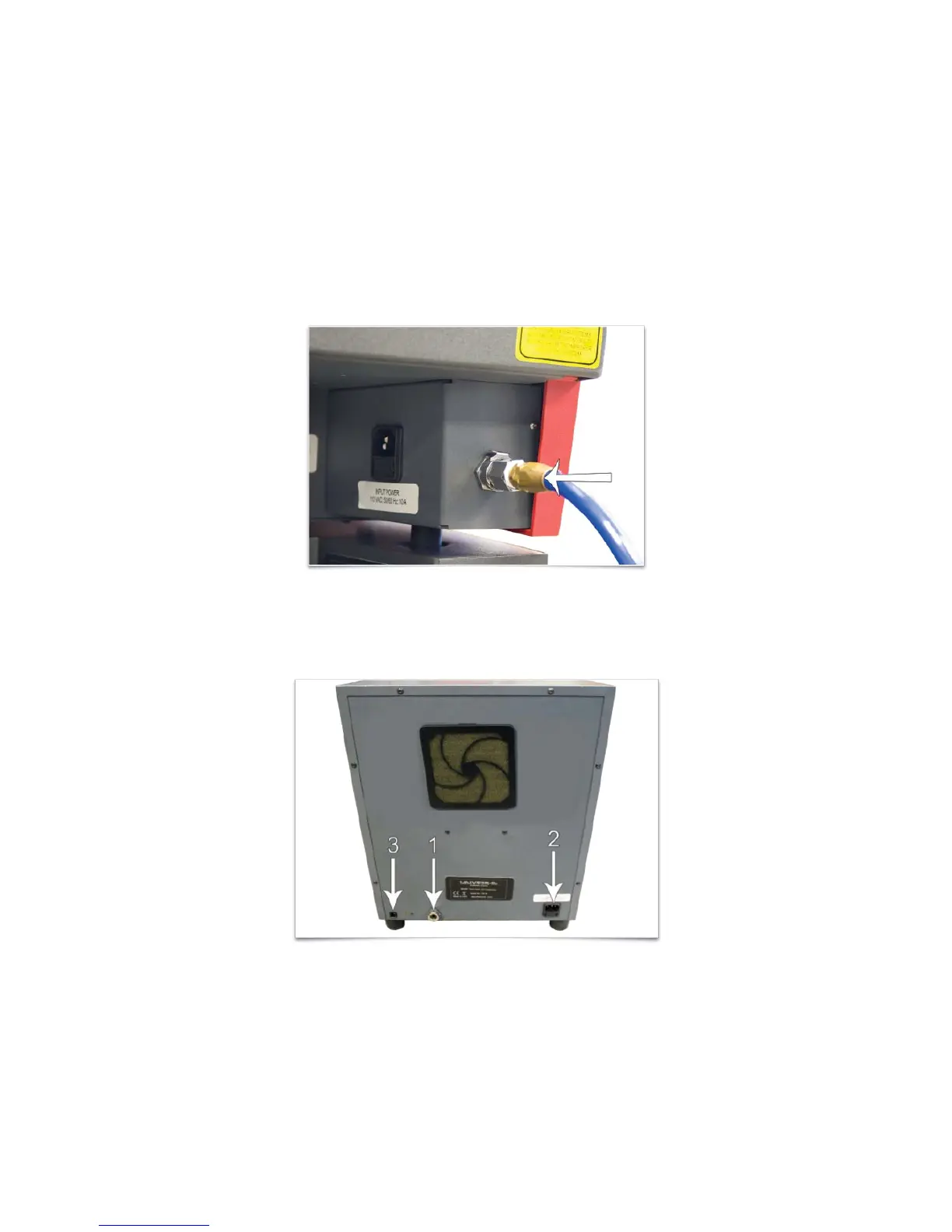
1. Insert one end of the provided blue coil hose into the air supply fitting on the back of the laser system.
2. Then connect the other end of the blue coil hose to the ULS Computer Controlled Compressed Air Unit
(1).
3. Connect a power cord to the power inlet (2) and then connect the power cord to a grounded electrical
outlet.
4. Connect the provided communications cable between one of the laser system Serial ports and the Serial
port (3).
Operation
Operation of the compressor is automatic if all of the connections are properly made and the unit has power. The
ULS Computer Controlled Compressed Air Unit will automatically power on when the laser system starts a job,
and then power off automatically when the job is complete.
73


 To Next Page