7?A<
=<
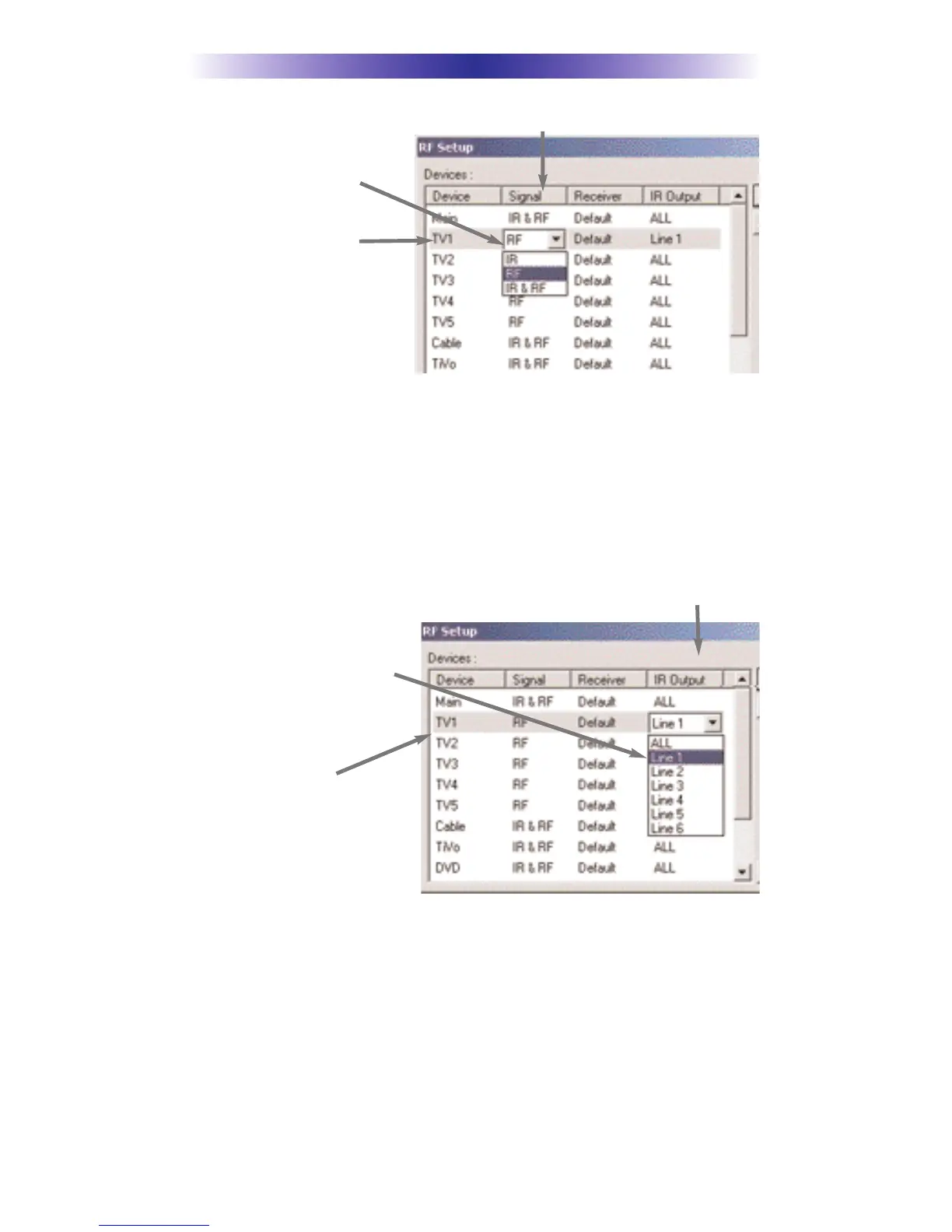
Click on the “cell” for the first
identical TV, by crossing the
device row with the Signals col-
umn.
#+)&$++)&'+ &%**&.%&) &+ %+ #*4&,
$0#-+&+)&$'&%%+*&+*0*+$*++&F:4
+'C7!,*++#*)*&)&+%+ #- *
The RF Setup window enables you to adjust which Flashers output by the
remote control for each device individually, by clicking on the intersection of a
row and a column and then selecting =7B from the seven options shown in the
pull down list box.
Click on the “cell” for the first
identical TV, by crossing the
device row with the Flashers col-
umn.
#++&))+#*)8))+&0&,)&%%+ &%%&+*9&) &+
%+ #*4&,$0#-+&+)&$'&%%+*&+*0*+$*++&4
+'D7''#02-2&.%#&%*+
First click on the OK button of the RF Setup window. Next, Save your work. Finally,
download to your remote. When you select TV1 with your remote, commands are
only sent to it. Likewise for the rest of your identical TVs!
Signal Column
TV1 Device Row
Flasher Column
TV1 Device Row


 To Next Page