EasyManua.ls Logo

Uniwell AX-3000 series - User Manual

Uniwell AX-3000 series
12 pages
Print Icon
To Next Page IconTo Next Page
Loading...
[AX3000] USR-005
2012-09-28
……..…..
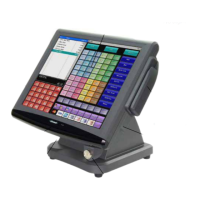
AX-3000 series
Users Manual
……..…..
THE SOCKET-OUTLET SHALL BE INSTALLED NEAR THE EQUIPMENT AND
SHALL BE EASILY ACCESSIBLE.
LA PRISE DOIT ETRE PRES DE L'APPAREIL ET FACILE D'ACCES.
Note: This equipment has been tested and found to comply with the limits for a Class B digital
device, pursuant to part 15 of the FCC Rules. These limits are designed to provide reasonable
protection against harmful interference in a residential installation. This equipment generates, uses
and can radiate radio frequency energy and, if not installed and used in accordance with the
instructions, may cause harmful interference to radio communications. However, there is no
guarantee that interference will not occur in a particular installation. If this equipment does cause
harmful interference to radio or television reception, which can be determined by turning the
equipment off and on, the user is encouraged to try to correct the interference by one or more of the
following measures:
-- Reorient or relocate the receiving antenna.
-- Increase the separation between the equipment and receiver.
-- Connect the equipment into an outlet on a circuit different from that to which the receiver is connected.
-- Consult the dealer or an experienced radio/TV technician for help.
!
Question and Answer IconNeed help?

Do you have a question about the Uniwell AX-3000 series and is the answer not in the manual?

Summary

Attention

Introduction

Main Features

Details the key functionalities and capabilities of the POS terminal.

Parts Names

Identifies and labels the physical components of the POS system.

Hardware Specifications

Lists the technical attributes and components of the POS hardware.

Installation and Remarks

Precautions to use this POS safely

Lists essential safety guidelines for operating the POS terminal.

Remarks

Provides important notes and checks before using the POS system.

How to Clean the Cabinet and Touch Screen

Instructions for cleaning the POS cabinet and touch screen.

In case of the power failure

Describes behavior and recovery after a power interruption.

In case if POS is locked down

Procedure for forced shutdown and restart when the POS is unresponsive.

Uniwell AX-3000 series Specifications

General IconGeneral
BrandUniwell
ModelAX-3000 series
CategoryTouch terminals
LanguageEnglish

Related product manuals