3
© UPLIFT Desk • 800-349-3839 • info@upliftdesk.com • upliftdesk.com
Assembly Instructions
WARNING: This product contains a spring mechanism that can cause injury. Be careful when removing monitors as the arm can
spring up when the weight of the monitor is removed.
Note: There are two ways to attach to your desktop: Clamp and Bolt-through mount. Determine if you need to attach it around the
back side of your desk or through a hole from 0.4’’ to 3.15’’ in diameter.
Acceptable monitor weight range: 2.2 to 33 lb
Desktop thickness compatibility: Clamp Method: 0.4”-3.3” thick | Bolt-through Method: 0.4”-1.8” thick
Step 1 - Clamp
If you purchased the Crestview Monitor Arm Wiring Kit,
assemble that FIRST, before proceeding. Refer to the
separate instructions contained in the Crestview Monitor
Arm Wiring Kit (ACC076) package for complete details.
Step 2
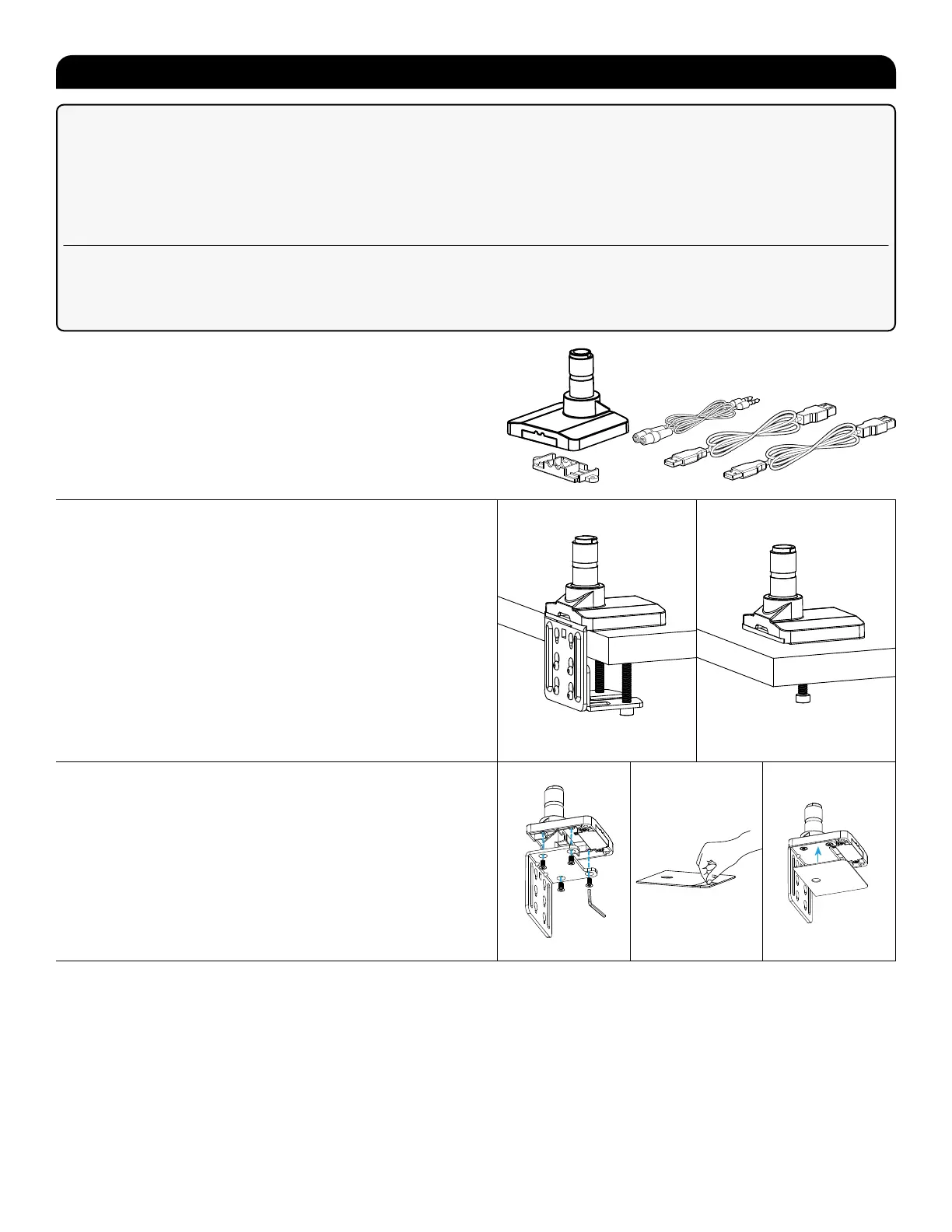
Determine your mounting method. There are two ways to
attach the Crestview Single Monitor Arm to your desktop:
Clamp Method: If you would like attach the monitor arm
along the back edge of your desktop, follow the Clamp
Method instructions (Steps 3 - 5) and ensure your desk is
between 0.4” and 3.3” thick.
Bolt-Through Method: If you prefer to attach the monitor
arm through your desktop, skip steps 3 - 5 and follow
the Bolt-Through Method Instructions (Steps 6 - 9) and
ensure your desk is between 0.4” and 1.8” thick.
Step 3 (Clamp Method)
A. Align the Upper Clamp with the Base in the orientation
shown. Attach using four M6 x 12 Flathead Screws and
the 4mm Allen Wrench.
B. Then peel the adhesive backing off of the Adhesive
Pad and attach it to the bottom of the Base and Upper
Clamp as shown. Align the pad with the front edge of
the Base rst, then work to the back.
Clamp Method Bolt-Through Method
Base
Lower arm
Upper arm
Vesa mount (x1)
Lower base plate
Upper base plate
Bar Handle
Adhesive Pad
Wire Cover
Upper Clamp
Lower Clamp
Base screw (x4)
3mm Allen wrench
L
4mm Allen wrench
M
6mm Allen wrench
N
D5 Washers (x4)
M5x12 bolt (x4)
M4x12 bolt (x4)
O Bolt (x4)
N Bolt (x4)


 To Next Page
 Loading...