EasyManua.ls Logo

URayTech URayCoder - User Manual

URayTech URayCoder
28 pages
Print Icon
To Next Page IconTo Next Page
Loading...
Preface
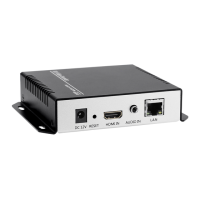
Thank you for your support of URayCoder video encoder and video decoder.
This quick user manual is for you to use the device quickly. If you need more information
about video encoder, please refer to another detailed user manual.
This manual is universal. If you have purchased an encoder with other interfaces (such as
SDI, VGA, etc), you can also use this manual.
If you need user manual in PDF format, you can open the USB flash drive to get it. By the
way, the video guidance is also included in the USB flash drive.
Since it is a professional product, and Amazon customer service is not familiar with this
product, if you encounter any technical problems when using the device, or encounter
document requirements(such as new firmware, SDK, APP etc), please contact us via the
following contact information, we will arrange professional engineers to provide you with
technical service.
Email: linda@szuray.com
Skype: .linda_go@yeah.net
Whatsapp: +86 135 9028 3020
Question and Answer IconNeed help?

Do you have a question about the URayTech URayCoder and is the answer not in the manual?

Summary

Reset

Log in to the Control Panel

2.1 Windows Operating System

Provides step-by-step instructions for logging into the control panel using a Windows OS.

2.2 MAC Operating System

Provides step-by-step instructions for logging into the control panel using a MAC OS.

WIFI Connection

Preview Video Stream

Adjust Output Video Audio Quality

Online Live Streaming

6.1 YouTube Live Streaming(RTMP)

Details how to configure RTMP settings for streaming live video to YouTube.

6.2 Facebook Live Streaming(RTMPS)

Details how to configure RTMPS settings for streaming live video to Facebook.

Push Stream to the Streaming Server

Port Mapping

Contact Us

URayTech URayCoder Specifications

General IconGeneral
Bitrate ControlCBR, VBR
Video InputHDMI
EncodingH.264, H.265
ProtocolsRTSP, RTMP, HLS
ManagementWeb GUI
Power Source12V DC