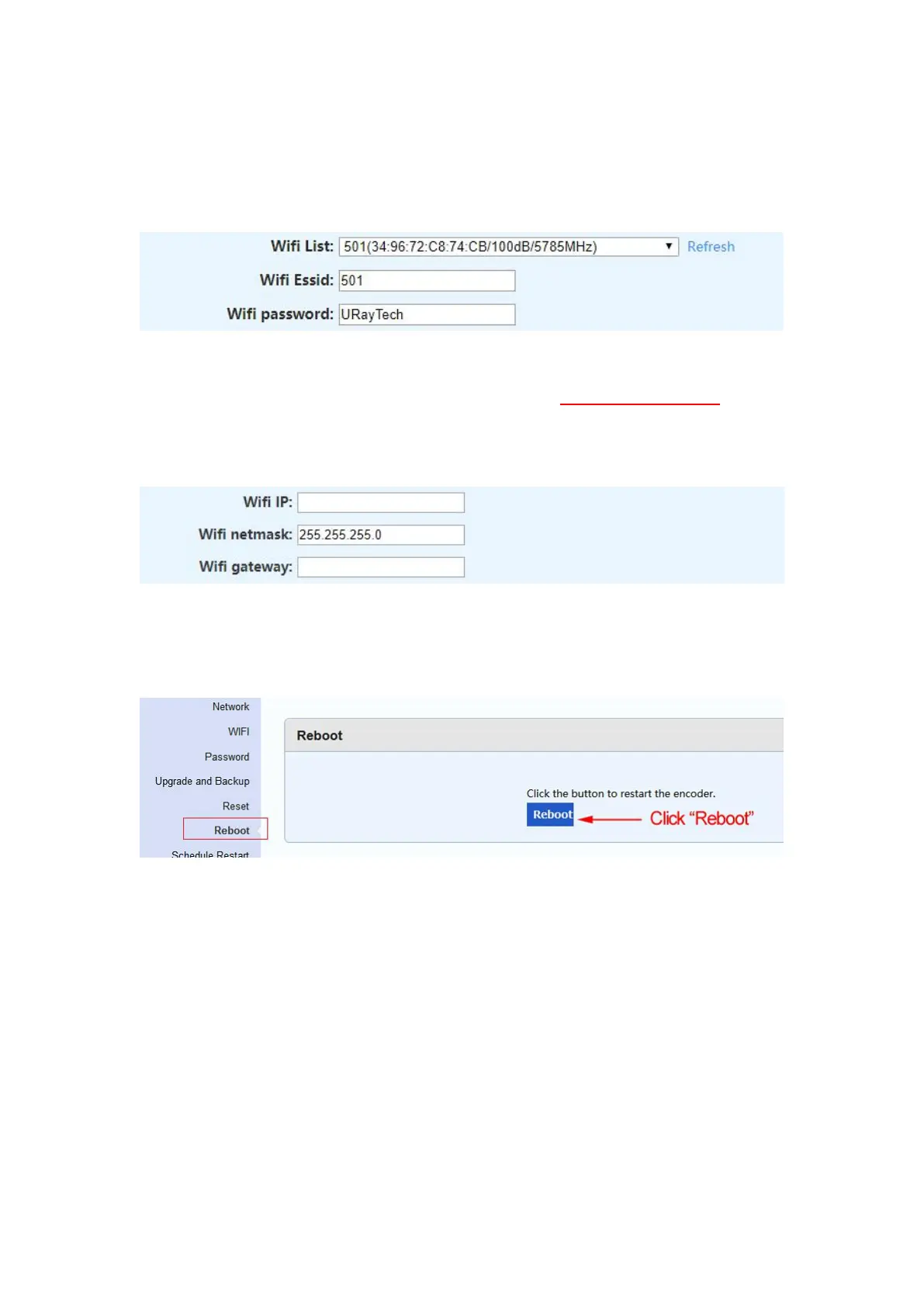
Step 5. Enter the name and password of the WIFI in ‘‘WIFI Essid’’ and ‘‘WIFI Password’’.
WIFI Essid: The name of the WIFI selected in the WIFI list.
WIFI Password: The password of the WIFI selected in the WIFI list.
Step 6. Change the IP and gateway of the video encoder, remember the WIFI IP.
Before changing the IP address, Please refer to the IP of the laptop or Mac. You can refer
to step 10 in chapter 2.1 or 2.2.
Step 7. Click ‘‘Apply’’.
Step 8. Click ''Reboot'' to restart the video encoder
Step 9. Log in to the WIFI IP of video encoder.
If you can log in to the WIFI IP, it means that the WIFI connection is successful, and the
WIFI status will be displayed as ‘‘COMPLETED’’.
If you cannot log in to the the WIFI IP, please log in to the Ethernet port IP, and check
whether the WIFI password is correct, or whether the IP of the video encoder and the IP of
PC(or laptop) are on the same network segment.
If you have trouble setting up a wireless network, please contact us. We will arrange an
engineer to help you set up.


 To Next Page