7.Power-on Button
Long press the button to turn on/off the E-scooter.
When switched on: short press the button to turn on/off the front light.
Press the button twice: change normal mode (White light on display) and power
saving mode (Green light on display).
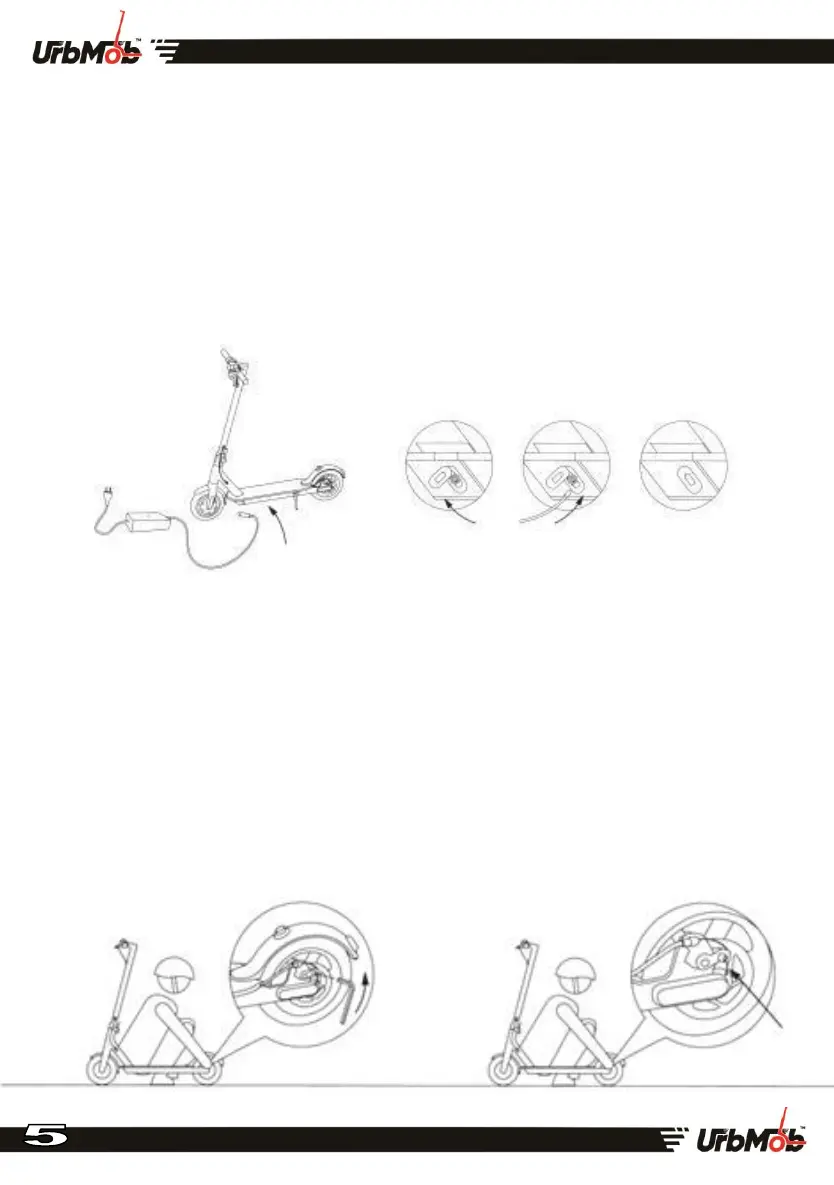
8.Charging the E-scooter
Open the cover Battery cover (under the Deck) & connect the charger cable, after
connecting the Charger Cable to the e-Scooter you can plug the power into the Wall-unit
9.Adjusting the brake disc
If a brake is very tight using M5 Hex wrench and scroll counter clockwise screws of
brake disc tensioner pulley, slightly shorten a length of a tail brake cable, then
tighten a tensioner pulley. If you think that brake is very free loosen a tension
pulley pull a brake cable to slightly increase a length of its tail. Tighten a tension
pulley.


 To Next Page