Need help?
Do you have a question about the UREVO STROL 2 and is the answer not in the manual?
Provides contact details and support channels for UREVO products, including email and website.
Informs users not to return the product to the store and directs them to customer service.
Covers essential safety precautions for operating the treadmill, including attire, physical condition, and environment.
Details requirements for power supply voltage, grounding, socket usage, and safe plug handling.
Outlines safety checks before use, emergency stop procedures, health considerations, and outdoor usage restrictions.
Guides on selecting an installation site, checking parts, safe handling of tools, and proper installation by adults.
Lists all items included in the product package, such as the treadmill, power cord, safety lock, remote, and manual.
Details the tools and hardware provided for assembly and maintenance, including wrenches, screws, and oil.
Illustrates and labels the various parts and components of the treadmill for user familiarization.
Instructions for selecting a safe installation surface and verifying all parts are present before assembly.
Highlights safety measures to prevent injury during assembly, such as wearing gloves, avoiding moving parts, and keeping children away.
Explains the critical function of the safety key for treadmill operation, emergency stops, and standby mode.
Step-by-step guide on connecting power, turning on the switch, and initiating the treadmill's startup sequence.
Details the treadmill's console display windows (SPEED, TIME, DIST, CAL) and control knob functions for operation.
Describes the buttons on the remote control for starting, stopping, and adjusting treadmill speed.
Explains the treadmill's display screen, parameter ranges for speed, time, distance, and heat.
Differentiates between the 'running machine mode' (column up) and 'walking machine mode' (column folded).
Provides instructions on how to fold the treadmill's upright column to switch to walking machine mode.
Explains how the treadmill enters dormant mode after inactivity and how it can be awakened.
Lists common error codes displayed on the console, their fault analysis, and recommended handling methods.
Details the steps required to safely fold the treadmill for storage, referencing walking mode operations.
Presents key technical details including package size, product dimensions, running area, power, speed, and weight capacity.
Provides guidelines for cleaning the treadmill console and parts using a clean cloth or mild detergent.
Instructions on how to adjust the treadmill belt for proper tightness using an Allen key.
Guides on centering the treadmill belt if it deviates, using adjustment screws and observing belt movement.
Explains how to inspect the treadmill for lubrication needs and the recommended lubrication cycle.
Details the process for adding silicone oil to the treadmill's running deck for maintenance.
Emphasizes turning off power and unplugging the cord before cleaning and avoiding corrosive detergents.
Advises on storing the treadmill in a dry environment, folding it, and unplugging when not in use.
Provides instructions for moving the treadmill, including safety steps like powering off and folding.
Offers solutions for common treadmill issues such as no display, power outage, or off-center running belt.
States the manufacturer's warranty against defects in material and workmanship for original purchasers.
Outlines the duration of the warranty for the structural frame (1 year) and other components (90 days).
Lists conditions and damages not covered by the warranty, including improper use, accidents, and cosmetic issues.
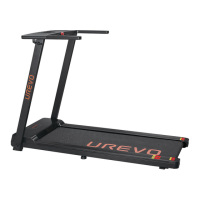
The UREVO STROL 2 is a versatile 2-in-1 under-desk treadmill designed to help users stay active and productive. This user manual provides comprehensive instructions for assembly, operation, maintenance, and troubleshooting, ensuring a safe and effective user experience.
The UREVO STROL 2 offers two distinct modes of operation: running machine mode and walking machine mode, adapting to various fitness needs and environments.
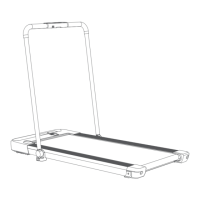
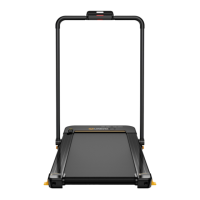
In running machine mode, the upright column is erected, allowing for higher intensity workouts. The speed can be adjusted from 0.6 to 7.6 mph, providing a range suitable for jogging and running. This mode is ideal for dedicated exercise sessions where users can focus on their fitness goals. The console features a display screen that shows speed, time, distance, and calories, providing essential feedback during workouts. An IPAD bracket is integrated into the design, allowing users to place their tablets for entertainment or work while exercising. The console also includes a speed control knob for easy adjustments and a safety key for emergency stops.
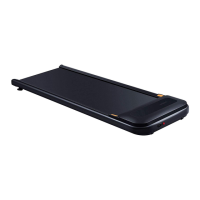
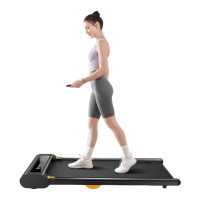
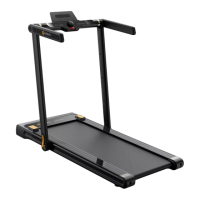
The walking machine mode is activated when the upright column is folded down, transforming the device into a compact under-desk treadmill. In this mode, the speed range is limited to 0.6 to 3.8 mph, making it perfect for light activity while working or engaging in other tasks. This feature promotes continuous movement throughout the day, combating sedentary lifestyles without requiring a dedicated workout space. The remote control is particularly useful in this mode, allowing users to adjust speed conveniently without reaching for the main console.
The treadmill is equipped with a safety lock mechanism, which is crucial for user safety. The treadmill will only operate when the safety lock is properly placed in its slot on the console. If the safety key is pulled off during operation, the treadmill will stop immediately, and the "SPEED" window will display "----", indicating an emergency stop. This feature prevents accidents and ensures user protection.
The lower control display panel provides real-time feedback on workout parameters. It displays speed data and cycles through time, speed, distance, and calories every 3 seconds when speed is not being adjusted. The infrared receiving area on this panel ensures seamless communication with the remote control, allowing for convenient speed adjustments.
A remote control is included for easy operation. It allows users to start and stop the treadmill, as well as increase or decrease the speed. In standby mode, pressing the start key initiates a 3-second countdown before the treadmill begins running at its lowest speed. During running, the same key stops the treadmill. The "+" and "-" keys allow for incremental speed adjustments of 0.2 miles each time, with continuous adjustment possible by pressing and holding the keys. It's important to note that speeds above 3.8 mph can only be adjusted using the knob on the main console, while the remote control is limited to adjusting speeds up to 3.8 mph.
The treadmill also features a dormancy function. If the treadmill stops running and remains inactive for more than 5 minutes, all data will be cleared, and the system will automatically enter dormant mode, closing all displays to save power. The device can be awakened by pressing the start key.
The UREVO STROL 2 emphasizes ease of installation and user-friendly operation. The assembly process is designed to be straightforward, with clear instructions provided to guide users. It is recommended that two people assemble the product to prevent injury and ensure proper setup. Users are advised to wear gloves during assembly and to keep children and bystanders away from moving parts.
The power supply precautions highlight the importance of using the correct voltage (US: 120V~ 60Hz / EU: 220-240V~ 50-60Hz) and ensuring the power plug is reliably grounded. Users should avoid using damaged plugs or pulling/inserting the plug with wet hands. A dedicated circuit is recommended to prevent sharing with other electrical equipment.
For emergency stops, users are instructed to clip the safety lock wire to their clothes. In case of dizziness, chest pain, nausea, or breathlessness, users should stop exercising immediately and consult a medical professional. The treadmill should not be used outdoors, under high humidity, or in direct sunlight.
The folding mechanism allows for easy storage and space-saving. The IPAD bracket can be pushed out of its slot and folded down. The horizontal armrests can be rotated and laid down to overlap with the upright column. The column jacket can then be lowered and fixed, transforming the treadmill into its compact walking machine mode. Transport wheels are integrated into the design, facilitating easy movement of the folded treadmill.
Proper maintenance is essential to prolong the service life of the UREVO STROL 2. The manual provides guidelines for general cleaning and treadmill adjustments.
Users are advised to place the treadmill in a dry and shady environment, away from direct sunlight. Regular checks and locking of all parts are recommended, with defective parts replaced in a timely manner. The treadmill should not be used by force if damaged. After each use, the console and other parts should be wiped with a clean cloth. For frequent use, a mild detergent can be used for cleaning. It is crucial to turn off the power switch and unplug the power cord before cleaning, and corrosive detergents should be avoided.
The treadmill's tread-belt is pre-adjusted at the factory, but it may stretch or deviate from the center over time. Timely adjustment is necessary to prevent damage.
If the tread-belt slips or does not run smoothly, its tightness can be adjusted. An Allen key is used to turn the adjustment screw socket on both sides of the tread-belt clockwise to tighten it. It is important to rotate both screws by the same distance. If loosening is required, the key should be turned counterclockwise, ensuring equal rotation on both sides. Users are warned against over-tightening the tread-belt, as this can damage the belt, increase pressure on the rotary drum, damage drum bearings, and cause noise.
The tread-belt may deviate from the center due to uneven force exerted during use. This is considered normal, and often the belt will return to the center after running unloaded for a period. If not, manual adjustment is required. Users should run the treadmill without load at a low speed (0.6-0.9 mph) and observe the distance from the tread-belt to the sidebars. If it deviates to the left, the left screw should be turned clockwise with an Allen key. If it deviates to the right, the right screw should be turned clockwise. This process should be repeated until the tread-belt is centered. Over-tightening the rotary drum during this adjustment is also cautioned against, as it can cause permanent damage to the bearing.
While lubricant is added at the factory, regular inspection and lubrication are recommended to maintain optimal performance. Users should pull up the side tread-belt and touch the running deck. If it feels dry, 10ml of silicone oil should be added. The lubrication cycle suggests checking and adding lubricant as needed for the first 30 days or 30 hours of use, and adding 10ml of silicone oil annually or after 100 hours of working. Only silicone oil not made of petroleum should be used. To add oil, a small opening is cut in the oil bottle, and the oil is injected into the middle of the running board by lifting the side tread-belt. After adding oil, the treadmill should be run without load for about one minute to ensure even distribution of the silicone oil.
The treadmill should be stored in a clean and dry environment. When not in use, it can be folded to save space. The power switch should be turned off, and the power plug unplugged when the treadmill is not in use.
 General
| Model | STROL 2 |
|---|---|
| Motor Power | 2.5 HP |
| Weight Capacity | 265 lbs |
| Display | LCD Display |
| Programs | 12 Preset Programs |
| Foldable | Yes |
| Incline | Manual Incline |
| Bluetooth Connectivity | No |
| Type | Folding Treadmill |

 To Next Page