7
DS1082-004D
AUTO-ON FUNCTION
If the indoor set is in stand-by mode and on the hook, the ‘Master’ station can be switched on using the
auto-on function pressing the button on the video door phones or button 2 on the door phones (see door
unit functions).
Pick up the handset to establish audio and video communication with the Master door unit. The door can be
opened at any time.
INTERCOM CALL FORWARDING
After programming a button (
or on video door phones, one of the six buttons on add-on Ref. 1082/96
or keys 1, 2 or 3 of the door phone) for the intercom function (see programming paragraph).
The following cases can occur according to the calling indoor station state:
• Indoor station free: the calling indoor station will output a confi rmation tone (2 beeps) and the called indoor
station will ring. Communication is established when the called user picks up.
• Indoor station busy: the indoor station outputs a warning tone (4 beeps in rapid sequence). Hang up and
try again later.
FLOOR CALL FUNCTION
The indoor station is equipped with a pair of terminals (CP) for connecting the fl oor call button. The indoor
station will ring with the set tone for 3s when the button is pressed. Connect this button to indoor station 0
only if there are several indoor stations in parallel. Indoor stations 0 and 1 will ring immediately. Stations 2
and 3 will ring immediately after.
ADDITIONAL RINGER MANAGEMENT
The indoor station is equipped with a pair of terminals (S-, S+) for connecting a supplementary ringer or a
relay. This ringer is controlled when any call tone is generated.
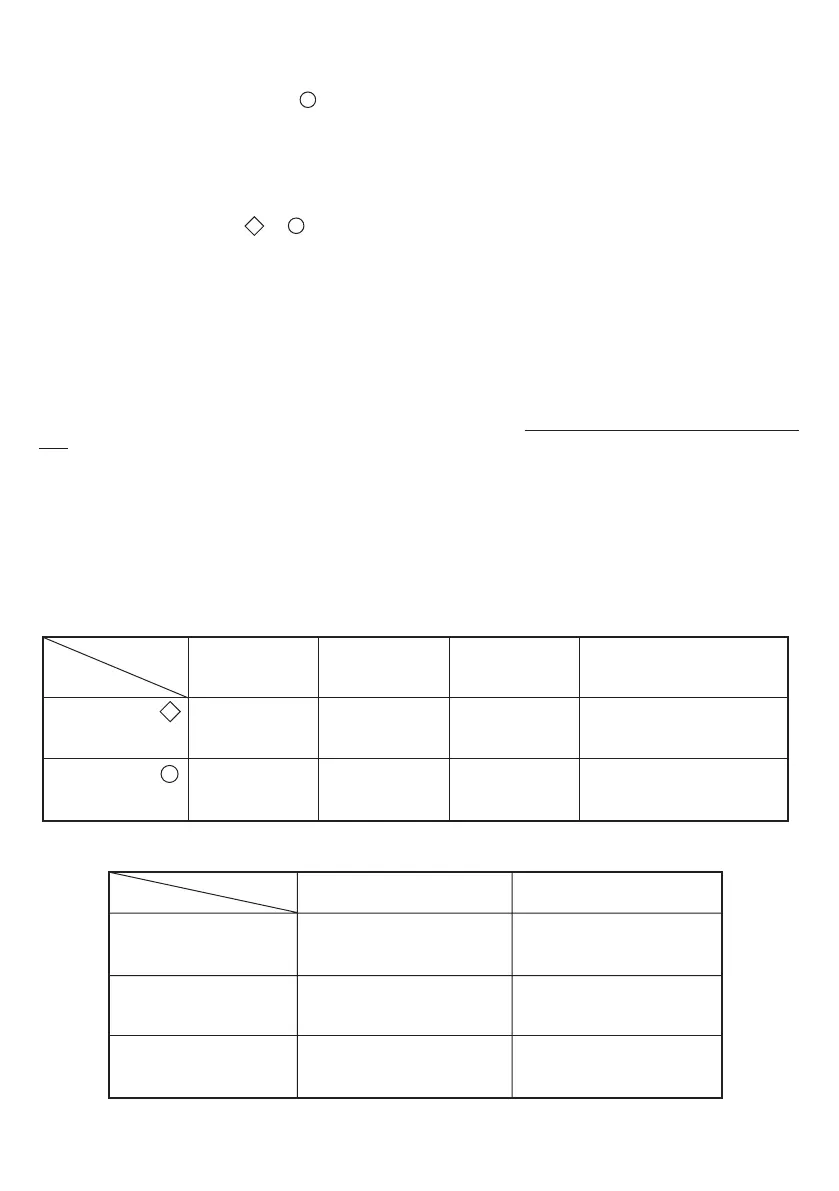
BUTTON AND FUNCTION SUMMARY
The following table summarises the button functions according to indoor station state.
The functions of the door phone keys 1, 2 and 3 are shown in the following table:
(1) This function is available for future developments.
State
Button pressed 3 (1)
‘Master’ Auto-on
(1)
Stand-by
and off-book
If is programmed,
intercom call or
special decoding activation
If is programmed,
intercom call or
special decoding activation
If is programmed,
intercom call or
special decoding activation
Button pressed 1
Button pressed 2
Button
Stand-by
and on-book
State
Button
Standby and off-hook
Button pressed
Standby and
on-hook
Pick-up time
following
received call
Communication
established
===
If is programmed,
intercom call or
special decoding activation
If is programmed,
intercom call or
special decoding activation
Video door phone
answering
device activation
Special decoding
activation
Special decoding
activation
Button pressed ‘Master’ Auto-on Video switching



 To Next Page